


- LXC and Docker run on the same two Linux building blocks: namespaces and cgroups. Neither one pretends to be its own separate computer. That’s why both feel almost as fast as running an app with nothing else in the way.
- The real split is lifecycle. An LXC container is a small system. You patch it and keep it for years. A Docker container is a packaged app. You rebuild it and replace it.
- Docker used LXC as its engine by default, until version 0.9 in March 2014. Then it switched to its own code, called libcontainer.
- In August 2023, Canonical — the company behind Ubuntu — took LXD in-house. The original team then forked the project into Incus. Incus kept going as a community project. So in 2026, “LXC” usually means Incus or the LXC built into Proxmox.
- There’s no current, published LXC-vs-Docker speed test. If someone quotes you a performance number, it’s probably old.
Here’s the fast answer. Do you want a machine you can log into and fix by hand? Pick LXC. Do you want an app you throw away and rebuild every time something breaks? Pick Docker. That’s the real heart of the lxc vs docker question.
Both tools run on the same two parts of the Linux kernel: namespaces, which give each container its own private room, and cgroups (“control groups”), which cap how much power each room can use. Docker even ran on top of LXC itself, until March 2014.
The real difference is what you do on a Tuesday when a patch lands. And since 2023, there’s a twist on the LXC side — we’ll get to it.
Docker Was Literally Built on LXC
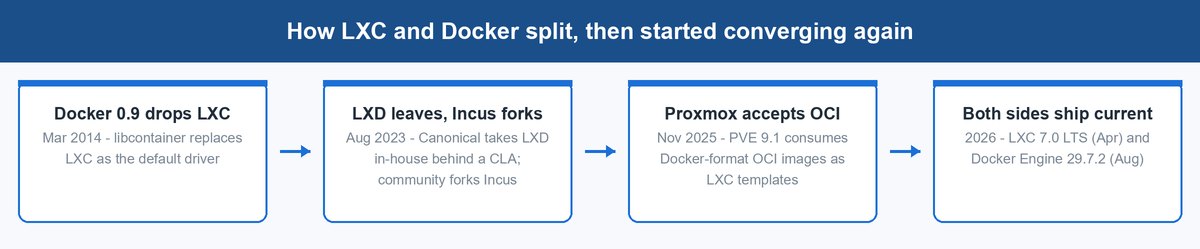
These two tools aren’t rivals from different families — they’re the same family. When Docker first came out, it didn’t talk to the Linux kernel by itself. LXC did that job for it, as Docker’s default engine, building the namespaces and cgroups every container needed.
That changed with Docker 0.9 in March 2014, which added a new default engine called libcontainer. From then on, Docker could talk to the kernel directly and no longer needed LXC.
It’s one shared foundation with two projects built on top, drifting apart for a decade and now drifting back together. Proxmox VE 9.1 can now take OCI images (short for Open Container Initiative, the standard packaging format Docker made popular) and use them as LXC templates. Full support is still listed as a technology preview.
What Is Actually Running Inside Each Container
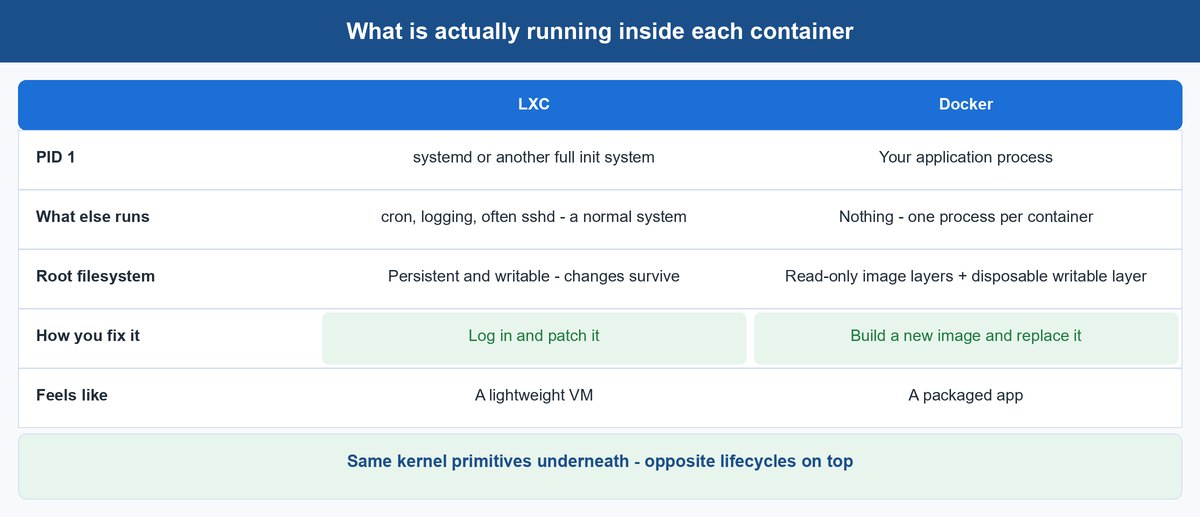
Look at what’s actually running inside. That’s where these two stop looking like siblings.
An LXC Container Boots Like a Small Server
Start an LXC container, and the first thing that runs is an init system — usually one called systemd. Think of it as a building’s control room. It starts and tracks everything a normal Linux computer runs: a background logging program (a daemon), a task scheduler (cron), and often a remote-login service called sshd, so you can connect from another computer.
You get a command-line shell, a tool for installing software, and a root filesystem — the full set of files that make up the container. It’s persistent — every change you make survives. Proxmox builds its container system on top of LXC. It puts the goal simply: it wants “an environment that provides the benefits of using a VM, but without the additional overhead.” In other words, a lightweight virtual machine, or VM. Think of it as a simulated computer that shares your host’s kernel instead of booting one of its own.
A Docker Container Runs One Process and Nothing Else
Start a Docker container, and the first thing that runs is your app. Not an init system — just the app, alone in its own private space. Its filesystem is built like a stack of see-through sheets. Several layers are read-only (that stack is called the “image”), with one thin, writable layer on top, meant to be thrown away. This whole setup is called image layering, and it’s how Docker keeps containers small and consistent.
There’s no remote-login service running, because you were never meant to log in and poke around. If the app needs a fix, you don’t repair the running container — you build a new image and start fresh. That’s not a shortcoming. It’s the entire point of the design.
The Real Difference Shows Up on Patch Day
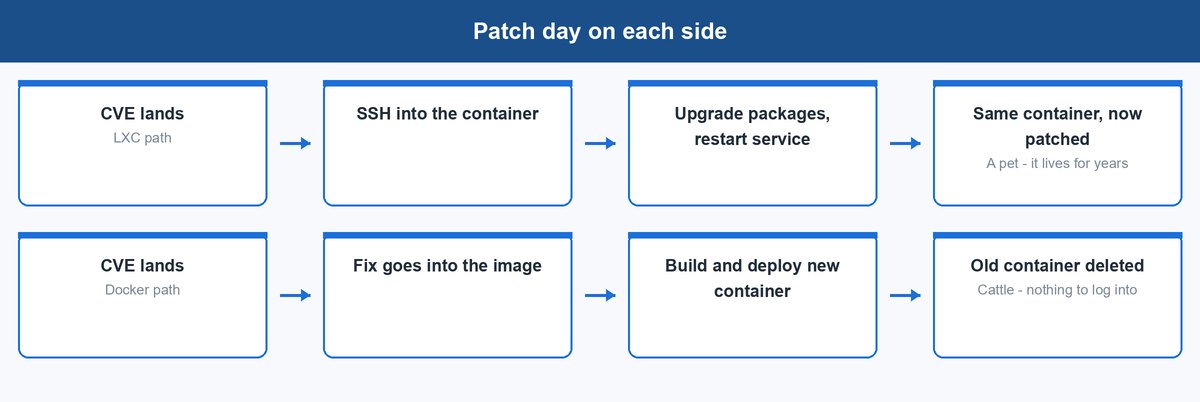
A container can behave like a “pet” — something you keep and take care of — or like “cattle” — something you replace without a second thought. Which one it is isn’t a style choice. It comes straight from how each one is built.
Docker’s image layers are immutable — they can’t be changed once built. Patching a running Docker container is like editing a printed book with a pen. The next copy off the press won’t have your edits, because the press prints from the original plates, not your marked-up copy. The fix has to go into the image itself, so the routine becomes rebuild, redeploy, throw away the old one. Once that’s your routine, logging in to fix things by hand is pointless.
An LXC container flips that around. It has a persistent root filesystem and a full init system, so it behaves like a real machine. You log in, run the update, restart the service, and the same container keeps going — for three years if you want it to. Neither approach is wrong. They just answer different questions: “how do I ship this app a hundred times?” versus “how do I keep this one system running for years?”
The LXC Side Changed Hands in 2023
If you last looked at this topic in 2022, the friendly management layer over LXC was called LXD, and it lived at linuxcontainers.org. Neither of those things is true anymore.
Canonical Took LXD In-House
In 2023, Canonical — the company behind Ubuntu — announced that LXD would no longer run as an independent community project. It pulled LXD out from under the Linux Containers group and took development in-house. It also required new contributors to sign a contributor license agreement, or CLA. That’s a legal handoff: it gives Canonical full rights over whatever code you submit. For a project that had been community-run, that was a governance earthquake. The Register covered the fallout in August 2023.
Incus Is the Same Team, Continuing the Same Project
The response was fast. Aleksa Sarai, an engineer at SUSE, forked LXD to create Incus. Forking means copying a project’s code and developing it separately, under new ownership. The Linux Containers group adopted the new fork right away. It handed Incus the same tools and servers it used to give LXD, to keep a community-run option alive.
Look at who signed on as the first maintainers: Christian Brauner, Serge Hallyn, Stéphane Graber, and Tycho Andersen. That’s the original LXD team, more or less. The people who built it walked over to the fork. Incus is now packaged in Debian stable, Fedora, openSUSE, and NixOS. linuxcontainers.org today hosts four projects: LXC, LXCFS, Incus, and distrobuilder. LXD isn’t one of them anymore.
Docker’s own blog has a comparison article on this topic, published June 13, 2024. It’s a useful read — but it doesn’t mention Incus or LXD by name, even though it was published almost a year after the fork. Today, in 2026, when someone says “LXC,” they usually mean Incus or the LXC built into Proxmox.
Where Podman Fits Into This Comparison
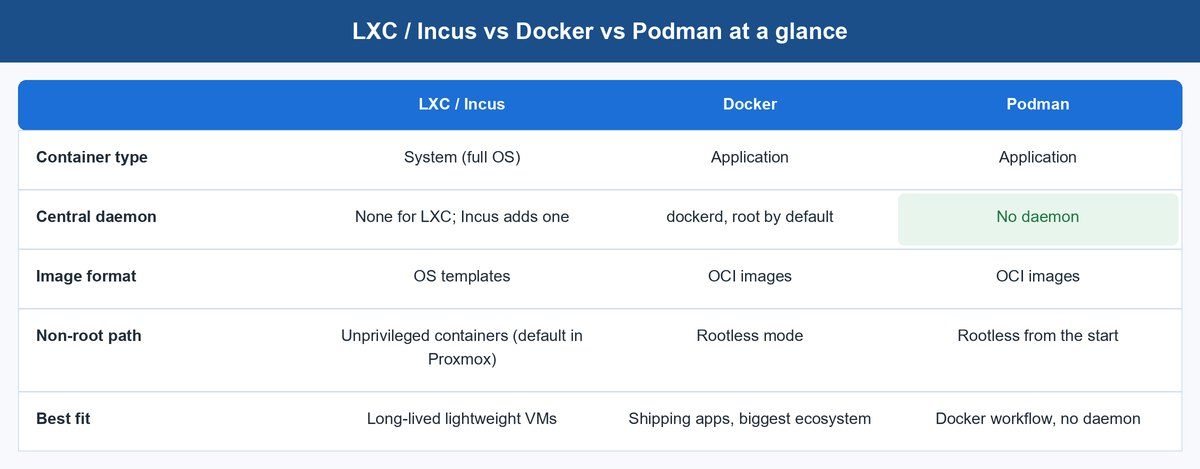
If you’re weighing these two, a third name belongs on the table. Podman runs the same OCI images Docker runs, with commands that work almost the same way — but with no central daemon, a background program that stays running and manages everything else. Podman also skips the need for “root” access, the account with total power to change anything on a computer. Docker later added rootless mode of its own; Podman made “no daemon, no root required” its whole founding pitch.
So here’s the honest three-way split. LXC and Incus are for system containers: long-lived, full-OS, “pet” lifecycle. Docker is for application containers. It has the biggest ecosystem and is the default choice in most tutorials and hosting guides. Podman is for teams who want Docker’s image format and workflow, but with no daemon and a smaller attack surface — fewer doors left open for something to go wrong.
If your reason for leaving Docker is the lifecycle, you want LXC or Incus. If your reason is the daemon, you want Podman. Switching to LXC just to get away from Docker’s daemon solves the wrong problem.
| LXC / Incus | Docker | Podman | |
|---|---|---|---|
| Runs | A full init system (systemd) | One process, your app | One process, your app |
| Filesystem | Persistent, you patch it in place | Disposable image layers, rebuild to fix | Disposable image layers, rebuild to fix |
| Daemon | Container manager (LXD/Incus) | Central dockerd daemon |
No daemon |
| Lifecycle | Pet — kept and maintained for years | Cattle — rebuilt and replaced | Cattle — rebuilt and replaced |
| Best fit | Long-lived system services, VM-style workloads | Shippable apps, build pipelines, CI | Docker-compatible workflow, smaller attack surface |
Performance, Security, and Version Numbers in 2026
Three practical questions decide real deployments.
Performance Numbers Are Usually Old
You’ll find pages claiming one side is some percent faster. Before you believe it, ask when that number was measured. There’s no current, published head-to-head speed test between LXC and Docker. By design, there shouldn’t be much difference anyway. Both run processes directly on the host’s kernel. Neither one fakes its own hardware, and neither boots a separate guest kernel. The real overhead question is containers versus full virtual machines — and both LXC and Docker land on the fast side of that.
Security Comes Down to Who Gets to Be Root
If you’re root inside the container, are you also root on the real host machine? Escaping the container would hand you full control of the machine it runs on.
LXC’s answer is called unprivileged containers. A namespace trick maps the container’s root account to a harmless, low-power account on the host. It’s not real root. This is the default and recommended setup in Proxmox’s LXC integration. Docker’s answer is rootless mode. It runs the daemon and containers without needing host root at all. Both are real security wins. Neither is a magic wall, though. The containers still share one kernel with the host, which is exactly why workloads needing the strongest isolation still get full virtual machines instead.
Where the Version Numbers Stand Right Now
LXC 7.0 LTS shipped on April 30, 2026. LTS means “long-term support” — this build keeps getting security patches for years, which matters if you won’t touch this system again for a while.
Docker Engine is currently at version 29.7.2, released August 5, 2026. An earlier July release, 29.6.2, fixed several security bugs, including one tracked as CVE-2026-15793. CVE is the standard ID system for known security bugs.
If you run Proxmox, VE 9.2 has shipped with LXC 7.0 built in since May 21, 2026. So if your Proxmox is current, your LXC already is too. If you run Unraid, version 7.3.2 shipped with Docker 29.5.3 in July 2026 — same idea: stay current on the platform, and you’re current on the container engine.
Both sides are actively maintained, long-term-support software — anyone telling you either one is “legacy” is selling you something.
How to Choose Without Regretting It in a Year
Just answer one question. When this thing breaks at 2 a.m., do you want to log into it, or throw it away and start over?
Pick LXC or Incus When the Workload Is a System
Think a DNS server, a database you tune by hand, an older app that expects a full OS — anything you’d otherwise give a small VM. You get VM-style comfort with container-scale overhead. If the box you’re really building is a storage server, that’s its own decision — our TrueNAS 26 breakdown walks through it.
Pick Docker When the Workload Is an App You Ship
Anything with a build pipeline. Anything you deploy more often than you maintain by hand. Anything whose fix should be a new image rather than a patched machine. The ecosystem — registries, compose files, every tutorial out there — is the real advantage.
Pick Podman When You Want Docker’s Workflow Without Docker’s Daemon
Same images, similar commands. No root-owned daemon sitting in the middle.
Running Both Is Normal, Not a Compromise
Most Proxmox and homelab setups do exactly this: LXC containers handle long-lived services, Docker handles apps, often running inside a VM. Now that Proxmox VE 9.1 accepts OCI images as LXC templates, the two worlds are starting to connect at the image level.
The Choice Was Never Really About Technology
Twelve years ago, these two projects shared code outright. Today they share the same core kernel tools, and increasingly, the same image formats too. The technology gap keeps shrinking. The lifecycle gap doesn’t, because it’s a philosophy, not a feature. Decide whether your typical Tuesday looks like patching a machine or rebuilding an image. The lxc vs docker answer falls out on its own.
Frequently Asked Questions
Does Docker still use LXC under the hood?
No, and it hasn’t since March 2014. Docker 0.9 replaced LXC with libcontainer, Docker’s own code library for talking to the kernel directly. Before that release, LXC was Docker’s default engine. Any page claiming Docker still runs on LXC is more than a decade out of date.
Is LXD dead now that Incus exists?
No — the details matter here. LXD is alive and still developed by Canonical. It’s just no longer a community Linux Containers project, and new contributors must sign Canonical’s CLA. Incus is the community fork of LXD, adopted by the Linux Containers group and maintained by the original LXD team. Both exist — they just answer different questions about who controls the roadmap.
Should I use LXC containers or Docker on Proxmox?
Use LXC for long-lived system services. Run Docker inside a virtual machine for your app stacks. That’s the pattern Proxmox’s own tooling favors, since LXC is built directly into the platform, and PVE 9.1 can even use OCI images as LXC templates. For the fuller Proxmox decision — including how it compares to other hypervisors, the software that runs virtual machines — see our sister site’s Hyper-V vs Proxmox comparison.
Which is better for a home server, LXC or Docker?
Whichever one matches how you like to maintain things. If you enjoy logging into a tidy little machine and patching it by hand, LXC (or Incus) will feel natural. If you’d rather define your services in files you can rebuild anytime, Docker fits better. Plenty of home servers run both. Our home lab starter guide shows how the pieces fit together.
Is LXC faster than Docker?
Nobody can honestly give you a current number — there’s no recent, published head-to-head test. By design, both run processes directly on the shared host kernel using namespaces and cgroups, with no hardware emulation. Neither one carries the extra overhead a full virtual machine does. Whatever difference you see comes down to your storage setup and configuration choices, not which project you picked.
What is the difference between LXC and Incus?
LXC is the low-level runtime — the library and tools that actually create system containers. Incus is the management layer on top: a background daemon, a web-style API, and a friendly command-line tool for running LXC-based containers (and virtual machines) at scale. Both live at linuxcontainers.org today. If you’re starting fresh with system containers in 2026, you’ll most likely touch LXC through Incus or through Proxmox, rather than typing raw lxc-* commands.
About the Author
Elena Brooks
Elena Brooks covers infrastructure and virtualization at vpod — the systems layer underneath everything else, from a single homelab box to a production rack. She reads release notes and vendor roadmaps line by line so a comparison like this one reflects what is actually shipping, not what shipped two years ago.