
- An open frame rack wins on airflow, access, and price. An enclosed cabinet wins only on security, dust, and noise.
- Four-post racks carry servers. Two-post racks carry switches and patch panels. Decide which type you need before you pick the model.
- The StarTech 4POSTRACK25U is the strongest all-round buy. It holds 1,200 lb stationary and adjusts from 22 to 40 inches deep.
- Check the static load rating, the depth range, and the hole type. Those three numbers decide what you can actually mount.
- Measure external depth, not mounting depth. A rack set to 22 inches can still need 27 inches of floor space.
Here is the short version. For a homelab, an office closet, or a small server room, an open frame server rack beats an enclosed cabinet on the three things that matter most. It cools better, because room air reaches every side of your gear. It is easier to work on, because you can touch any port from any angle. And it costs a fraction of a cabinet, because you are not paying for doors, side panels, and a lock. You only need a cabinet when you need that lock, or when dust and fan noise are real problems in the room. The rest of this guide names the five racks worth buying right now, with load ratings, depth ranges, and current price bands checked in September 2026.
Disclosure: if you buy through the Amazon links in this post, vpod may earn a small affiliate commission. It costs you nothing and does not change which racks we recommend.
What are you going to rack?
★ Your pick: StarTech 4POSTRACK42
42U and a 1,323 lb rating for a rack you will never outgrow
★ Your pick: NavePoint 42U 2-Post
A rolling relay rack that carries switches and patch panels for less
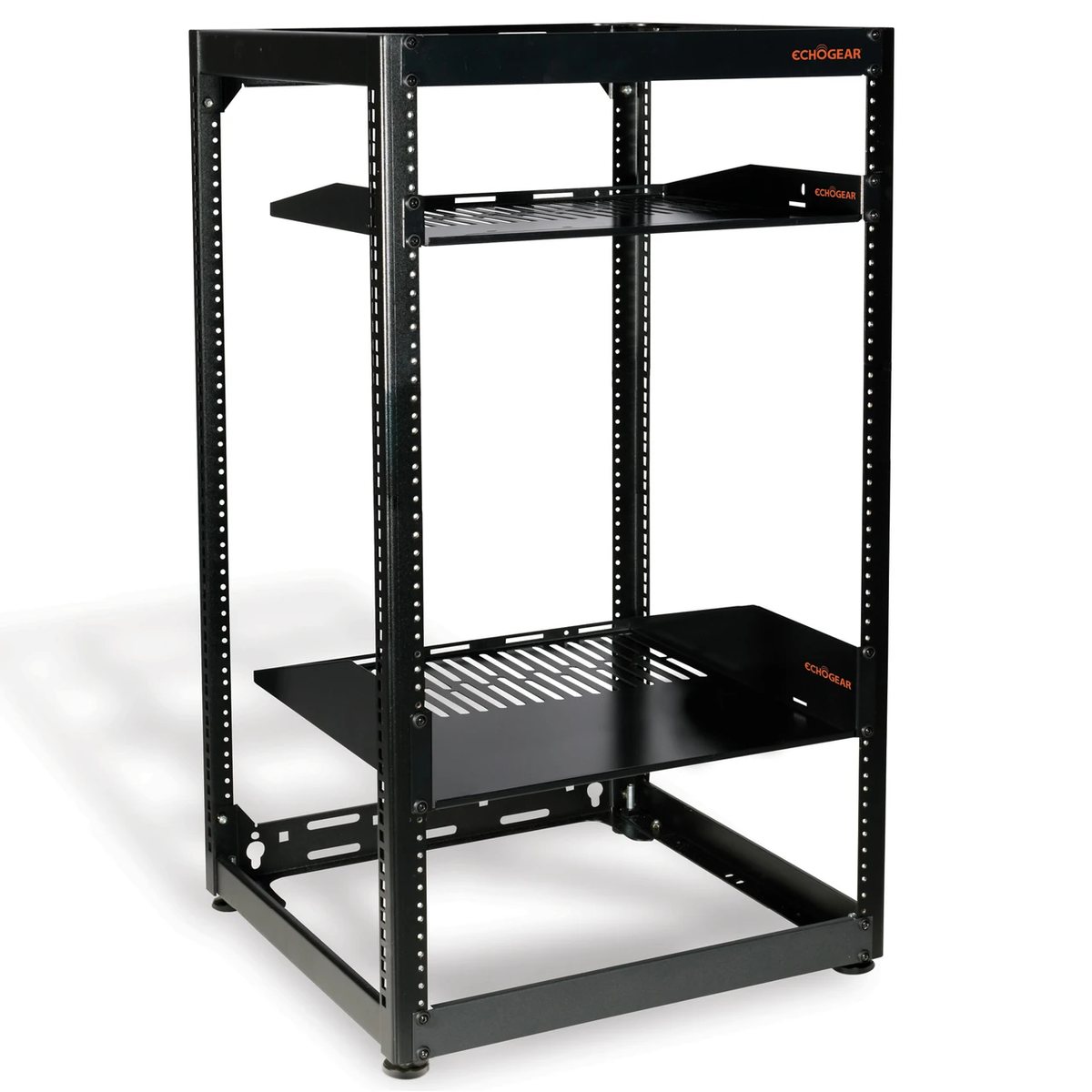
★ Your pick: ECHOGEAR 20U
Wall-mountable, two vented shelves included, and famously easy assembly
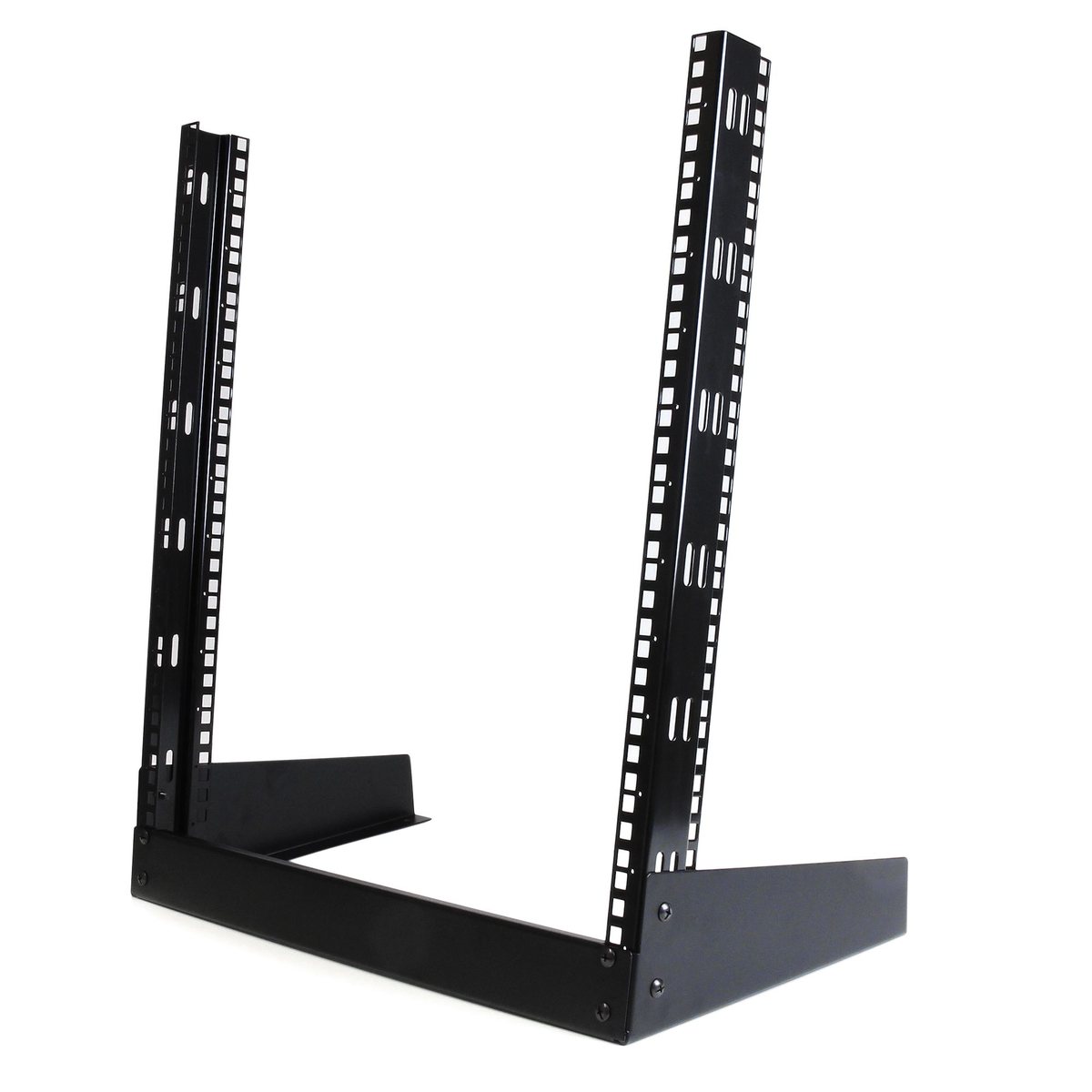
★ Your pick: StarTech RK12OD
A 12U desktop frame that gets your gear off the desk pile
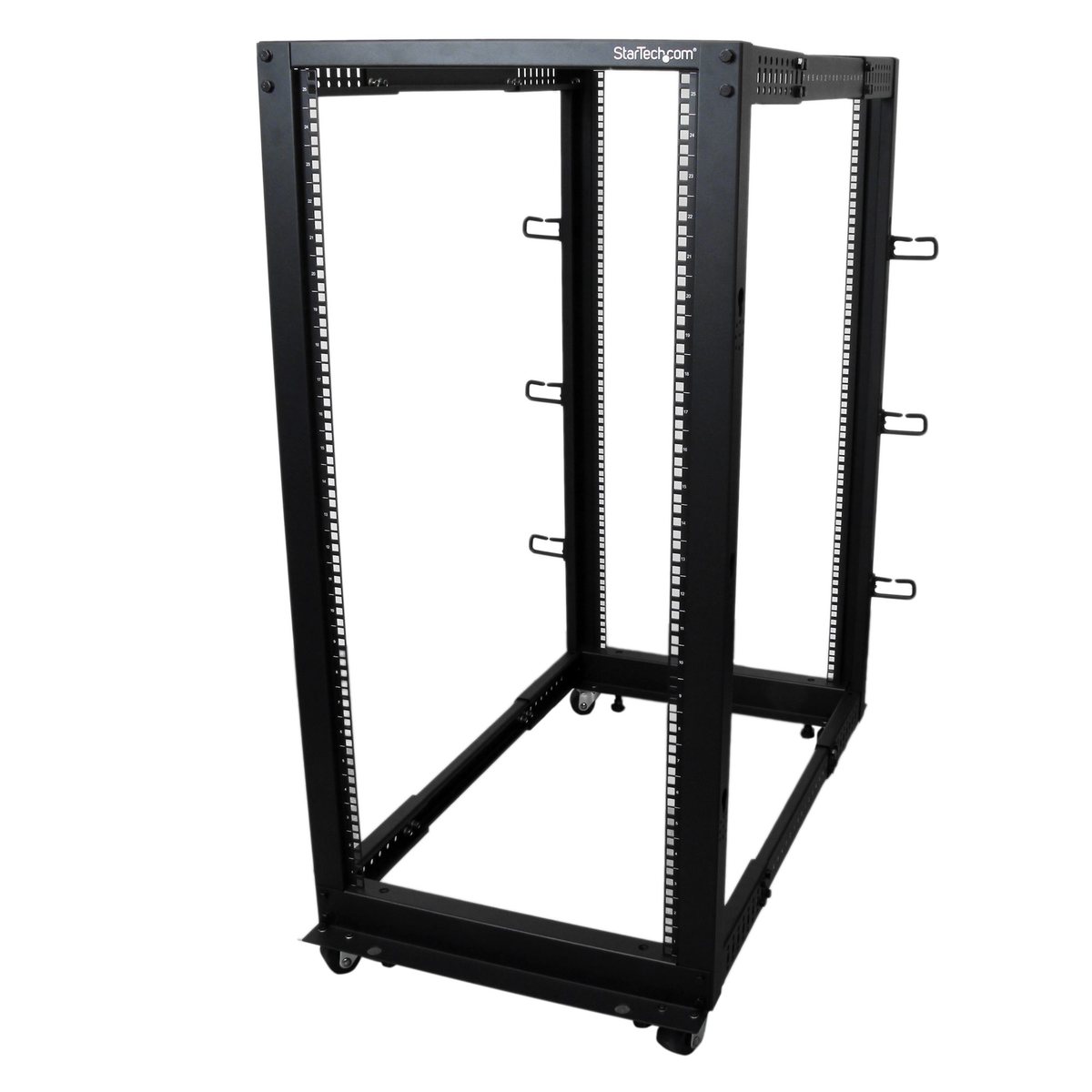
👑 Our Top Pick — Best Overall Value
StarTech 4POSTRACK25U
1,200 lb rating, 22-40 in adjustable depth, and every bolt and cage nut in the box
Opens on our Top Pick. Tap an option to see the best match for you.
Why an Open Frame Server Rack Wins on Airflow, Access, and Price
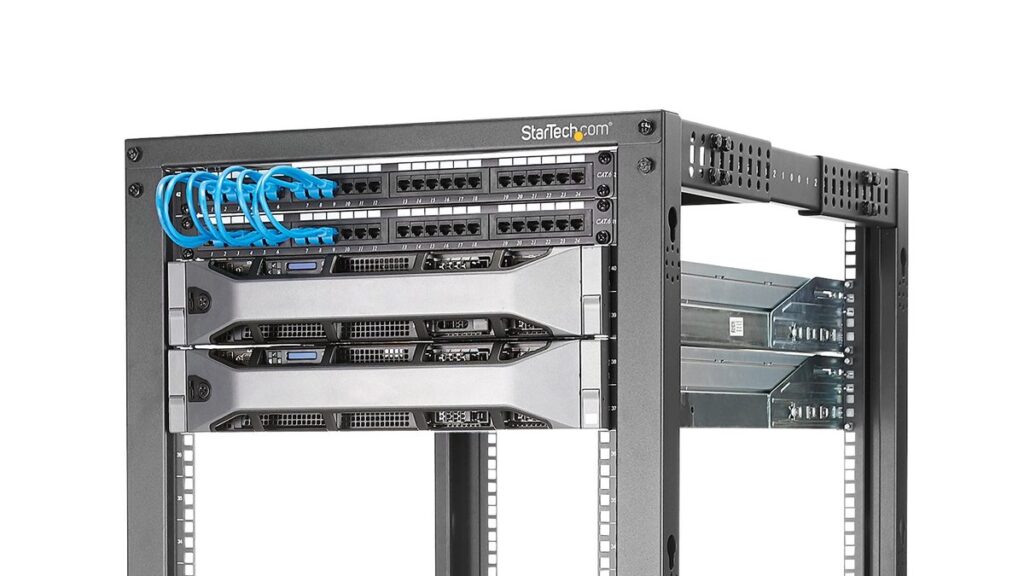
Strip a rack down to what you are actually buying. It is four steel posts, or two, with square holes punched every 1.75 inches. That spacing is the whole product. It comes from the EIA-310 standard, which is why a 19-inch switch from 1998 and a NAS (a network storage box) from 2026 bolt into the same posts. Everything else on a rack’s spec sheet is sheet metal wrapped around those holes.
That explains the price gap. An open frame skips the doors, the side panels, the lock, and the fan tray. A 25U open frame lands in the low hundreds. A 25U enclosed cabinet with the same hole pattern often costs two to four times more. You are paying for metal, not for capability.
It also explains the cooling story. Your servers and switches pull air front to back with their own fans. In an open frame, that exhaust just leaves. There is no box to trap it, so there is no heat to manage and no cabinet fan kit to buy. Enclosed cabinets exist for data centers with hot-aisle designs and forced airflow. A closet with one rack has neither, and a closed box in still air runs warmer, not cooler.
The third win is boring but real. Every re-cable, every drive swap, every “why is this port dead” moment happens faster when you can walk around the rack and reach the gear from the side. If you have ever fished a power cable through a cabinet’s rear door with one arm, you already know the value of open sides.
Open Frame vs Enclosed Rack Comes Down to Four Trade-Offs
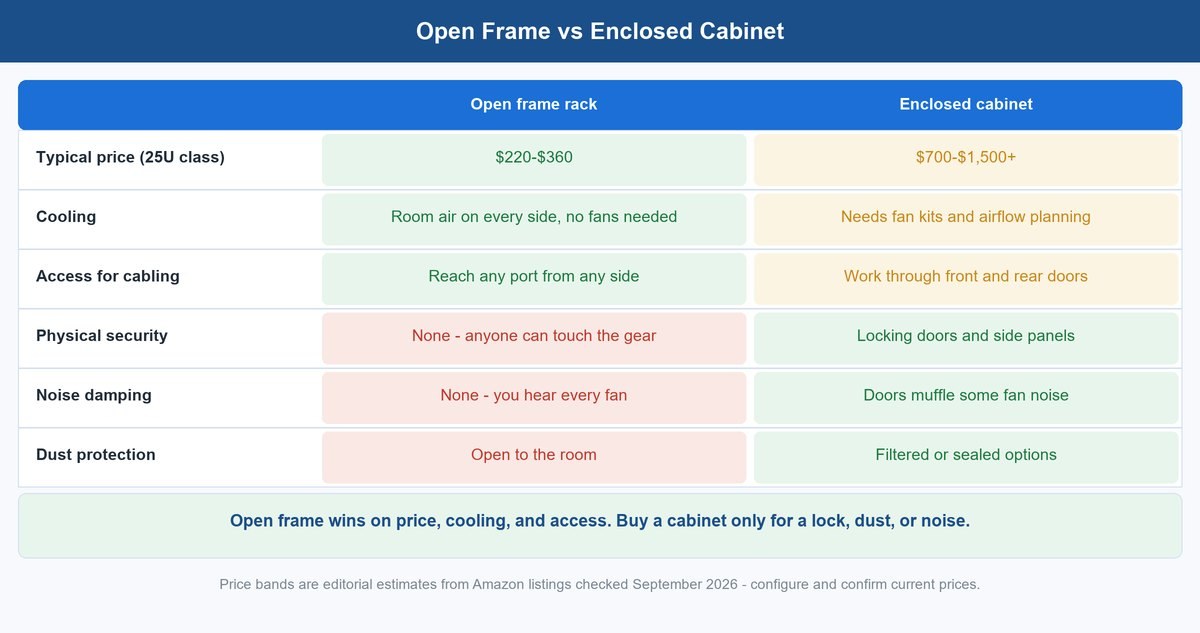
The comparison above is the honest version of the open frame vs enclosed rack decision. Open frame takes price, cooling, and access. The cabinet takes security, noise, and dust. That is the whole fight.
So make the call on your room, not on the hardware. A locked home office or a dedicated closet has no security problem, so the lock buys you nothing. A garage workshop full of sawdust is a different story. Fine dust loves server intake fans, and an enclosed cabinet with filtered vents is one of the few clean fixes. Same with shared spaces. If the rack lives where customers, coworkers, or kids walk past, a door with a key is not paranoia, it is the correct spec.
Noise is the trade-off people get backwards. A cabinet muffles fan noise a little, but it also makes the gear run warmer, which makes fans spin faster. If noise is your real problem, the fix is quieter equipment or a different room, not a steel box around loud equipment. We made the same point in our guide to picking a quiet, sensible switch for a home rack, the 10GbE switch buyer’s guide.
Two-Post or Four-Post: Decide This First
A two-post rack supports gear at one point, the middle or the front. That is perfect for switches, patch panels, and PDUs (power strips built to bolt into a rack), which are shallow and light. Telecom rooms have run on two-post relay racks for decades for exactly this reason. Per rack unit, they are the cheapest mounting you can buy, and they barely take up more room than the posts themselves.
The catch is physics. Hang a heavy, deep box off two posts and it becomes a lever. The weight twists the mounting ears and sags the free end. A seasoned reviewer trick helps here. If a device has movable brackets, sandwich each post between two brackets instead of bolting one ear to the front. That spreads the load across a box section instead of a single leaf of steel. It works, but it is a workaround, not a design.
A four-post rack supports gear at both ends, so full-depth servers and UPS units (battery backups that keep gear running through a power cut) sit on rails instead of hanging off their faceplates. The rule of thumb is simple. Anything deeper than about 20 inches or heavier than about 50 lb wants four posts and rails. A UPS wants four posts and a shelf, full stop, because batteries are the densest thing in your rack.
The Best Open Frame Server Racks for Five Different Jobs
These five cover every serious use case, from a full server tower to a first desktop frame. Every load figure and depth range below comes from the maker’s own listing or product page, and every price band was checked on Amazon in September 2026. Prices move, so treat the bands as bands.
1 StarTech 4POSTRACK25U Is the 25U Workhorse to Beat
This is the rack to buy when you want to stop thinking about racks. StarTech’s 4POSTRACK25U is a four-post 25U frame in cold-rolled steel, rated for 1,200 lb (544 kg) stationary, with mounting depth adjustable from 22 to 40 inches. It complies with EIA/ECA-310, IEC 60297, and DIN 41494, which is the long way of saying anything 19-inch fits. The box includes what cheaper racks make you buy separately: 32 M6 cage nuts and screws, casters, leveling feet, 12 cable hooks, grounding wires, and even the wrenches. It stands 48 inches tall, about 50.8 inches on casters, and ships flat-packed. Owners hold it at 4.7 stars across roughly 2,000 ratings, and the recurring praise is the same phrase: heavy gauge steel. It usually sells in the $320 to $360 band, backed by a 2-year warranty. Check today’s price on Amazon.
- Load rating: 1,200 lb (544 kg) stationary.
- Depth: adjustable from 22 to 40 inches.
- Height: 25U, 48 inches tall (50.8 inches on casters).
- Mount: 32 M6 cage nuts and screws, casters, leveling feet, 12 cable hooks, grounding wires, wrenches included.
- Warranty: 2 years.
- Rated for 1,200 lb stationary. More capacity than nearly any homelab or small office will load.
- Depth adjusts from 22 to 40 inches. One frame fits patch panels and full-depth servers alike.
- Ships with every bolt, cage nut, caster, and even the wrenches.
- Holds 4.7 stars across roughly 2,000 ratings. Backed by a 2-year warranty.
- Sells in the $320 to $360 band. That is more than the two-post or desktop options here.
- Ships flat-packed. Assembly is on you before it holds anything.
- External depth runs bigger than the mounting number. About 27 inches of true depth at the 22-inch setting, so measure the room.
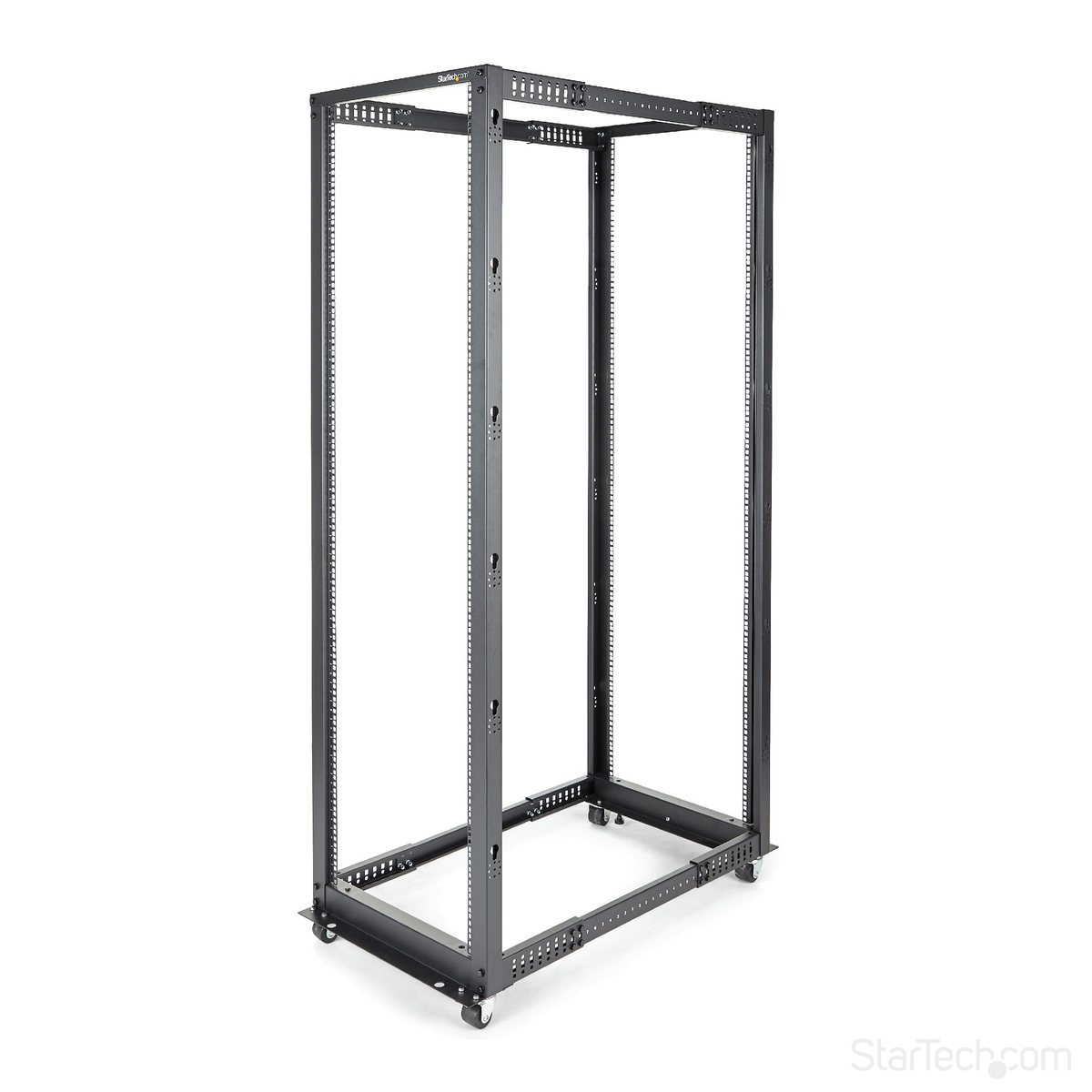
2 StarTech 4POSTRACK42 Gives You the Full Height Tower
Same steel, same design language, twice the height. The 42U version of StarTech’s open frame carries a 1,323 lb (600 kg) rating, the same 22 to 40 inch adjustable depth, and stands 80.3 inches tall, so measure your doorway before you build it in the wrong room. One owner moving off 1970s telecom racks noted the wide casters roll over floor gaps effortlessly, which matters at this size because a populated 42U frame is not a two-person lift, it is a do-not-lift. Buy this over the 25U only if you can name the gear that fills the extra 17U within two years. Empty rack units cost money and floor space. It typically sells in the $340 to $380 band. Check today’s price on Amazon.
- Load rating: 1,323 lb (600 kg) stationary.
- Depth: adjustable from 22 to 40 inches, same as the 25U.
- Height: 42U, 80.3 inches tall.
- Mount: wide casters included, roll over floor gaps.
- Rated for 1,323 lb stationary. The highest capacity of the five racks here.
- 42U of height. You will not outgrow it for years.
- Same 22 to 40 inch adjustable depth as the 25U. Handles shallow switches and deep servers alike.
- Wide casters roll over floor gaps even once the rack is loaded.
- Stands 80.3 inches tall. Measure the doorway and clearance first.
- Only worth the extra height if you can name the gear that fills the extra 17U within two years. Empty rack units still cost money and floor space.
- A fully populated 42U frame is not a two-person lift. Plan for that before it is built and loaded.
3 NavePoint’s 42U Two-Post Rack Carries Network Gear for Less
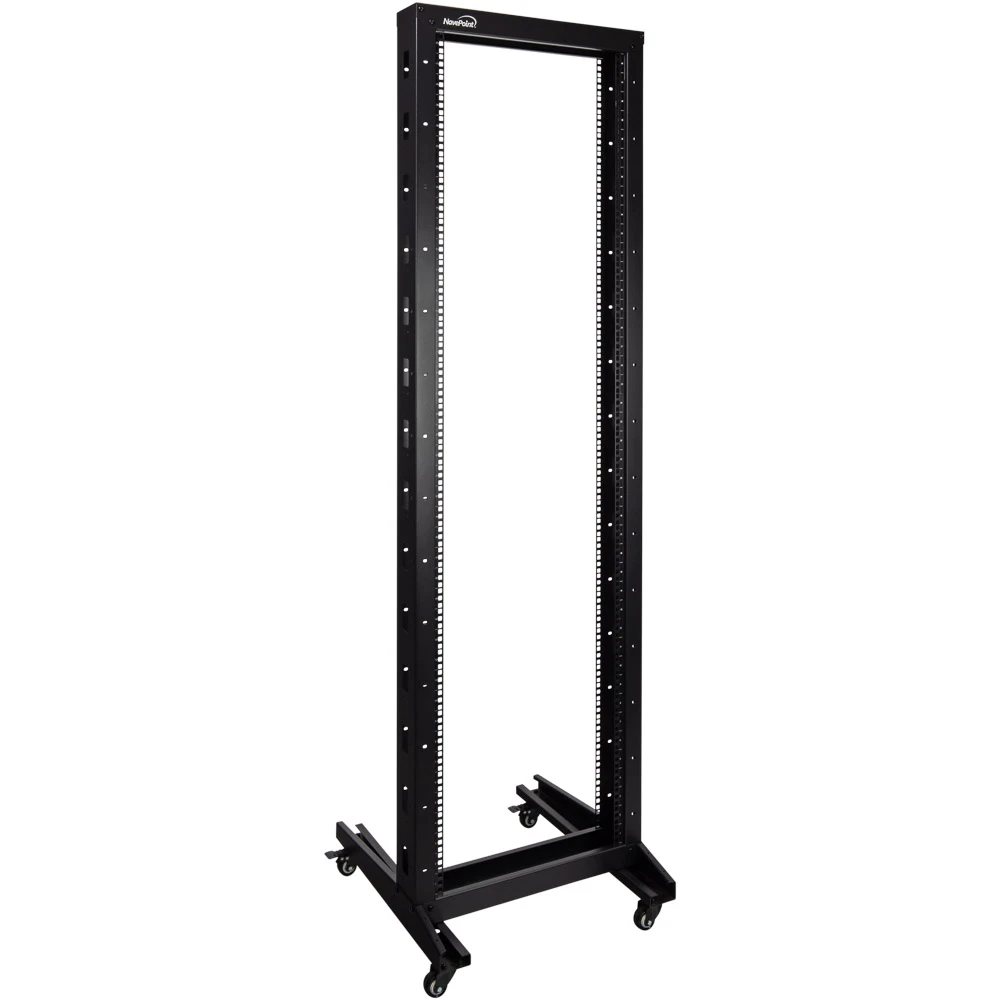
If your rack will never hold a server, stop paying for four posts. NavePoint’s 42U two-post open frame is a rolling relay rack, 81.75 inches tall, rated for 330 lb, with casters included and brakes on two of them. That rating sounds small next to the four-post numbers, but do the honest math: a 48-port switch is under 15 lb and a loaded patch panel is less. Forty units of network gear will not get near 330 lb. Owners rate the family 4.6 stars, and it earned an Amazon’s Choice badge in its category. The full-height version runs in the $270 to $300 band, and the same series comes in shorter sizes for less. Skip it for anything deep or dense, that is four-post work. Check today’s price on Amazon.
- Load rating: 330 lb static.
- Height: 42U, 81.75 inches tall.
- Mount: casters included, with brakes on two wheels.
- Also sold in shorter sizes in the same series.
- Cheapest way into a full 42U of rack space. Usually $270 to $300.
- Casters with brakes on two wheels. Easy to roll into place and lock down.
- Rated 4.6 stars. Carries an Amazon’s Choice badge in its category.
- Also sold in shorter sizes in the same series, if 42U is more than you need.
- Only 330 lb static. Well below the four-post StarTech ratings.
- Two posts mean gear hangs off the middle or front, not both ends. Wrong choice for anything deep or dense.
- Not built for a UPS or a full-depth server. That is four-post work.
4 ECHOGEAR’s 20U Open Frame Rack Is the Wall-Friendly AV Pick
ECHOGEAR’s EGAV-PROF20 is the pick when the rack lives in a media closet or on a wall. It is a 20U frame, 20.4 inches deep, rated for 600 lb on the floor and 200 lb wall-mounted, and it is stackable to 40U later. The value is in the box: a 1U and a 2U vented shelf come included, which is exactly what your non-rackmount gear, a NAS, a modem, a game console, actually needs. Owners rate it 4.7 stars across about 1,300 ratings and keep praising the genuinely funny manual. Two honest limits. The depth is fixed, not adjustable, so gear deeper than about 19 inches does not fit between the posts. And full servers need your server brand’s rails. It sells in the $210 to $240 band. Check today’s price on Amazon.
- Load rating: 600 lb on the floor, 200 lb wall-mounted.
- Depth: fixed at 20.4 inches, not adjustable.
- Height: 20U, stackable to 40U.
- Mount: 1U and 2U vented shelves included.
- Comes with a 1U and a 2U vented shelf. Exactly what non-rackmount gear like a NAS or a modem needs.
- Rated for 600 lb on the floor. Plenty for a media closet.
- Stackable to 40U later if the setup grows.
- 4.7 stars across about 1,300 ratings. Owners specifically praise the manual.
- Depth is fixed at 20.4 inches, not adjustable. Gear deeper than about 19 inches will not fit between the posts.
- Wall-mounted rating drops to 200 lb. A third of the floor rating.
- Full servers need your server brand’s own rails. Those do not come in the box.
5 StarTech RK12OD Is the Cheapest Honest Way Into a Rack
Every homelab starts as a pile of gear on a desk. The RK12OD is the cheapest respectable way out of the pile. It is a 12U two-post desktop frame rated for 110 lb, sized for switch-depth gear, with M6 cage nuts and screws in the box. At 4.7 stars across about 1,300 ratings, it is one of the best-reviewed racks on Amazon at any price, and it usually sells under $70. The honest frame around it: 110 lb and two posts means switches, patch panels, a shallow router, a small UPS on the base, and nothing deep or heavy. Pair it with one of the machines from our mini PC homelab guide sitting beside it, and you have a tidy first lab for less than the cost of one cabinet door. Check today’s price on Amazon.
- Load rating: 110 lb.
- Height: 12U desktop frame.
- Depth: sized for switch-depth gear, not full servers.
- Mount: M6 cage nuts and screws included.
- Usually sells for under $70. The cheapest way off the desk pile.
- 4.7 stars across about 1,300 ratings. One of the best-reviewed racks on Amazon at any price.
- M6 cage nuts and screws included. Ready to mount out of the box.
- Small desktop footprint. Fits on or beside a desk.
- Only 110 lb on two posts. Switches, patch panels, and a shallow router, nothing deep or heavy.
- Not built for full-depth servers. A small UPS on the base is about the limit.
- 12U fills up fast once you add more than a switch and a couple of shelves.
How to Size an Open Frame Rack You Will Not Outgrow
Count your rack units first, then double them. List every device you own that mounts, add 1U of PDU and 2U to 4U of UPS, add a shelf unit for the stuff that does not mount, then leave a unit of breathing room between hot boxes. If that list says 10U, buy 20U to 25U. Racks are the one homelab purchase where buying ahead is cheap. The jump from 12U to 25U costs far less than replacing the whole rack in two years, and used enterprise gear has a way of following you home.
Depth is where sizing goes wrong, in both directions. Mounting depth is the post-to-post distance your rails span. A 1U short-depth switch needs 10 to 17 inches. A real 2U server can need 30 inches or more plus cable clearance behind it. This is why the adjustable 22 to 40 inch range on the StarTech frames covers you from patch panel to full server, and why a fixed 20.4-inch frame like the ECHOGEAR cannot hold a deep server no matter how strong it is.
Height is the easy one, until it is not. A 25U frame at roughly 48 to 51 inches fits under shelves and rolls through any doorway. An 80-inch 42U frame clears a standard 80-inch door by millimeters on a bare floor, and does not clear it on carpet. If the rack will ever change rooms, that inch of clearance is a spec, so check it like one.
The Ratings and Holes That Decide What You Can Mount
Three specs on the sheet decide what you can actually mount. Here is how to read each one like the manufacturer meant it, not like the marketing hoped you would.
Static Load Ratings Are the Only Numbers You Can Trust
Load ratings on racks mean the stationary number unless the listing says otherwise. StarTech’s 1,200 lb figure for the 25U is a static rating, gear loaded, rack parked on feet or bolted down. The moment a rack is rolling on casters, its safe load falls hard, and manufacturers rarely print the rolling number. Load the heavy things low, lock the caster brakes, and treat a populated rack as furniture, not a cart.
Wall Mounting Cuts Capacity by Two Thirds
Wall mounting has its own derating, and it is brutal. The ECHOGEAR carries 600 lb on the floor but 200 lb on the wall, one third the capacity from the same steel. The limit is not the rack, it is your wall and your lag bolts. Hit studs, use the maker’s hardware, and count the weight of everything you will ever add, not what you are hanging today.
Square Holes Beat Threaded Holes Over a Rack’s Lifetime
Then there are the holes, the spec everyone skips and then regrets. Square holes take cage nuts, which snap in anywhere and replace for pennies when a thread strips. Threaded holes, 10-32 or 12-24, are faster to use but the thread is part of the rack, so one cross-threaded screw becomes permanent damage. Many racks mix them. NavePoint’s two-post designs put threaded holes on one face and square holes on the other, which is genuinely convenient once you know it is there and confusing the first time your screws do not fit.
The Bottom Line on Picking Your Rack
A rack is holes in the right places, and an open frame gives you those holes with better cooling, faster access, and a smaller bill. Buy the StarTech 4POSTRACK25U if you want one rack that handles everything from patch panels to full servers for a decade. Buy the 42U version if your gear list already justifies the height, the NavePoint two-post if that list is all network gear, the ECHOGEAR if it hangs on a wall in a media closet, and the RK12OD if you are escaping the desk pile for the price of a dinner out. Save the enclosed cabinet for the one job it actually does better, which is standing between your equipment and hands, dust, or noise you cannot control.
Frequently Asked Questions
Is an open frame server rack safe for expensive servers?
Yes, structurally it is the same mounting standard a cabinet uses, with the same EIA-310 hole spacing and often a higher load rating per dollar. The StarTech four-post frames carry 1,200 lb and more, which is beyond what most homelabs and small offices will ever load. Safe is a question about the room, not the rack. If untrusted people can reach the gear, that is when you pay for a locking cabinet.
Can I put an open frame rack in a bedroom or home office?
You can, but the rack will not protect you from the noise, because there is nothing between you and the fans. The honest fix is choosing quiet gear, fanless switches, mini PCs, low-RPM NAS units, rather than boxing loud gear in. An enclosed cabinet only muffles noise a little and makes everything run warmer, so it is a poor purchase if silence is the actual goal.
Do open frame racks come with cage nuts and screws?
The good ones do, and it is worth checking the box list before buying. StarTech includes 32 M6 cage nuts, screws, and even the assembly wrenches with the 4POSTRACK25U, and the RK12OD ships with M6 hardware too. ECHOGEAR includes 25 rack screws with its 20U frame. Budget racks often ship with barely enough for their own assembly, and a strip of 50 spare cage nuts costs little.
How deep should an open frame server rack be for a full-size server?
Plan on 30 inches or more of mounting depth for a modern 1U or 2U server, plus a few inches behind for power and network cables. That is why adjustable-depth four-post frames that reach 40 inches, like both StarTech models here, are the safe choice for server duty. Fixed short-depth frames around 20 inches are for switches, panels, and AV gear, not servers.
Can I wall-mount an open frame server rack?
Some models are designed for it, and the spec to respect is the wall rating, not the floor rating. The ECHOGEAR 20U drops from 600 lb on the floor to 200 lb on the wall. Mount into studs with the manufacturer’s hardware, keep heavy UPS units out of wall-mounted frames entirely, and re-check the total weight every time you add a device.
What does the load rating on an open frame rack really mean?
It is the stationary capacity, the weight the frame holds while parked on leveling feet or bolted to the floor. Rolling capacity on casters is much lower and usually unpublished, so move a rack empty or nearly empty. Two-post ratings also assume balanced, shallow loads. A deep box cantilevered off two posts stresses the steel in ways the headline number does not describe.
About the Author
Elena Brooks
Elena Brooks writes about the infrastructure decisions that are hard to reverse – network access, storage layouts, and the gear small teams actually run. She reads the vendor documentation and the release notes so you don’t have to, quotes them directly, and says plainly when a product’s reputation and its own docs disagree.