
- The deciding spec is IDS/IPS throughput — the speed your gateway keeps AFTER you turn threat inspection on. Match it to your WAN speed and the choice makes itself.
- The Cloud Gateway Ultra (about $130) inspects 1 Gbps. That covers every gigabit ISP plan with nothing wasted.
- The Cloud Gateway Max adds five 2.5 GbE ports, 2.3 Gbps inspection, and an NVMe bay (a slot for a small plug-in SSD stick) for camera recording. Expect roughly $200–$280 depending on storage.
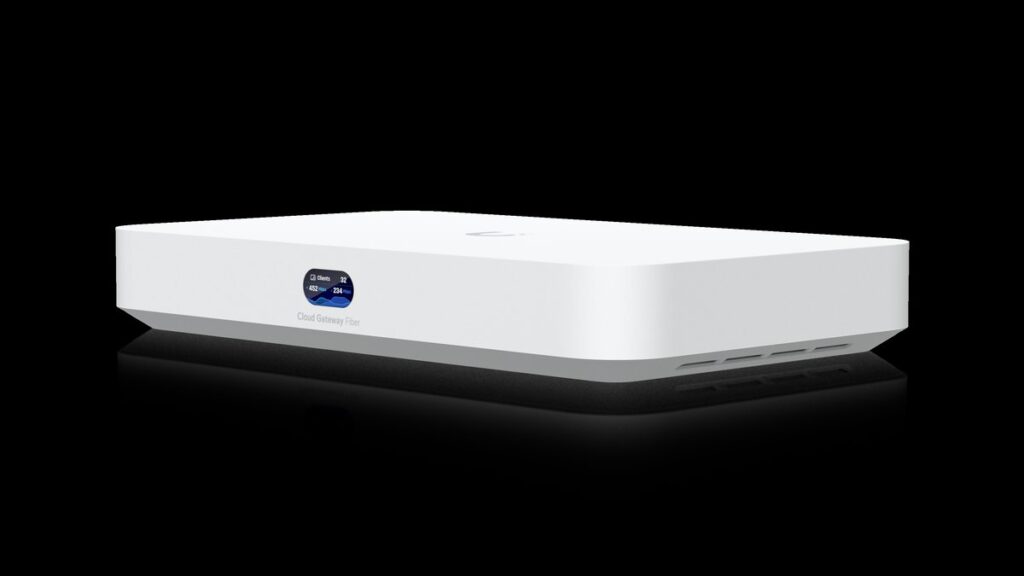
- The Cloud Gateway Fiber is the value outlier: 10G ports, 5 Gbps inspection, PoE (power sent right through the network cable), and an NVMe bay for less than an aging Dream Machine Pro.
- The Dream Machine Pro line still wins on scale — 100+ UniFi devices and 1,000+ clients per box — and on rack mounting, not on speed per dollar.
- A Cloud Key is not a gateway. It runs the UniFi software but routes nothing, so only buy one if something else is already your router.
Here is the short version. Your WAN is the internet line your provider hands you at the wall. Buy the Cloud Gateway Ultra if that line is a gigabit or less. Buy the Cloud Gateway Max if you run multi-gig or want cameras recording locally. Buy the Cloud Gateway Fiber if your ISP hands you 5 or 10 gigabits. Move to the Dream Machine Pro family when the network lives in a rack.
That answer took one paragraph. The problem is that Ubiquiti will not give it to you. Search for a UniFi Cloud Gateway and you land on a store page with five white boxes that look nearly identical, priced from about $130 to about $600. The store lists specs. It does not tell you which spec should make the decision. This guide does, with every number pulled from Ubiquiti’s own spec sheets.
One honest note before we start: some links below are affiliate links. If you buy through one, vpod may earn a small commission at no extra cost to you. It does not change which box we tell you to buy.
What does your ISP actually hand you at the wall?
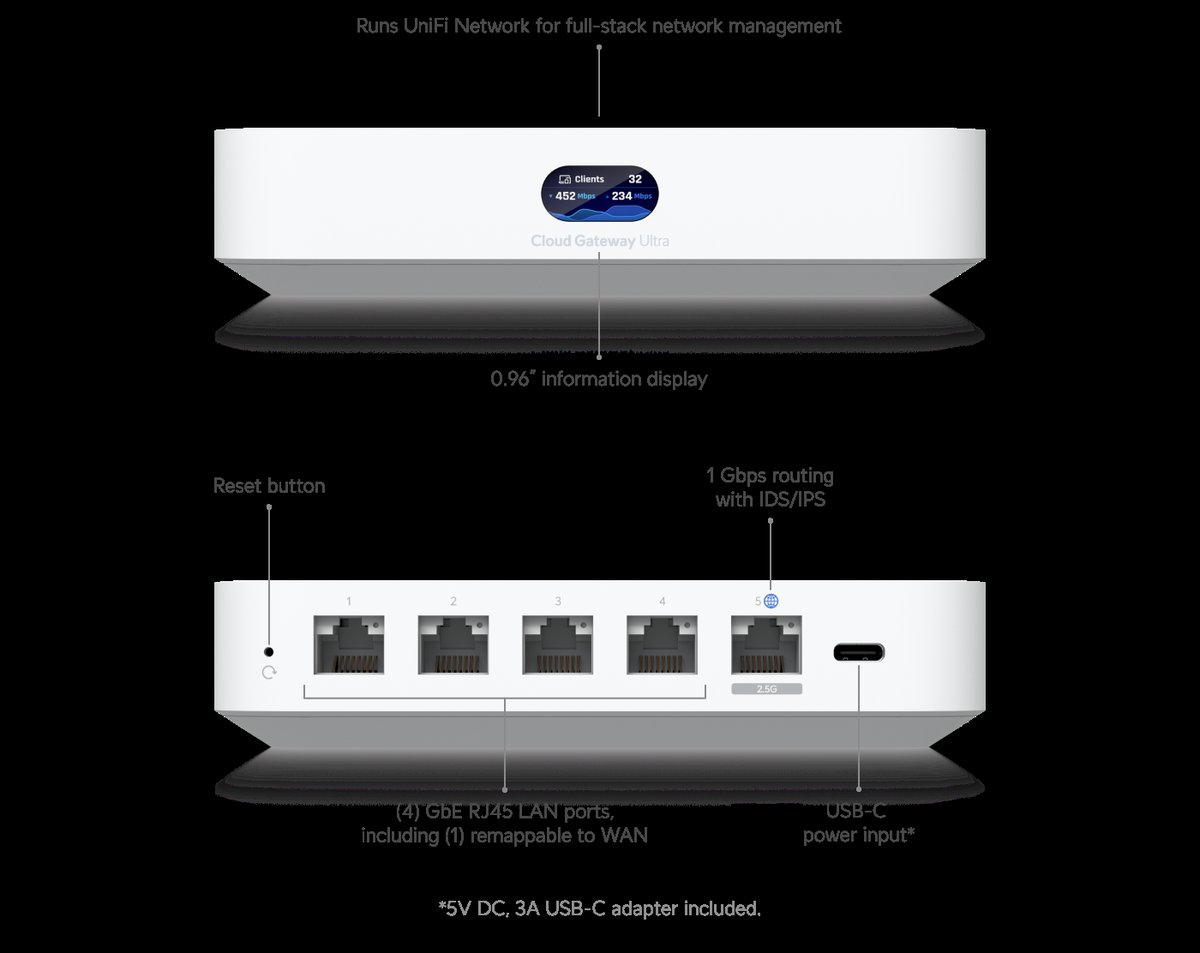
★ Your pick: UniFi Cloud Gateway Ultra
1 Gbps inspection matches your WAN exactly, and it sips 6.2 watts
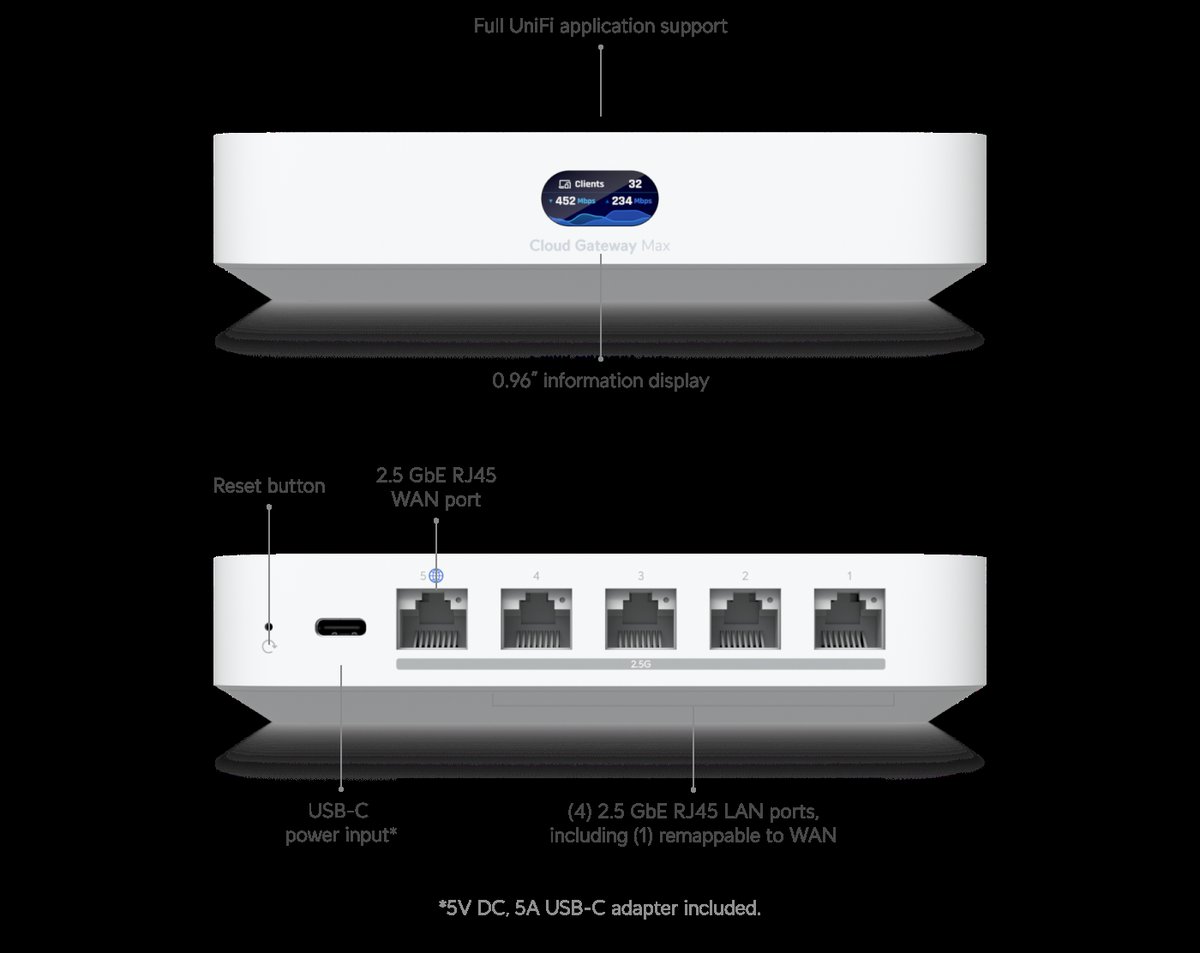
★ Your pick: UniFi Cloud Gateway Max
Five 2.5 GbE ports and 2.3 Gbps inspection, plus an NVMe bay for Protect cameras
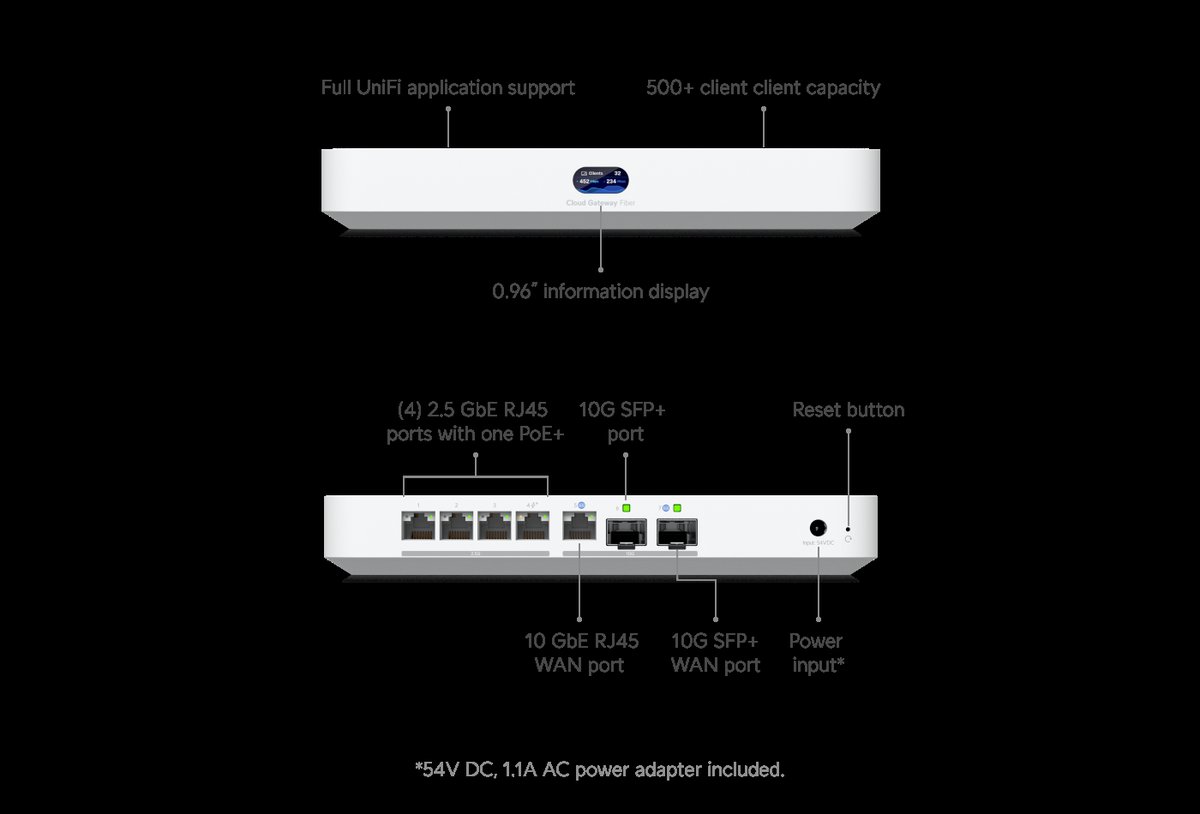
★ Your pick: UniFi Cloud Gateway Fiber
Two SFP+ ports, a 10G RJ45, a 30W PoE+ port, and 5 Gbps inspection
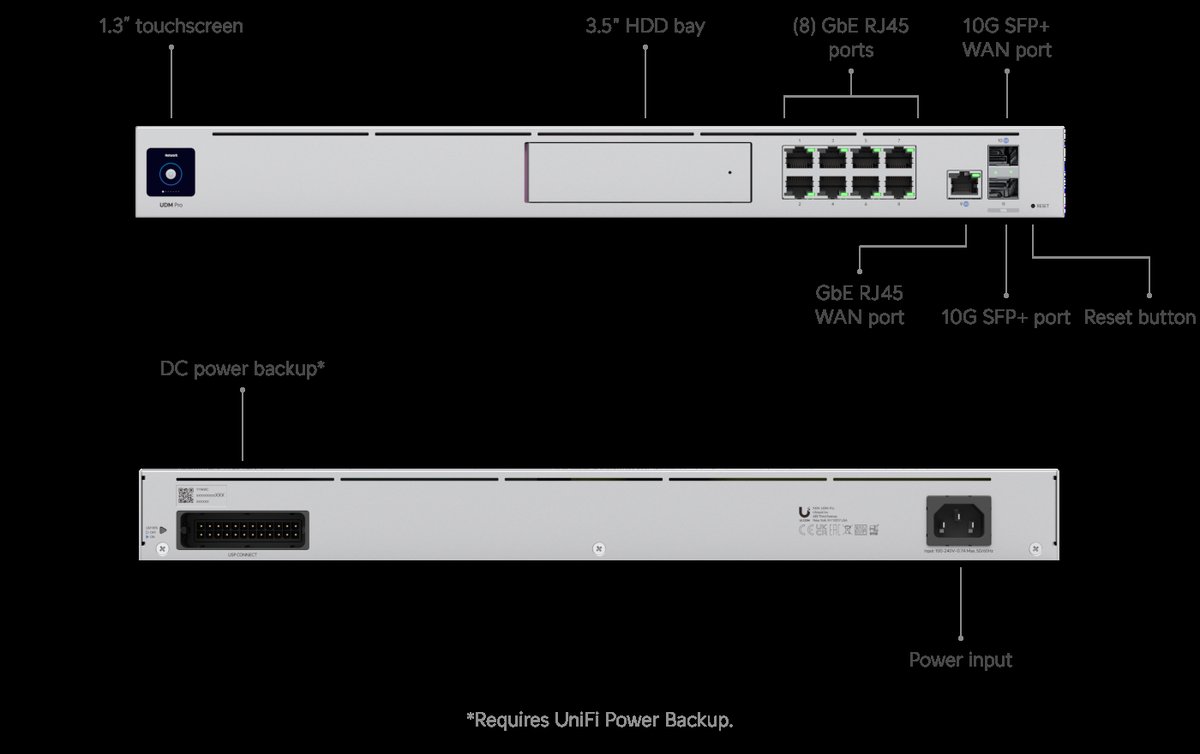
★ Your pick: UniFi Dream Machine Pro
1U rackmount, dual SFP+, a 3.5-inch NVR bay, and support for 100+ UniFi devices
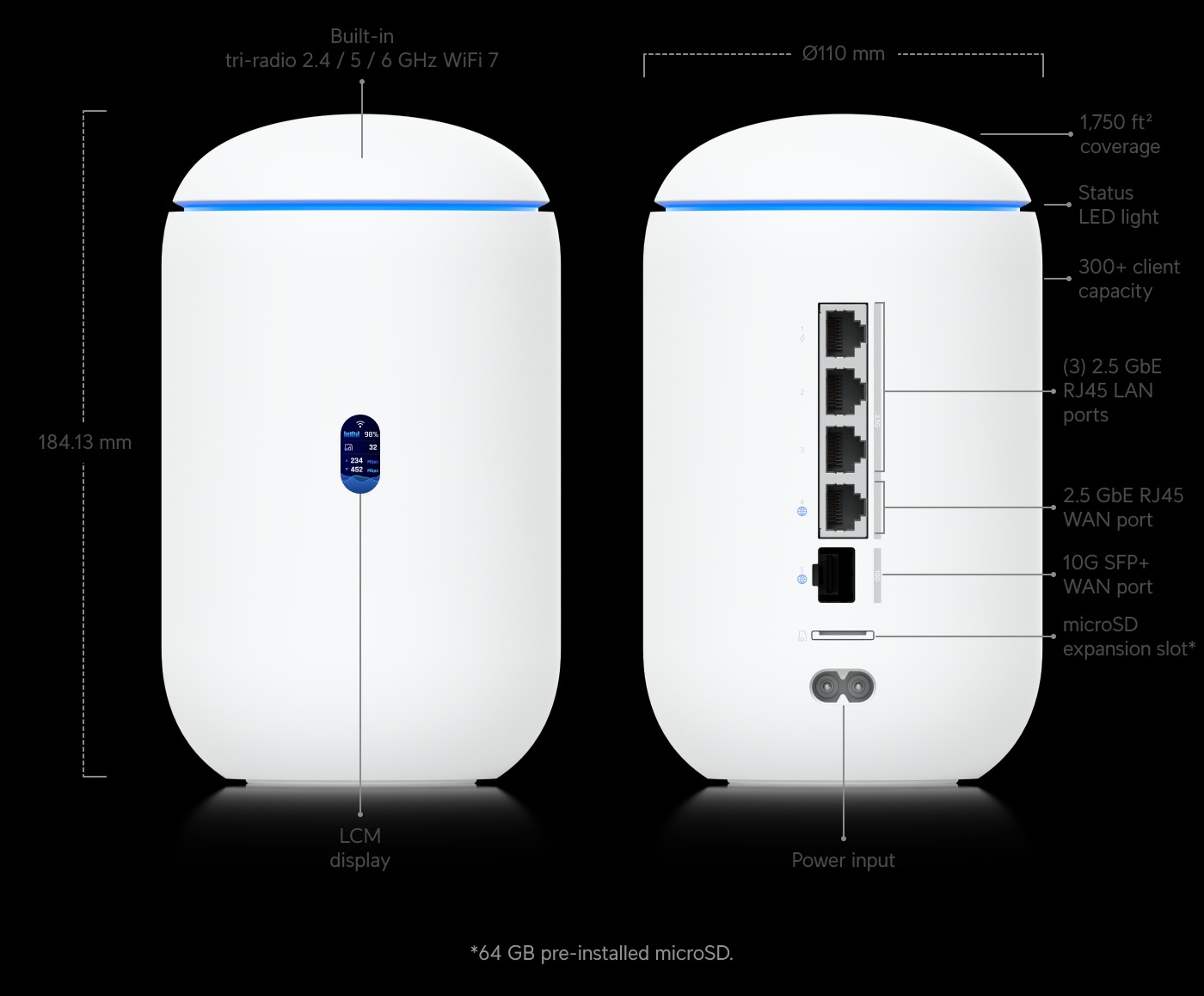
★ Your pick: UniFi Dream Router 7
A 10G gateway with WiFi 7 and a PoE switch inside one desktop shell
👑 Our Top Pick — Best Overall Value
UniFi Cloud Gateway Fiber
10G ports, 5 Gbps inspection, PoE, and an NVR bay for under $300 — the most gateway per dollar Ubiquiti has ever shipped
Opens on our Top Pick. Tap an option to see the best match for you.
The Lineup Problem Ubiquiti Quietly Built for Itself
Rewind to 2020 and this decision was easy. If you wanted a UniFi gateway, you bought a Dream Machine or a Dream Machine Pro. That was the menu. Since then, Ubiquiti has shipped the Cloud Gateway Ultra, the Cloud Gateway Max, the Cloud Gateway Fiber, and a pair of WiFi 7 desktop gateways. Reviewers at Dong Knows Tech tracked the newest two, the Dream Router 7 and the Express 7, landing between February and March 2025. That is at least seven boxes that all do the same core job.
Why did the menu explode? Because the software stopped being the difference. Every one of these boxes runs UniFi OS, and from the Cloud Gateway Max up, the full application suite — Network, Protect, Access, Talk. The two cheapest boxes, the Ultra and the Express line, run UniFi Network only. Otherwise, the thing you manage looks identical whether you spent $130 or $600. So Ubiquiti tells the boxes apart by hardware alone: port speed, inspection speed, storage bays, PoE, and how many devices one box can manage. That makes sense as a lineup for Ubiquiti. It is a trap for buyers, because the boxes hide their differences behind matching white plastic.
The trap has a predictable result. People buy on price and get burned at renewal time — the person who took gigabit fiber to 5 gig service and watched their Ultra flatline at 1 Gbps. Or they buy on fear and overspend — the 30-device office running a $600 rack unit at a tenth of its capacity. Both mistakes come from judging the box by the wrong number. The right number is one spec, and it is printed on every spec sheet.
The One Number That Should Make the Decision for You
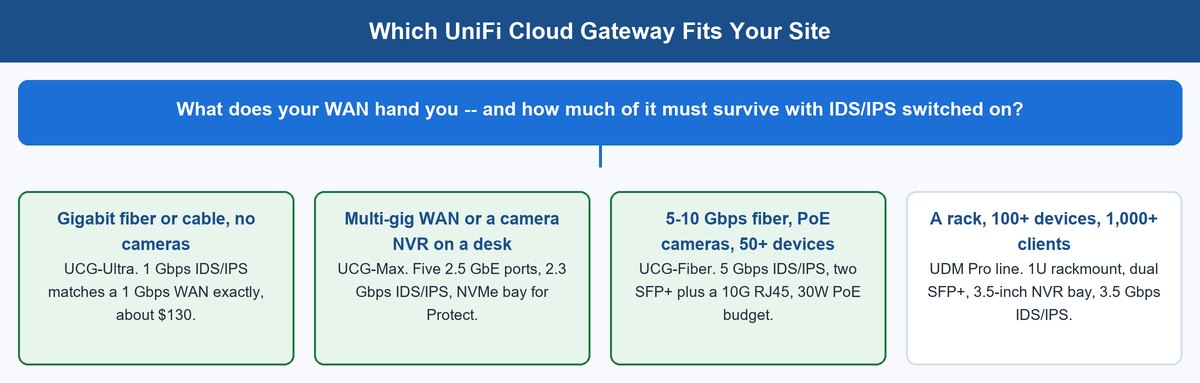
Every gateway in this lineup routes at full port speed when its security features are off. Turn on IDS/IPS — intrusion detection and prevention, the feature that inspects traffic for attacks — and the picture changes. Inspection is CPU work. Each packet gets opened and checked against more than 55,000 threat signatures before it moves on. The gateway’s processor becomes the bottleneck, and the spec sheet’s IDS/IPS number is Ubiquiti telling you exactly where that wall sits.
The numbers, straight from Ubiquiti’s spec pages: the Ultra inspects 1 Gbps. The Max inspects 2.3 Gbps. The Dream Machine Pro inspects 3.5 Gbps. The Cloud Gateway Fiber and the Dream Machine Pro Max both inspect 5 Gbps. Now put your WAN plan next to those numbers. A gigabit plan fits every box in the lineup. A 2.5 gig plan quietly outruns the Ultra. A 5 gig plan outruns everything except the Fiber and the Pro Max.
This is also why “just get the biggest one” fails as advice. Inspection throughput is the expensive spec. Paying for 5 Gbps of it on a gigabit WAN is like buying a truck rated to tow a boat you do not own. The money should go where your site actually strains — more PoE, more cameras, better WiFi — not into a cap you will never hit.
The Best UniFi Gateway Picks for Four Kinds of Sites
Here is the whole decision on one screen. Prices are current US list bands from Ubiquiti’s store, rounded — storage options move the Max and Fiber up within their bands.
| Model | Price band | Key ports | IDS/IPS | Scale | Local storage | PoE out |
|---|---|---|---|---|---|---|
| Cloud Gateway Ultra | ~$130 | 1× 2.5G WAN, 4× GbE LAN | 1 Gbps | 30+ devices, 300+ clients | none | no |
| Cloud Gateway Max | ~$200–$280 | 5× 2.5 GbE | 2.3 Gbps | 30+ devices, 300+ clients | NVMe bay, up to 2 TB | no |
| Cloud Gateway Fiber | under $300 | 2× 10G SFP+, 1× 10G RJ45, 4× 2.5 GbE | 5 Gbps | 50+ devices, 500+ clients | NVMe bay, up to 2 TB | 1× PoE+ (30W) |
| Dream Machine Pro | under $400 | 2× 10G SFP+, 9× GbE RJ45 | 3.5 Gbps | 100+ devices, 1,000+ clients | 3.5″ HDD bay | no |
| Dream Machine SE | ~$500 | 10G SFP+, PoE switch built in | 3.5 Gbps | 100+ devices, 1,000+ clients | 3.5″ HDD bay | yes |
| Dream Machine Pro Max | ~$600 | 2× 10G SFP+, 9× GbE RJ45 | 5 Gbps | 200+ devices, 2,000+ clients | dual HDD bays | no |
Four of these deserve a closer look, because each one is the correct answer for a different site.
1 Cloud Gateway Ultra Keeps Gigabit Sites Honest for About $130
The UniFi Cloud Gateway Ultra is the entry ticket, and it is a better box than its price suggests. You get a 2.5 GbE WAN port, four gigabit LAN ports, and full inspection at 1 Gbps. It manages 30+ UniFi devices and 300+ clients, which covers most homes and a lot of small offices. It draws 6.2 watts and powers from USB-C, so it disappears on a shelf and barely registers on a UPS.
What the Ultra gives up is storage and PoE. It runs UniFi Network only — no Protect at all, and no NVMe bay — so cameras are off the table entirely. This is not the box for a camera site. Its four LAN ports are gigabit, so a fast NAS on the LAN cannot talk to the WAN port’s 2.5 gig speed. Those are honest cuts at this price, not flaws. The mistake is buying an Ultra for a site that will outgrow it within a year.
- 2.5 GbE WAN port plus four gigabit LAN ports.
- 1 Gbps IDS/IPS inspection throughput.
- Manages 30+ UniFi devices and 300+ clients.
- Runs UniFi Network only — no Protect, no camera storage.
- No PoE output.
- Draws 6.2 watts, powered over USB-C.
- Cheapest way into full UniFi Network, at about $130.
- Sips power at 6.2 watts and runs off a small USB-C adapter.
- 1 Gbps inspection is a perfect match for a gigabit ISP plan, not a compromise.
- Runs UniFi Network only — no Protect, so cameras are off the table entirely.
- LAN ports are capped at gigabit, so a fast NAS can’t use the 2.5 GbE WAN speed.
- No PoE output — access points and cameras still need a separate switch or injector.
2 Cloud Gateway Max Brings 2.5 GbE Everywhere and a Protect NVR
The UniFi Cloud Gateway Max fixes both of the Ultra’s cuts in one move. All five ports run at 2.5 GbE, inspection climbs to 2.3 Gbps, and an NVMe bay accepts up to 2 TB for UniFi Protect. Ubiquiti rates it for 15 HD cameras, 8 at 2K, or 5 at 4K. That turns one small silent box into router, firewall, and video recorder for a shop, a clinic, or a serious home.
The Max still manages the same 30+ devices and 300+ clients as the Ultra, and it still has no PoE — cameras and access points need a PoE switch or injectors behind it. Its real job is the 2.5 gig ISP tier. Cable providers now sell 2 gig plans in most metros, and the Max’s 2.3 Gbps inspection is sized almost exactly to that reality. That sizing is the tell: Ubiquiti built this box for the plan your ISP wants to upsell you next.
- Five ports, all running 2.5 GbE.
- 2.3 Gbps IDS/IPS inspection throughput.
- NVMe bay for UniFi Protect, up to 2 TB.
- Rated for 15 HD cameras, 8 at 2K, or 5 at 4K.
- Manages 30+ UniFi devices and 300+ clients.
- No PoE output — cameras and access points need a separate PoE switch or injectors.
- All five ports run 2.5 GbE — two and a half times the Ultra’s LAN speed.
- NVMe bay turns it into a subscription-free Protect NVR, no extra box needed.
- 2.3 Gbps inspection is sized almost exactly to the 2.5 gig plans cable providers now sell.
- Still no PoE output — cameras and access points need a separate switch or injectors.
- Storage tiers (512 GB to 2 TB) add real cost if you want Protect running.
- Same 30+ device, 300+ client ceiling as the cheaper Ultra.
3 Cloud Gateway Fiber Is the 10G Bargain of the Whole Lineup
The UniFi Cloud Gateway Fiber is where the lineup stops making polite steps and jumps. For under $300 you get 10G ports, a PoE+ port, fast inspection, and the same NVMe storage bay as the Max — the Features list below has the exact numbers. Per Ubiquiti’s own spec sheet, it also steps up to 50+ devices and 500+ clients on a faster processor than either small sibling.
Read that against the rest of the family and the pricing looks almost like a mistake. The Fiber inspects traffic faster than the Dream Machine Pro, which lists for about $100 more. It matches the $600 Pro Max’s 5 Gbps inspection number in a fanless desktop shell. It is the only desktop gateway here with a PoE+ port on the box itself, enough to run one camera or one access point with no switch in between. Since launching in early 2025 it has become the default answer for multi-gig fiber, and a year on, nothing in the lineup undercuts it.
The catch list is short but real. The PoE+ output lives on a single port with a 30W budget, so it feeds one camera or one access point, not a camera farm. And 10G ports deserve 10G neighbors — if the rest of your network is gigabit, budget for a multi-gig switch or the Fiber’s best ports sit idle.
- Two 10G SFP+ ports, one 10G RJ45, and four 2.5 GbE ports.
- One PoE+ port with a 30W budget.
- 5 Gbps IDS/IPS inspection throughput.
- NVMe bay for UniFi Protect, up to 2 TB.
- Manages 50+ UniFi devices and 500+ clients.
- Rated for 15 HD cameras or 5 at 4K.
- Fastest inspection in the whole lineup at 5 Gbps — matches the $600 Pro Max for under $300.
- Only desktop gateway here with a built-in PoE+ port, no extra injector required.
- NVMe bay for Protect at the same tier as the pricier Max.
- PoE+ budget is a single 30W port — one camera or one access point, not a farm.
- 10G ports go to waste without a multi-gig switch behind them.
- NVMe storage still costs extra if you actually want Protect running.
4 The Dream Machine Pro Family Still Owns the Rack
The UniFi Dream Machine Pro is the elder statesman: a 1U rackmount with dual 10G SFP+ (the square ports that take fiber modules), nine RJ45 ports, a 3.5-inch drive bay for Protect, a touchscreen, and 3.5 Gbps of inspection. Its headline is scale — 100+ UniFi devices and 1,000+ clients — which is triple what the desktop boxes manage. When one gateway has to carry a whole office building of access points, switches, and cameras, this class is where you land.
The family has two variants worth knowing. The Dream Machine SE, around $500, adds a built-in PoE switch so access points plug straight into the gateway. The Dream Machine Pro Max, about $600, doubles scale again to 200+ devices and 2,000+ clients, lifts inspection to 5 Gbps, and adds a second drive bay with redundant recording. Those are real enterprise features, priced like it.
- 1U rackmount chassis with a touchscreen.
- Dual 10G SFP+ ports plus nine gigabit RJ45 ports.
- 3.5-inch drive bay for UniFi Protect.
- 3.5 Gbps IDS/IPS inspection (5 Gbps on the Pro Max).
- Manages 100+ UniFi devices and 1,000+ clients (200+ devices and 2,000+ clients on the Pro Max).
- Dream Machine SE adds a built-in PoE switch.
- Scale no desktop box in this lineup touches — 100+ devices, 1,000+ clients (double that on the Pro Max).
- Rack format and 3.5-inch bays take cheap, huge surveillance drives instead of pricey NVMe.
- SE variant adds a built-in PoE switch, so access points plug straight into the gateway.
- No longer the fastest inspection per dollar — the Cloud Gateway Fiber out-inspects the base Pro for less money.
- Bulkier and pricier than the desktop boxes, and it wants a rack or a shelf to itself.
- Oldest platform in the current lineup — due for a refresh, per Ubiquiti’s release pace.
Here is the honest 2026 reading: the Pro line no longer wins on speed. It wins on capacity, rack format, and drive bays. If you do not need a hundred managed devices or a rack ear in sight, the Cloud Gateway Fiber gives you more throughput for less money. Buy the Pro family for what it is uniquely good at, not out of habit.
Ultra vs Max Is Two Numbers and a Storage Bay
The UniFi Cloud Gateway Ultra vs Max question decides itself with two numbers and one bay. Number one: LAN speed. The Ultra’s four LAN ports are gigabit; every Max port runs 2.5 GbE. If you move big files between a NAS and workstations, the Max moves them two and a half times faster, full stop. Number two: inspection. The Ultra caps at 1 Gbps, the Max at 2.3 Gbps. On a gigabit ISP plan both are fine. The moment you upgrade past a gig, the Ultra becomes the bottleneck you pay your ISP to have.
The bay settles the rest. The Max’s NVMe slot is what makes it a self-contained UniFi Protect recorder — up to 2 TB of local, subscription-free camera storage. The Ultra simply cannot do this job. So ask two questions: will this site ever run cameras, and will the WAN ever exceed a gigabit? Two nos and the Ultra saves you real money. Either yes and the Max is the cheaper box across a three-year life, because replacing an outgrown Ultra costs more than the price gap did.
UCG Fiber vs Dream Machine Changes the Question Entirely
The UCG Fiber vs Dream Machine comparison is not a spec race — the Fiber wins that on price alone. It inspects at 5 Gbps to the UDM Pro’s 3.5, costs about $100 less, uses a fraction of the power, and makes no fan noise on a desk. If the question is pure throughput per dollar for one site with a fast WAN, the Fiber is the answer and you can stop reading this section.
The Dream Machine Pro line answers a different question: how much network can one box be responsible for. Its 100+ device and 1,000+ client rating is double the Fiber’s on devices and double on clients, and the Pro Max doubles it again. Its 3.5-inch bays take cheap, huge surveillance drives — a 2 TB NVMe stick is a starter NVR (network video recorder), while a pair of 8 TB drives with redundancy is a serious one. And it racks. In an MSP (managed IT provider) closet or a comms room, desktop boxes on a shelf are how cables get ripped out; rack ears are not a vanity spec.
So draw the line by count, not speed. Under about 50 UniFi devices, the Fiber does everything the Pro does, faster and cheaper. Past that — dozens of access points, cameras on every corner, hundreds of concurrent clients — the Pro family’s capacity ratings are the spec that keeps the controller responsive, and the one you cannot add later with an accessory.
A Cloud Key Is Not a Gateway, So Stop Cross-Shopping It
The UniFi Cloud Gateway vs Cloud Key confusion is the most expensive mix-up in this ecosystem, and Ubiquiti’s naming deserves the blame.
Cloud Key Gen2 Plus Is the Console, Not the Router
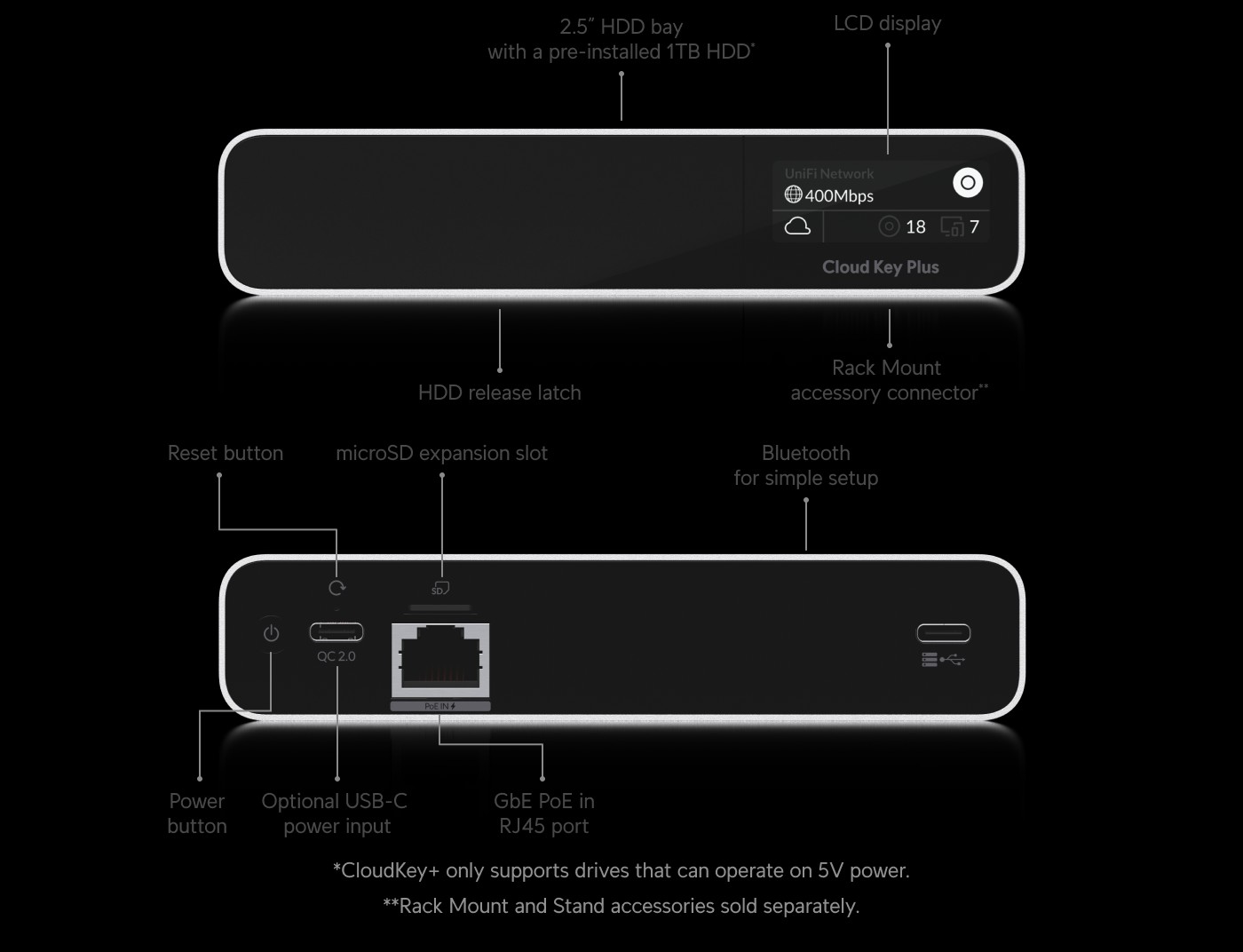
The Cloud Key Gen2 Plus, about $200, is a console. It runs the UniFi applications — the same Network and Protect software the gateways run — but it routes nothing, firewalls nothing, and has no WAN port. Plug a Cloud Key into a network with no router and you have a very nice brick.
- Runs the UniFi Network and Protect applications.
- No routing, no firewall, no WAN port.
- Costs about $200.
- Only for setups where something else is the router.
- The only piece of UniFi hardware built purely to host the controller software.
- Works alongside a non-UniFi router — pfSense, OPNsense, or an ISP box you can’t replace.
- Simple setup over Bluetooth, at a price well under any full gateway.
- Routes nothing and has no WAN port — useless as a standalone gateway.
- Redundant if you already own any current UniFi cloud gateway, since the controller ships inside those for free.
- Still needs a separate router in front of it either way.
Ten years ago the split made sense. UniFi’s controller was software you hosted somewhere, and the Cloud Key was the tidy appliance to host it on. Every device in this guide has since absorbed that job: buy any UniFi cloud gateway and the controller is simply inside. That collapsed the Cloud Key’s role to one scenario — you want UniFi access points, switches, or cameras managed locally, but something else owns routing. A pfSense or OPNsense box at the edge, an ISP router you cannot replace, or a homelab mini PC doing gateway duty.
If that is you, the Cloud Key is the right buy and no gateway here replaces it. If it is not — if you are choosing your first UniFi setup from scratch — you are comparing two different kinds of box. A $130 Ultra gives you the controller AND the router. Start there, not with the accessory.
What the WiFi 7 Additions Change About Timing
Ubiquiti did not stop at three desktop gateways. In early 2025 it pushed WiFi into the gateway itself, and reviewers tracked two new arrivals landing within weeks of each other. Both change what makes sense to buy at the bottom of the lineup, so they earn a closer look before you commit to a wired-only box.
The Dream Router 7 Folds Your Access Point Into the Gateway
The Dream Router 7 packs a 10G SFP+ WAN port, a PoE-capable LAN port, microSD storage for Protect, and tri-radio WiFi 7 into one desktop unit for under $300. For an apartment or a small office that would otherwise buy a gateway plus one access point, this single box now does both jobs for less than the pair would cost.
- 10G SFP+ WAN port plus a 2.5 GbE WAN port and three 2.5 GbE LAN ports (one PoE-capable).
- Tri-radio 2.4/5/6 GHz WiFi 7 built in.
- 2.3 Gbps IDS/IPS inspection throughput.
- microSD expansion slot for UniFi Protect.
- Manages 30+ UniFi devices and 300+ clients.
- Runs the full UniFi application suite, same as the Max and Fiber.
- Folds the gateway AND the access point into one $279 box — no separate AP to buy or mount.
- 2.3 Gbps inspection beats the cheaper Ultra while adding WiFi 7 for free.
- 10G SFP+ WAN port makes it fiber-ready, not just cable-ready.
- WiFi radiates from wherever the gateway sits — wiring an AP elsewhere in the house isn’t an option.
- Still a desktop box, not built for wired-only or rack setups.
- Newer platform than the Cloud Gateway line, with less field history behind it.
That changes the Ultra’s cleanest pitch. The cheapest way into UniFi now competes with a box that includes the WiFi you were about to buy separately. The Ultra still wins where you want wired-only routing, or where the access points must sit far from the gateway. But if your plan was “Ultra plus one AP in the same room,” price a Dream Router 7 first. What makes sense to buy has genuinely changed.
The Express 7 Aims at Mesh-First Small Spaces
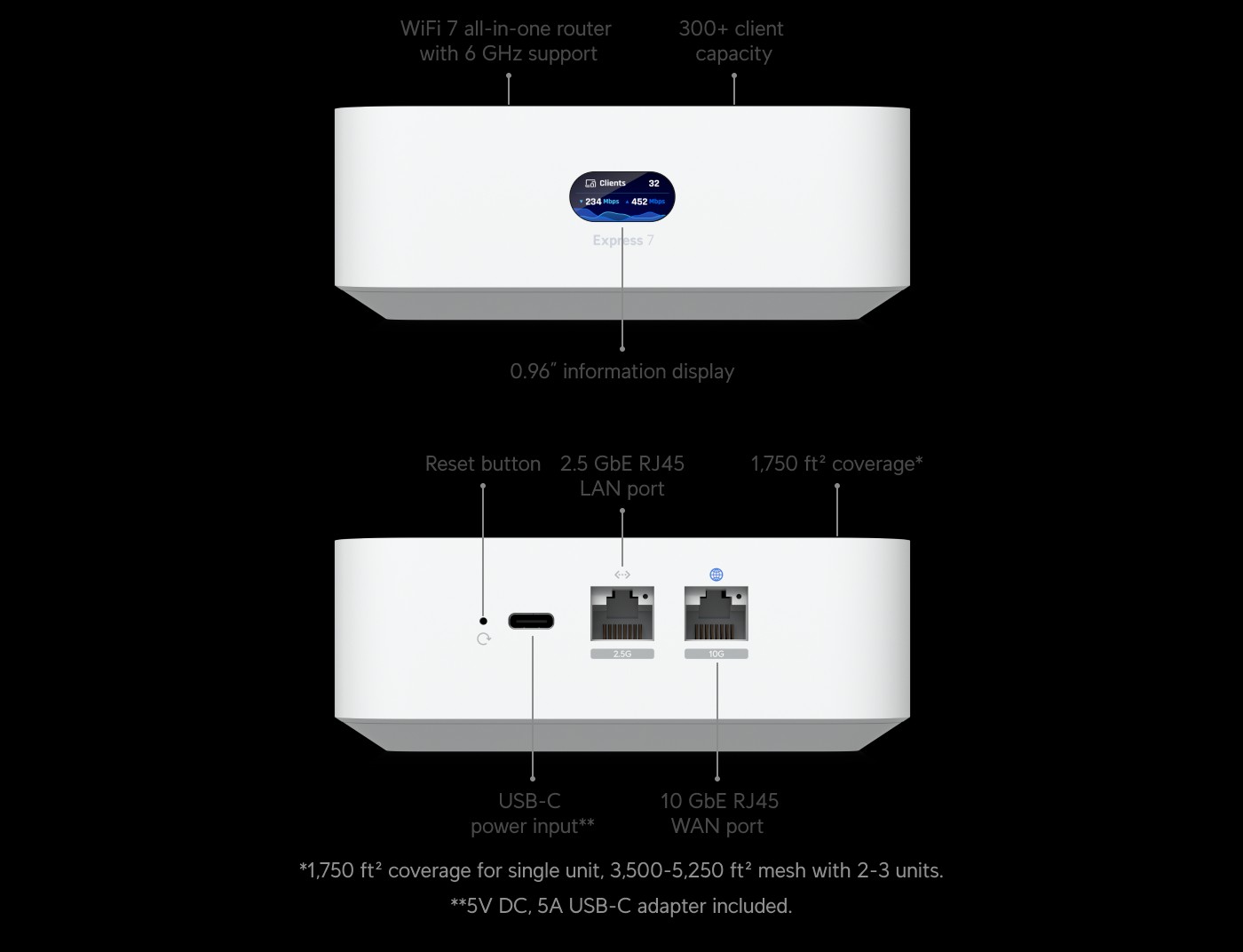
The compact Express 7 takes the same idea smaller: a 10G-capable gateway with 6 GHz WiFi 7 in a shell you can hold in one palm. Ubiquiti sells it solo and in mesh multi-packs, and each extra unit joins as a mesh node. Coverage grows by adding boxes, not by planning cable runs.
The trade is scale. An Express-based network is built for homes and very small offices, not for the device counts the Cloud Gateway line handles. Treat it as the answer to “I want UniFi and I refuse to run wires,” and it is a good one. Treat it as a Cloud Gateway substitute for a growing site, and you will outgrow it.
- 10G-capable WAN, in a shell you can hold in one palm.
- 6 GHz WiFi 7 radio built in.
- Sold solo or in mesh multi-packs, so extra units join as mesh nodes.
- Built for home and very small office device counts, not Cloud Gateway-class scale.
- Coverage grows by adding boxes, not by planning cable runs — no wiring skill required.
- 10G-capable WAN in the smallest, cheapest shell in the whole lineup.
- Mesh multi-packs scale cleanly for a home that outgrows a single unit’s range.
- Built for home and small-office device counts, not the Cloud Gateway line’s scale.
- Mesh nodes share one WiFi backhaul — coverage costs some throughput past one hop.
- Grow past a very small site and you will outgrow it, not just its WiFi.
It also tells you something about timing the bigger boxes. Ubiquiti’s release pace since 2024 has been relentless — Ultra, then Max, then Fiber inside a single year, each one undercutting the class above it. The Dream Machine Pro’s slot is the most exposed: a desktop box already out-inspects it for less. If history rhymes, the rack line gets its refresh next. Need a rack gateway today? Buy today — capacity is capacity. But nobody should be surprised if the next spec-sheet jump lands there.
The Bottom Line for Your Next Purchase Order
Stop shopping this lineup by price tag and start with two numbers written on your ISP bill and your device list: WAN speed and gear count. Gigabit WAN, no cameras, under 30 UniFi devices — Cloud Gateway Ultra, done. Multi-gig cable or local camera recording — Cloud Gateway Max. Fiber at 5 gig or better, or any site that wants 10G done right on a desk — Cloud Gateway Fiber, the best value in the family. A hundred devices, a thousand clients, or anything that lives in a rack — Dream Machine Pro, SE for built-in PoE, Pro Max when even that is small.
The pattern behind every recommendation here is the same: pay for the cap you will actually hit, not the one that sounds impressive. Ubiquiti prices these boxes by inspection throughput and capacity, and both specs are printed in public. Ten minutes matching them to your actual WAN and your actual device count beats any amount of forum debate — and it is ten minutes most buyers of this lineup never spend. Spend them. Your renewal-day self will thank you.
Frequently Asked Questions
What is a UniFi cloud gateway, in plain terms?
It is Ubiquiti’s name for a box that does three jobs at once: routes your internet traffic, firewalls it, and hosts the UniFi software that manages your access points, switches, and cameras. Older UniFi setups needed a separate controller for that third job. Every current gateway has it built in.
Despite the word “cloud,” your traffic does not route through Ubiquiti’s servers. The cloud part is remote management — you can reach your dashboard from anywhere through unifi.ui.com. The routing and the data stay on your hardware, in your building.
Which UniFi cloud gateway should I buy for a 1 Gbps connection?
The Cloud Gateway Ultra, at about $130, is sized for exactly this. Its 1 Gbps IDS/IPS throughput means you keep full threat inspection at your full WAN speed, and it manages 30+ UniFi devices — more than most gigabit sites will ever install.
Spend more only for a specific reason: the Max if you want local camera recording or 2.5 GbE between wired machines, or a Dream Router 7 if you also need WiFi and want it in the same box.
Is the UCG Fiber better than the Dream Machine Pro?
On raw specs, mostly yes. The Fiber inspects traffic at 5 Gbps to the UDM Pro’s 3.5 Gbps, costs about $100 less, and adds a PoE+ port and an NVMe bay. For a single site with a fast WAN and a modest device count, it is the better buy.
The Dream Machine Pro still wins on scale and format. It manages 100+ UniFi devices and 1,000+ clients to the Fiber’s 50+ and 500+, takes cheap 3.5-inch surveillance drives, and mounts in a rack. Big sites and MSP closets still belong to the Pro family.
Do I need a Cloud Key if I buy a cloud gateway?
For most setups, no. Every current UniFi cloud gateway hosts the UniFi Network controller natively, and the Max, Fiber, and Dream Machine lines add Protect, Access, and Talk. The one exception: an Ultra owner who wants Protect needs either a Cloud Key Gen2 Plus or a gateway upgrade, because the Ultra runs Network only.
The Cloud Key only makes sense when something else is your router. If a pfSense box or an ISP-mandated router owns the edge and you just want UniFi gear managed locally, the roughly $200 Cloud Key Gen2 Plus hosts the software without touching your routing.
Can the Cloud Gateway Max and Fiber replace a dedicated NVR?
For small camera counts, yes. Both carry an NVMe bay that takes up to a 2 TB SSD for UniFi Protect. Ubiquiti rates the Max for up to 15 HD or 5 4K cameras, and the Fiber for 15 HD or 5 4K as well, with the Fiber’s single PoE+ port able to power one of them directly.
Past that, storage cost takes over. SSD capacity is expensive per terabyte, so camera-heavy sites do better with a Dream Machine Pro’s 3.5-inch bay — or the Pro Max’s dual bays with redundant recording — filled with purpose-built surveillance drives.
Does turning on IDS/IPS really slow these gateways down?
It does not slow the gateway below its rated number — that is the point of the rating. Each box inspects traffic at full speed up to its published cap: 1 Gbps on the Ultra, 2.3 on the Max, 3.5 on the Dream Machine Pro, 5 on the Fiber and Pro Max.
The slowdown only appears when your WAN is faster than that cap. A 2.5 gig plan behind an Ultra will measure roughly 1 Gbps with inspection on. That is why matching the IDS/IPS number to your WAN speed is the single most useful thing you can do before buying.
About the Author
Elena Brooks
Elena Brooks writes about the infrastructure decisions that are hard to reverse – network access, storage layouts, and the gear small teams actually run. She reads the vendor spec sheets and the release notes line by line, so a guide like this one quotes what the maker really publishes, not what a product page implies.