
- The real decision is SFP+ vs copper (10GBASE-T), not brand vs brand. SFP+ runs cooler, quieter, and cheaper per port.
- Match the switch to your storage first. A single hard drive barely outruns 2.5GbE; an NVMe pool is the setup that truly pays for 10GbE.
- Copper 10G ports draw multiple times the power of SFP+ ports. That is why fanless copper switches above two ports are rare.
- Fanless picks exist at every tier: MikroTik CRS305 and CRS309 for SFP+, QNAP QSW-2104-2T for copper, TP-Link TL-SG108-M2 for 2.5GbE.
- Budget for the whole path. The switch is only one of three pieces that must speak 10GbE — your NICs and cables count too.
Here’s the thing nobody tells you before you buy a 10GbE switch: the port type matters more than the port count. Pick SFP+ and you get a silent, fanless box that sips power. Pick 10GbE over regular copper cable and you get convenience. But you pay for it in watts and heat. Sometimes you also get a fan that whines in your office forever. That one fork in the road explains almost every happy purchase and almost every return.
So this guide walks that fork properly. First, whether your storage can even feed 10GbE — plenty of setups are better served by a 2.5GbE switch at a fraction of the cost. Then the SFP+ vs copper physics, with power numbers pulled straight from vendor spec sheets. Then the picks that make sense for a home lab, including the used enterprise route and its very honest downside.
We earn an affiliate commission if you buy through links on this page, at no extra cost to you. It does not change our picks.
What are you actually hooking up to 10GbE?
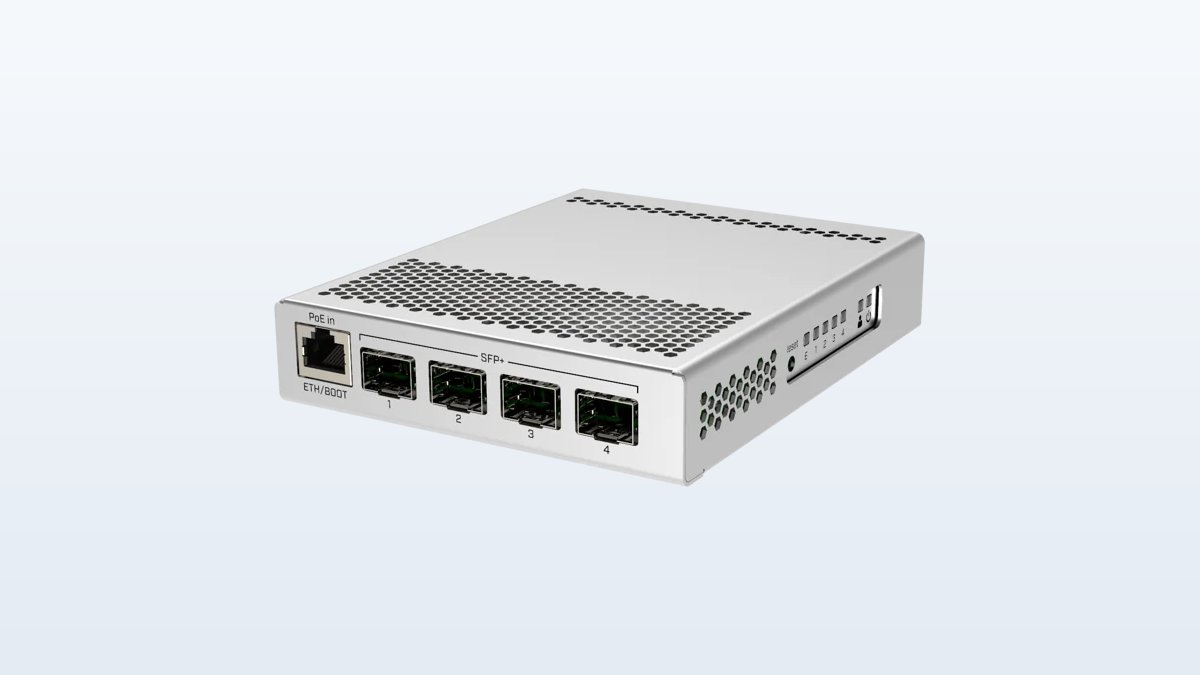
★ Your pick: MikroTik CRS305-1G-4S+IN
Four SFP+ ports. Fanless. Sips power.
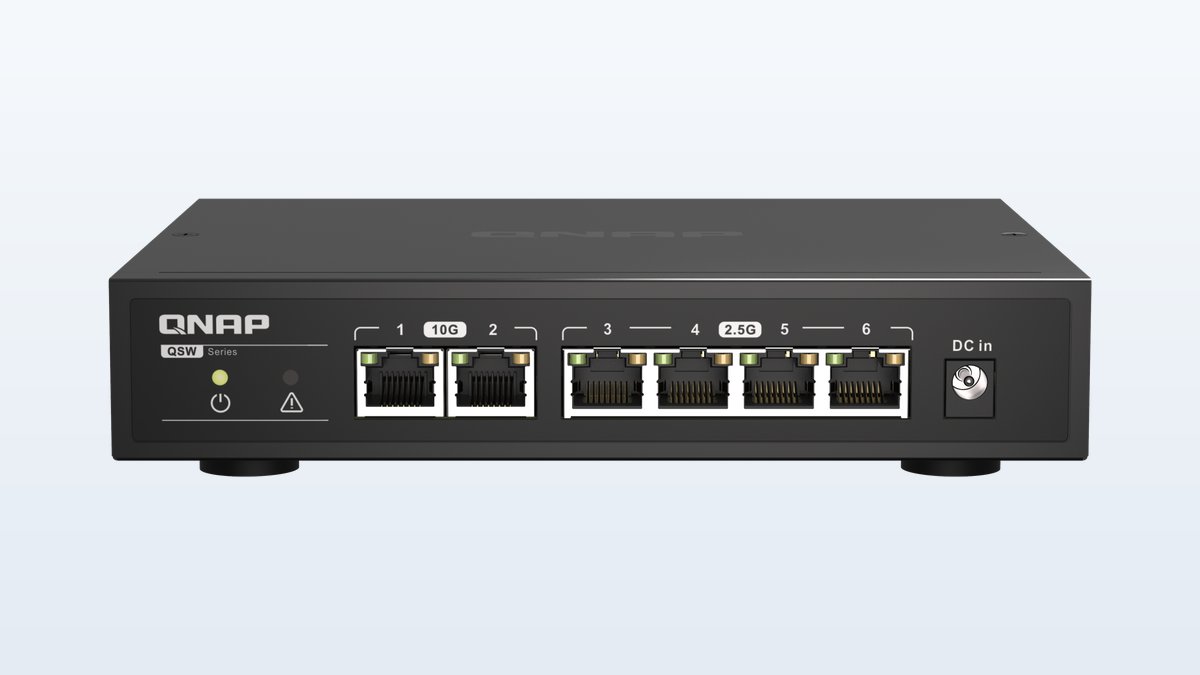
★ Your pick: QNAP QSW-2104-2T
Two 10G copper ports plus four 2.5GbE. Fanless. No rewiring.
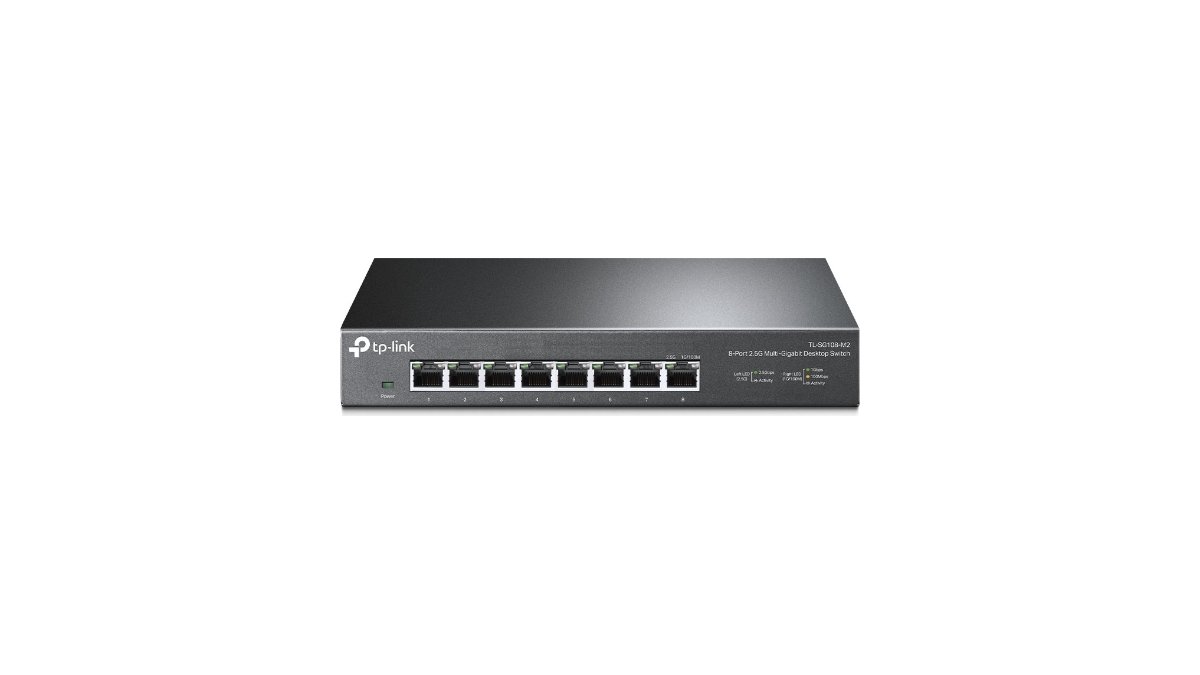
★ Your pick: TP-Link TL-SG108-M2
Eight 2.5GbE ports for a fraction of the heat and cost.
★ Your pick: Brocade ICX6450-24 (used)
Retired enterprise gear. Absurdly cheap per port. But loud.
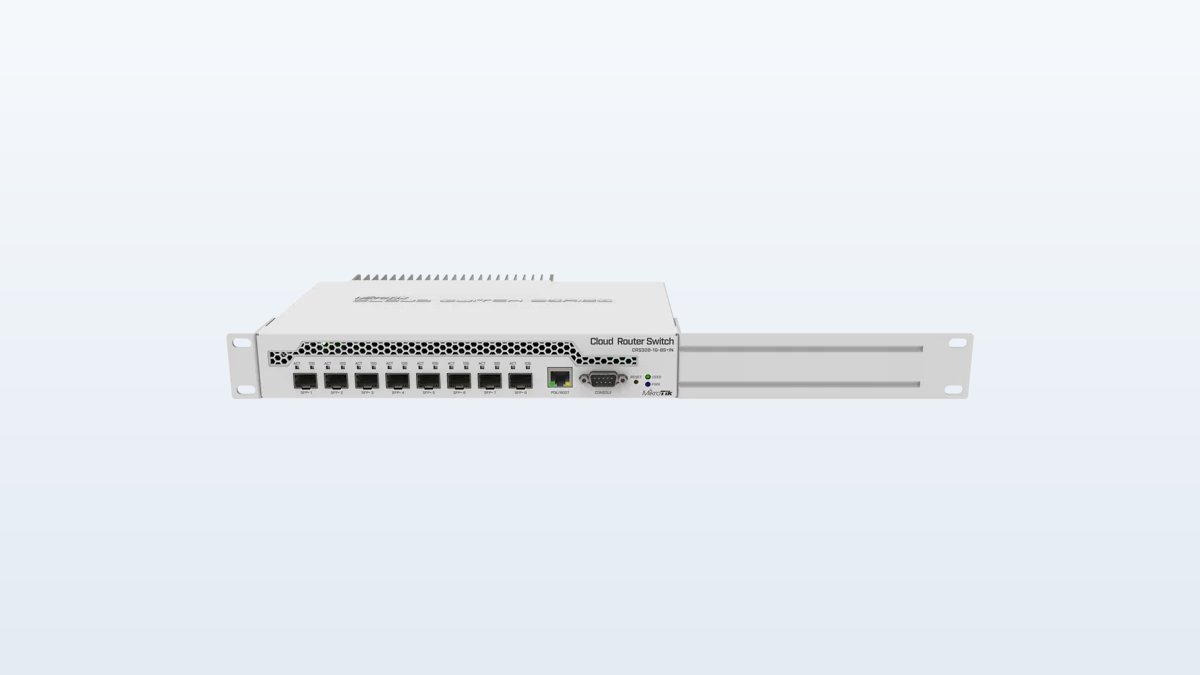
👑 Our Top Pick — Best Overall Value
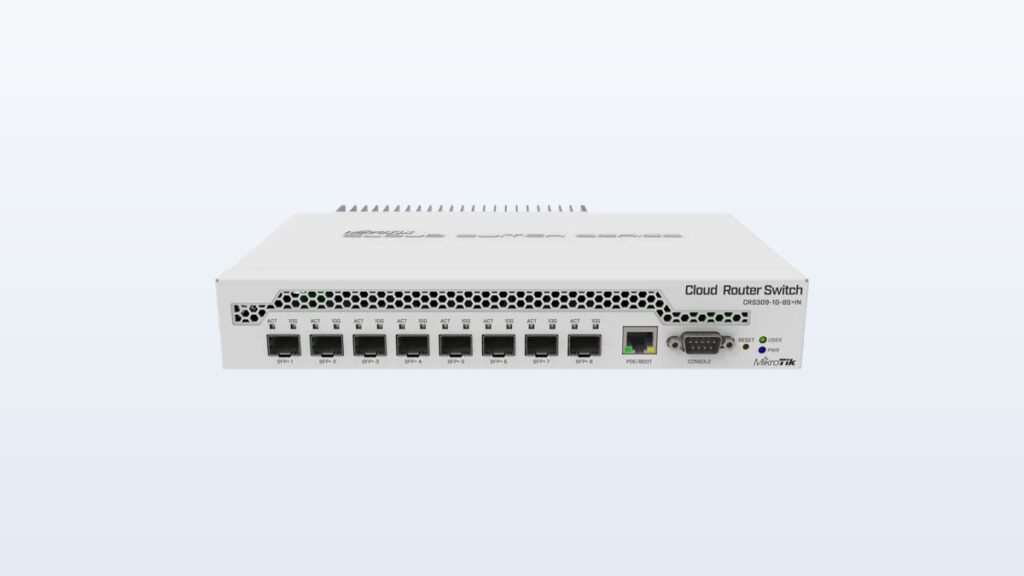
MikroTik CRS309-1G-8S+IN
Eight silent SFP+ ports. Fanless. Room to grow for years.
Opens on our Top Pick. Tap an option to see the best match for you.
Figure Out What Your Storage Can Push Before You Buy Anything
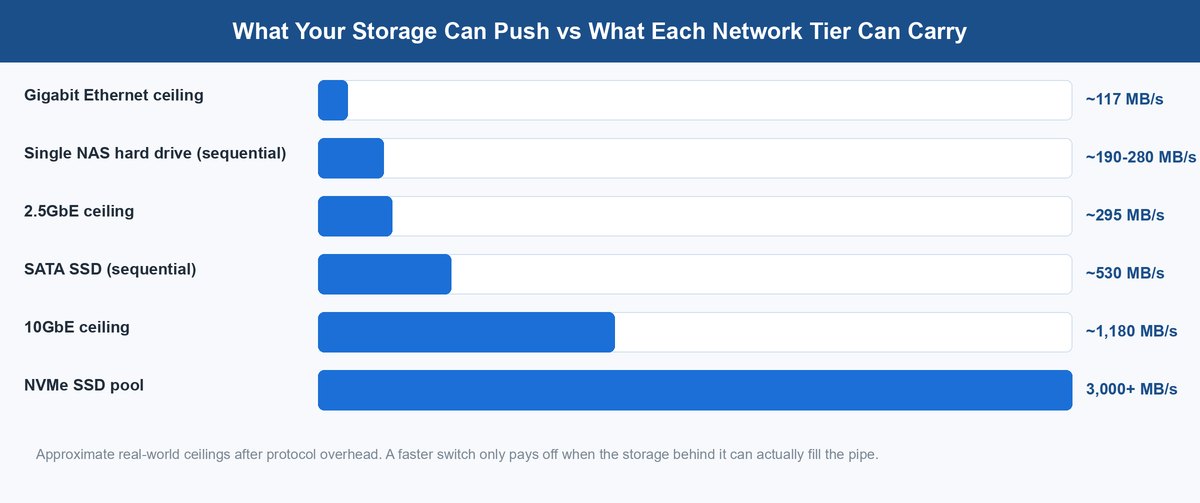
A faster network only helps if something on the other end can fill it. Gigabit Ethernet tops out around 117 MB/s of real payload. A single modern NAS hard drive reads big files at roughly 190–280 MB/s. So yes, one spinning drive already outruns gigabit — that’s the crawling-transfer pain that sent you shopping. But notice what it doesn’t outrun. 2.5GbE carries about 295 MB/s, which covers a single drive almost perfectly.
The math shifts as the storage stack grows. A small array of spinning drives can stream large files in the 400–600 MB/s range on a good day. That sails past 2.5GbE. A single SATA SSD sits near 530 MB/s. An NVMe pool can push 3,000 MB/s and beyond — it laughs at everything below 10GbE. So the honest rule: single drive or small HDD mirror, buy the 2.5GbE switch and bank the difference. With a multi-drive array or any SSD pool, 10GbE stops being a luxury. It becomes the pipe your hardware deserves.
There’s a second-order effect worth naming too. Big file copies are the best case. Small files, random reads, and busy arrays deliver far less than the spec-sheet number. That means the network tier you buy should match your storage’s realistic ceiling, not its theoretical one. Buying 10GbE “for headroom” over a two-drive NAS mostly buys idle capacity. Pick the wrong port type and it buys extra heat for nothing.
SFP+ vs Copper Is the Decision That Actually Matters
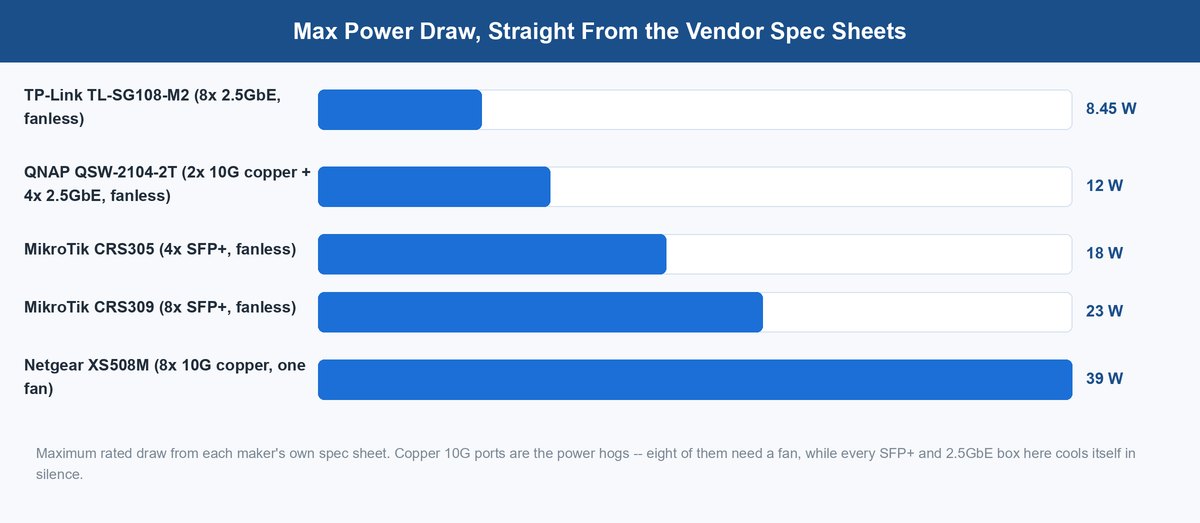
Every 10GbE switch sells you one of two port types, and they behave like different species. SFP+ is a cage: you slot in a DAC cable or a fiber transceiver. 10GBASE-T is the familiar RJ45 jack that takes the copper cable you already know. The spec-sheet consequence is stark. MikroTik’s fanless 8-port SFP+ switch is rated at 23 W maximum with modules loaded. Netgear’s 8-port copper equivalent, the XS508M, is rated at 39 W and needs a fan. If copper everywhere is truly your situation, the Netgear XS508M is on Amazon.
SFP+ Cages Keep the Heat in the Cable, Not the Switch
Why the gap? Pushing 10 Gbps through twisted-pair copper is a signal-processing workout. The chip behind every 10GBASE-T port fights crosstalk on four wire pairs, all day long. That work burns several watts per port, whether you’re transferring or idle. An SFP+ port doing the same job over a short DAC cable barely works at all by comparison. The cable is a simple shielded link that needs a fraction of a watt.
Data centers figured this out years ago, and that precedent should guide you. Big server rooms settled on SFP+ for rack switching for exactly this reason: copper 10G ran too hot at scale. Your homelab is a tiny data center in a closet with no airflow plan. The same physics applies, just with your ears in the same room.
10GBASE-T Copper Buys Convenience With Watts
None of this makes copper wrong. If your house already has Cat6 in the walls, 10GBASE-T runs over it for shorter distances. Cat6 honestly holds 10G to roughly 55 meters. Cat6a takes you to a full 100. No new cables, no transceivers to match, and every dock and motherboard port with an RJ45 jack just works. That plug-and-forget convenience is real value.
The trade is heat and noise, and it scales with port count. Two copper 10G ports can still be cooled in silence — that’s exactly what QNAP’s fanless hybrid does. Eight of them can’t, which is why nearly every 8-port copper switch on the market carries a fan. So the copper question is not “is copper bad.” It is “how many hot ports can one small metal box survive?” Keep the copper count low and hybrid designs work beautifully.
Why Are 10GbE Switches So Expensive in the First Place
Gigabit switches cost less than dinner because gigabit won the volume lottery. The chips went into billions of motherboards, routers, TVs, and consoles. Two decades of that scale ground the price to nearly nothing. 10GbE never got that ramp. It stayed an enterprise technology, made in small volumes and priced with fat margins. The heavy 10GBASE-T signal work kept chip sizes and power budgets high on top of that.
Then the market did something interesting. Instead of 10GbE getting cheap, 2.5GbE showed up underneath it. The 802.3bz standard was built to run on existing Cat5e cable with far simpler chips. So consumer motherboards and routers adopted it as the new default fast port. That absorbed exactly the mass-market volume that would have driven 10GbE prices down. The result is the two-tier world you shop in today. 2.5GbE gear is priced like a commodity. A 10GbE switch is still priced like the specialist tool it stayed.
The practical takeaway cuts both ways. Prices are drifting down. A fanless SFP+ switch now costs about what a decent router does — that would have sounded made up a few years ago. But waiting for gigabit-style pricing is waiting for a volume ramp that already happened to a different standard. If your storage can use 10GbE today, the value math already works. If it can’t, 2.5GbE is cheap exactly because the market moved there.
The Best 10GbE Switch Picks for a Home Lab Right Now
Every pick below is fanless except the last. Each is Amazon-buyable, and each solves a different version of the problem. Port counts and power ratings come from the vendors’ own spec sheets.
1 MikroTik CRS309-1G-8S+IN Is the Quiet Workhorse for a Growing Lab
Eight SFP+ ports at 10G each, one gigabit port for management, passive cooling, and a 23 W maximum draw with everything loaded. The CRS309 is the switch most homelabbers eventually wish they’d bought first. Eight ports sounds like a lot until you count. NAS, hypervisor box, workstation, an uplink — and suddenly a 4-port switch is full and you’re shopping again.
It dual-boots MikroTik’s SwOS and RouterOS. That means it can act as a simple smart switch now, then handle VLANs and routing when your lab grows into them. The learning curve on RouterOS is real — this is enterprise-flavored gear at hobbyist pricing — but SwOS keeps the simple path simple. For a lab you expect to still be running in five years, the MikroTik CRS309-1G-8S+IN is the sweet spot. Silent on a shelf. Cool to the touch. Never the bottleneck.
2 MikroTik CRS305-1G-4S+IN Covers a NAS and a PC for Less
The CRS305 is the same idea shrunk down. Four SFP+ ports, an 18 W maximum, and a case small enough to hide behind the NAS it serves. The classic starter setup is one NAS, one workstation, and an uplink to the rest of the house. Four ports cover that with one to spare. And the price lands in impulse-buy territory for a 10G device.
It shares the CRS309’s dual-boot software, so nothing about it is cut down except the port count and the wattage. The honest caution is the one from earlier: labs grow. If you can already name five devices that want fast ports, skip straight to the bigger box. If you genuinely have two or three, the MikroTik CRS305-1G-4S+IN is the cheapest silent on-ramp to real 10GbE that exists new.
3 QNAP QSW-2104-2T Brings 10GbE to the Cables Already in Your Walls
QNAP’s little hybrid is the copper answer done right: two 10GBASE-T ports, four 2.5GbE ports, completely fanless, 12 W maximum by QNAP’s own spec sheet. It works because it respects the physics — two hot copper ports is the number a small passive case can actually cool. Plug the NAS and your main PC into the 10G jacks. Everything else goes on 2.5GbE. The whole house gets faster with zero new cabling.
It’s unmanaged — no VLANs, nothing to set up. That’s either a limit or a blessing, depending on the week you’re having. Got Cat6 in the walls and no wish to visit the attic? Then the QNAP QSW-2104-2T is the smoothest path to a 10G backbone.
4 TP-Link TL-SG108-M2 Is the 2.5GbE Stopgap That Covers Most Homes
Now the honest option for everyone whose storage math came out under 300 MB/s. Eight 2.5GbE ports, fanless, unmanaged, and a spec-sheet maximum of 8.45 W. Per TP-Link’s own numbers, that is less power for eight ports than one copper 10G port can draw under load. It runs on the Cat5e already in your walls. And it matches the 2.5GbE ports that new motherboards, mini PCs, and NAS boxes now ship as standard.
The strategy argument for the TP-Link TL-SG108-M2 is that it is not a detour you’ll regret. Run a 2.5GbE backbone today. Add a small SFP+ switch later for just the NAS-to-workstation link. That beats one premature 10G purchase, because you upgrade the one link that needs it instead of overbuilding all eight. For a single-drive NAS, this box removes the gigabit bottleneck entirely and costs less than most 10G transceiver shopping carts.
5 A Used Enterprise Switch Buys the Most Ports and the Most Noise
The secondhand market is where port-count math gets silly. A retired unit like a used Brocade ICX6450-24 can sell for less than some 5-port consumer boxes. Yet it carries 24 gigabit ports plus SFP+ uplinks, with full enterprise management included. That is often the cheapest 10G-capable port money can buy.
Real talk: these boxes were built for server rooms where nobody sleeps. Stock fans are loud enough to hear through a door. Idle power draw can top an entire fanless SFP+ switch’s maximum. And warranty means “whatever the seller feels like.” Homelabbers do quiet them with fan swaps, and busy forum threads document which models tolerate it. Go this route if tinkering IS the hobby and the switch lives in a garage or basement. Skip it if the switch shares a room with humans.
Budget for the Cables and Cards Before You Click Buy
The switch is one of three pieces, and forgetting the other two is the most common 10GbE budgeting mistake. Both endpoints need to speak 10G too. Many NAS units ship with 2.5GbE onboard and need an add-in card for true 10G. Desktop PCs need a PCIe network card. The good news: used server cards from the big vendors sell cheap, because data centers retire them in bulk. Count your endpoints before you count switch ports.
Then the links themselves. For SFP+, short runs inside a rack or desk want DAC cables. These are a few meters of cable with the plugs built in — cheap, and nearly zero power. Longer runs want a pair of transceivers plus fiber. That costs more per link, and it adds a wrinkle: some switch vendors are picky about whose modules they accept. Buy modules coded for your switch brand. For 10GBASE-T, the run length decides the cable — existing Cat6 is fine for most in-house distances, Cat6a for anything long or noisy.
Where a 10GbE Switch Fits in Your Homelab Plan
The pattern behind every good purchase in this guide is the same. Buy the tier your storage can fill, in the port type your room can live with. Single drive, buy 2.5GbE and smile at the savings. Real array or SSD pool, buy SFP+ if you can run new cables and fanless copper if you can’t. And treat the used enterprise route as a hobby project, not a shortcut.
Building out the rest of the rack? The same watts-first logic drives the compute side. Our guide to picking a mini PC for your homelab runs the always-on power math there too. A silent switch next to a silent server is a lab you’ll actually enjoy living with.
Frequently Asked Questions
Do I need a managed or unmanaged 10GbE switch for a home lab?
Unmanaged covers most homes: plug in, transfer fast, done. You want managed the day you need VLANs — separating lab traffic, IoT devices, or a DMZ from the family network. The nice middle path is MikroTik’s dual-boot approach. The same hardware runs a simple switch OS now and a full router OS later.
Can I mix 2.5GbE and 10GbE devices on the same switch?
Yes. 10GBASE-T ports negotiate down to 5G, 2.5G, and gigabit. Hybrid switches like the QNAP QSW-2104-2T are built around exactly that mix. Each device links at its own best speed. The switch moves traffic between the tiers on its own.
Is SFP+ better than 10GbE over copper?
For power, heat, and noise, yes. Copper 10G chips draw several watts per port; SFP+ DAC links need a fraction of that. It is why fanless SFP+ switches are common while fanless copper ones stop at two 10G ports. Copper wins on convenience: it uses the RJ45 jacks and Cat6 cable your devices already have.
What cable do I need for 10GbE over RJ45?
Existing Cat6 handles 10G to roughly 55 meters. That covers most runs inside a house. Go Cat6a for longer runs, electrically noisy paths, or new installations — it holds 10G to a full 100 meters. Cat5e is not rated for 10G. It does carry 2.5GbE — that is the entire reason 2.5GbE exists.
How loud are 10GbE switches?
The fanless picks in this guide are silent — zero moving parts. Small fan-cooled copper switches are office-friendly; Netgear rates its 8-port copper unit around 28 dB. Used enterprise switches are the loud tier. Their stock fans were made for server rooms, so most people swap the fans or move the switch somewhere without ears.
Will a 10GbE switch make my internet faster?
No — it speeds up traffic between devices on your own network, like PC-to-NAS transfers. Your internet speed is set by your ISP plan and router. The one indirect win comes when several jobs share the wire. If people stream from a local media server while you move files, the fatter pipe keeps those jobs out of each other’s way.
About the Author
Elena Brooks
Elena Brooks covers infrastructure and networking at vpod — the systems layer underneath everything else, from a single homelab shelf to a production rack. She reads vendor spec sheets line by line, so the power, heat, and noise numbers in a guide like this come from the manufacturers’ own datasheets, not marketing copy.