

- The btrfs project documents RAID5/6 as unstable and says it “should not be used in production” — that is the vendor’s own wording, not a rumor.
- A safe btrfs layout is therefore RAID1 or RAID1C3, which stores 2 or 3 full copies and gives you 50% or 33% of raw capacity.
- ZFS RAIDZ has no partial-stripe update to lose, so parity is production-grade — but a raidz vdev can never be removed from a pool.
- RAIDZ expansion shipped in OpenZFS 2.3.0 (January 2025). It adds a disk online, but old blocks keep their old parity ratio, so the space math is not what you expect.
- Both scrub and self-heal. Btrfs only repairs where a second copy exists; ZFS repairs across mirror, raidz and draid.
Every zfs vs btrfs comparison opens the same way. Both are copy-on-write. Both checksum every block. Both do snapshots and send-receive. Then the article stops, because on that list the two really are a wash.
That list is not the decision. You are choosing what happens at 2am when a disk drops mid-write and you have to explain the outcome to someone. On that question the two are not close, and both projects say so in their own documentation.
The short version: btrfs still labels its parity RAID unstable, so a safe btrfs array is a mirrored array — which quietly costs you half your raw capacity. ZFS gives you parity you can actually run, and charges for it up front in geometry decisions you cannot undo. Everything below follows from that trade.
Where ZFS and Btrfs Genuinely Agree

Both write new blocks instead of overwriting live ones, checksum what they write, and verify that checksum on every read. That is why either one exists: a bit that rots on a platter gets caught instead of quietly reaching your application.
Snapshots fall out of the same design. If nothing is overwritten in place, a snapshot is just a reference that stops old blocks being freed. Cheap to take and cheap to keep, on both.
So the surface comparison really is a tie. Every difference that decides a deployment sits one level down, in what happens when the ideal path breaks.
Four Ways Btrfs Parity RAID Can Surprise You
Btrfs implements RAID5 and RAID6. It also tells you not to use them. The btrfs status table marks RAID56 as unstable, and the mkfs.btrfs page is blunter still: “RAID5/6 has known problems and should not be used in production.”
That status has held across many kernel releases — the current table is built against Linux 7.1 and still reads unstable. A feature that stays unstable for that long is not one release away from being fixed. It is a structural gap, and here is what it actually consists of.
1 The Write Hole After an Unclean Shutdown
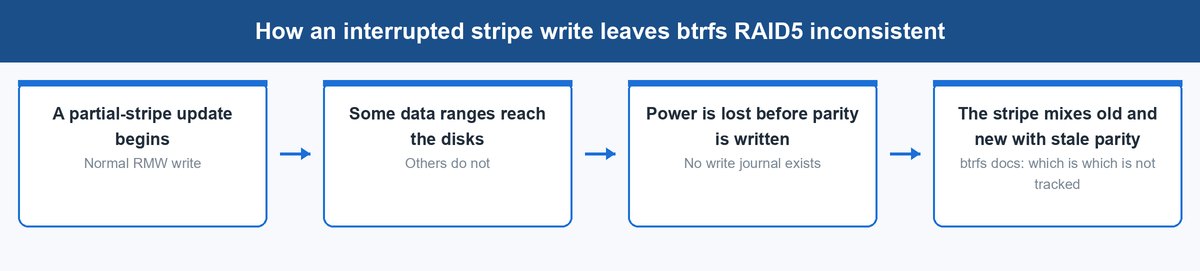
Parity RAID updates a stripe by reading it, modifying part of it, and writing data plus new parity. If the power drops between those writes, the stripe is half old and half new. The btrfs documentation describes it precisely: an unclean shutdown can leave a partially written stripe, and “the information which is which is not tracked. Write journal is not implemented.”
Untracked is the operative word. A conventional RAID controller closes this with a battery-backed journal; btrfs has none. So after a hard power event, parity may silently disagree with data, and you learn about it during a rebuild — the one moment you have no redundancy left.
2 Scrub Slows Down Across Every Member Disk
Scrub is your detection loop, so how it behaves under parity matters. The same page notes that starting a scrub on a RAID56 filesystem starts it on all devices at once and degrades performance, with the workaround being to start it on each device separately.
That turns routine hygiene into a staged job you have to babysit. On a small team, work that needs babysitting is work that stops happening — and a parity array nobody scrubs is one whose errors you meet in the worst possible order.
3 Metadata on Parity RAID Is Documented as Risky
The docs draw one more line most people miss. They state that power-failure safety for metadata on RAID56 “is not 100%”, and recommend directly: do not use raid5 or raid6 for metadata, use raid1 or raid1c3 instead.
That is why you see mixed-profile btrfs arrays in the wild — data on RAID5, metadata on RAID1. It is a real mitigation, and it also concedes the point. If the safe configuration for your most critical structures is mirroring, mirroring is the design.
4 Space Reporting Goes Wrong With Mixed Profiles
The moment you run that mixed layout, capacity reporting stops being trustworthy. The btrfs documentation says that when RAID56 shares a filesystem with other profiles, space reporting is inaccurate in df, btrfs filesystem df and btrfs filesystem usage.
For an operator that is worse than it sounds, because your monitoring reads those numbers. Free-space alerts on a copy-on-write filesystem already page you often enough; now the input itself is wrong.
How RAIDZ Survives the Same Interrupted Write
RAIDZ does not have a partial-stripe update to be caught in the middle of. Each block is written as its own full-width stripe with its own parity, in a single transaction, so there is no read-modify-write cycle that a power loss can bisect.
You can see that design in the documentation without being told it directly. The zpool attach page explains that after a RAIDZ expansion, “old blocks retain their old data-to-parity ratio” while new blocks use the new one. That is only possible because the data-to-parity ratio lives with each block, not in a fixed stripe geometry — the same property that makes the write hole a non-issue.
The second-order effect is the one that shows up on an invoice. Trustworthy parity means you keep parity’s capacity efficiency, roughly (N-1)/N or (N-2)/N of raw. Untrustworthy parity means mirroring at 50%. In an eight-bay chassis that is six drives of usable space against four — a stability label turned into a hardware bill.
What a Scrub Actually Repairs on Each Filesystem
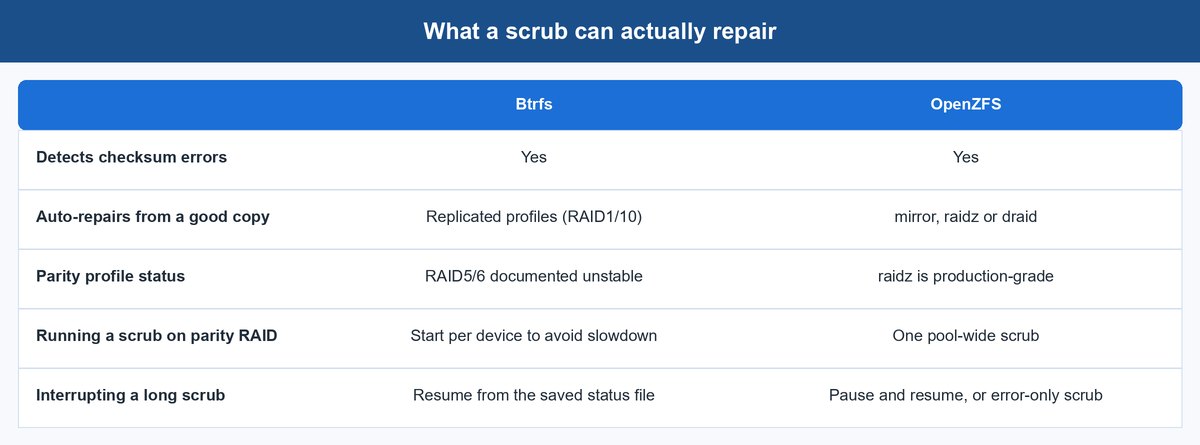
Both projects define scrub the same way — read everything, verify the checksum, fix what does not match. The btrfs scrub page calls it a validation pass over all data and metadata, and says that on replicated profiles such as RAID1, a read-write scrub “will also automatically repair any damage by copying verified good data from one of the other replicas.”
OpenZFS words it almost identically. The zpool scrub page says a normal scrub verifies each block’s checksum, and that “for replicated (mirror, raidz, or draid) devices, ZFS automatically repairs any damage discovered during the scrub.” Note which profiles are named: raidz is in the list, and on btrfs the equivalent is not.
The operational difference is in the long tail. ZFS scrubs pause and resume across reboots, and zpool scrub -e will re-check only files already known to have errors instead of re-reading the whole pool. Btrfs gives you a background pass with a --limit throttle and can cancel and resume from a saved status file, but on parity it is the staged per-device job described above.
chattr +C on a VM image or database directory to avoid fragmentation. Scrub cannot validate or repair that data. If you take that performance shortcut, you have opted out of the integrity guarantee you chose btrfs for.What It Costs to Add Capacity Later
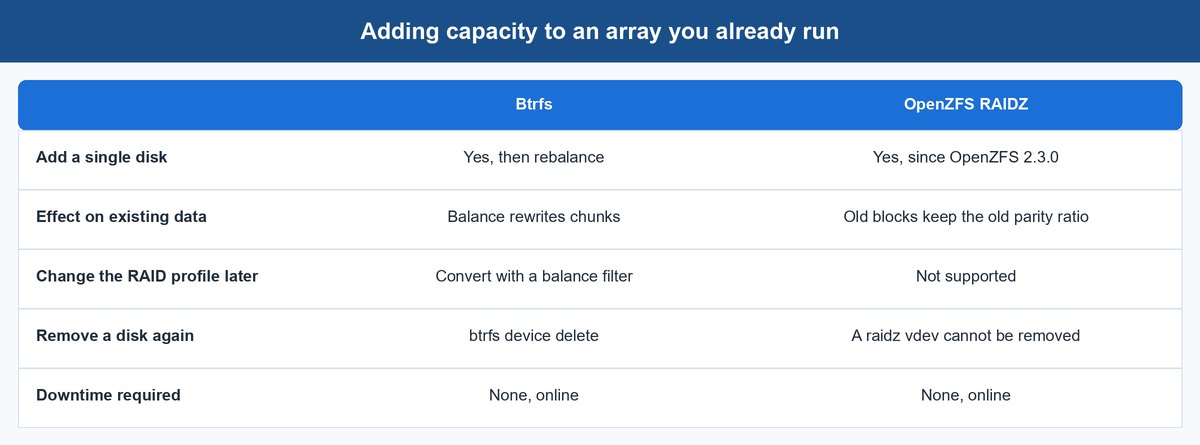
This is where the two swap roles. Btrfs is the flexible one and ZFS is the one that makes you decide early, which is the exact opposite of their reputations on reliability.
Expanding a RAIDZ Vdev After OpenZFS 2.3.0
RAIDZ expansion is real and it is recent. It shipped in OpenZFS 2.3.0, released 14 January 2025, described as adding new devices to an existing RAIDZ pool without downtime. Attach a disk to a raidz vdev, the expansion runs online, and the vdev gets wider.
Read the fine print. Existing blocks keep their old data-to-parity ratio while being redistributed across more disks, so you do not immediately get the capacity a fresh array of that width would give — only new writes get the better ratio. Fault tolerance does not change either: a RAIDZ2 stays a RAIDZ2. And removal is off the table. The zpool remove page states that top-level vdevs can only be removed if the pool contains no top-level raidz or draid vdev at all.
Adding and Removing Disks on Btrfs
Btrfs treats devices as a pool of chunks rather than a fixed geometry, so btrfs device add then btrfs balance is the whole procedure, online. You can add one odd-sized disk, and btrfs device delete takes one back out again, relocating its chunks first.
You can also change your mind about the layout itself. A balance with a convert filter migrates data and metadata between profiles in place — single to RAID1, RAID1 to RAID1C3 — while the filesystem stays mounted. There is no ZFS equivalent for a raidz vdev.
What Each Filesystem Asks of Your Hardware
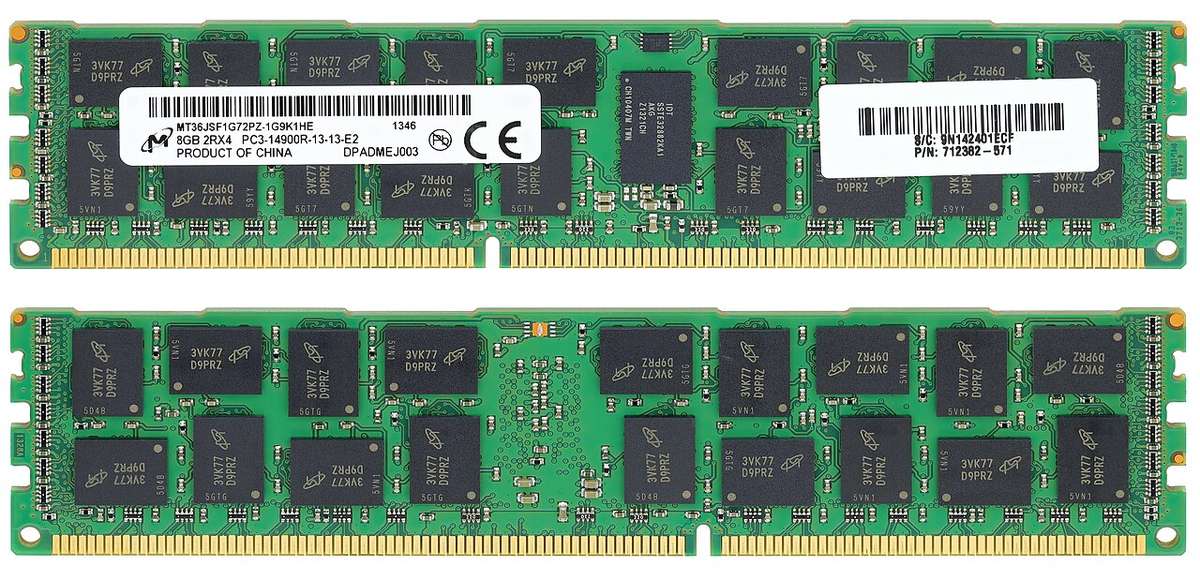
ZFS asks for more, and it is specific about what. Btrfs asks for almost nothing beyond a current kernel, which is a genuine advantage on hardware you did not get to specify.
How Much Memory the ZFS ARC Will Take
ZFS keeps its own cache, the ARC, sized independently of the kernel page cache. Current OpenZFS defaults are generous: the zfs(4) parameters set the ARC limit to the larger of total memory minus 1 GiB, or five-eighths of total memory. That is not a leak, it is by design, and it releases under pressure — but on a shared box you should set zfs_arc_max deliberately rather than discover it.
For sizing, the TrueNAS hardware guide gives the most concrete published figure: 8 GB as the minimum for basic operation with up to eight drives, plus 1 GB for each drive beyond eight. OpenZFS also recommends ECC memory, and states plainly that hardware RAID controllers should not be used with ZFS, because they limit its ability to self-heal on a checksum failure. Put the card in IT mode or buy an HBA.
Why Btrfs Feels Lighter on the Same Box
Btrfs uses the standard kernel page cache. There is no second cache to size, no module parameter to reason about, and no separate memory budget to defend when a service on the same host wants RAM.
That is a real win on a mixed-use server, a laptop, or an appliance you inherited.
How Snapshots and Send-Receive Differ in Practice
Snapshots look equivalent until you build a replication job on them. Btrfs requires every snapshot in a send to be read-only, and that status cannot change mid-send. Incrementals use -p for a parent or -c for clone sources, and the send documentation warns that you must guarantee those clone sources are in exactly the same state on both sides.
ZFS ships more replication machinery in the box. The zfs send page documents -i for a single incremental and -I for every intermediate snapshot, -R for a full replication stream of a dataset and its children, and -w to send encrypted data raw without loading the keys on either end.
The one that changes your runbook is -t. A ZFS receive that dies partway leaves a resume token, and zfs send -t <token> picks up where it stopped. On a 20 TB seed over a slow link, that is the difference between an overnight job and a week of restarts. Btrfs has no equivalent — an interrupted send starts again.
Which Filesystem a Small Team Should Actually Run
Answer the operating question, not the benchmark question. The choice is between an array whose safe layout costs half your capacity but stays changeable, and an array that is efficient and durable but locks in its shape.
| Your situation | Run this | Why |
|---|---|---|
| A handful of mixed-size disks, one part-time admin | Btrfs RAID1 or RAID1C3 | Add and remove disks online, convert profiles in place, nothing to size |
| Bulk storage where usable terabytes per bay matter | ZFS RAIDZ2 | Parity you can trust, plus scrub and replication tooling built for it |
| Backup target replicating over a slow link | ZFS | Resumable send, raw encrypted send, full replication streams |
| Root filesystem on a distro that ships it | Btrfs | In-tree, snapshot-on-update integration, zero memory tuning |
| Anything you would miss if it went | Never btrfs RAID5/6 | The project itself says not to |
The trap in the middle deserves naming. Teams pick btrfs for its flexibility, then pick RAID5 for the capacity, and land on the one configuration its own maintainers warn against. If you want btrfs, budget for mirroring. If you want parity, budget for planning — an afternoon on vdev layout is the cheapest hour in the project.
For the platform decision sitting above the filesystem, our look at how IT teams responded to the VMware licensing shake-up covers the surrounding stack.
Frequently Asked Questions
Is btrfs RAID5 safe to use in 2026?
The btrfs project itself still says no. Its status table lists RAID56 as unstable against current kernels, and the mkfs documentation says RAID5/6 has known problems and should not be used in production. The gap is that no write journal is implemented, so an unclean shutdown can leave a stripe whose data and parity disagree, with no record of which ranges are stale.
Does ZFS really need 1 GB of RAM per TB of storage?
No, that rule of thumb was never in the documentation. The published figure comes from the TrueNAS hardware guide: 8 GB minimum with up to eight drives, plus 1 GB per drive after that. The ARC will happily use far more if it is free, because OpenZFS defaults the limit to the larger of total memory minus 1 GiB or five-eighths of memory, then releases it under pressure.
Can you add a single disk to a RAIDZ vdev now?
Yes. RAIDZ expansion shipped in OpenZFS 2.3.0 in January 2025 and runs online. The caveat is that blocks written before the expansion keep their old data-to-parity ratio, so usable space does not jump to what a fresh vdev of that width would give, and fault tolerance does not increase.
Which filesystem detects and repairs bit rot better?
Both detect it equally well, because both checksum every block and verify on read. Repair depends on redundancy. Btrfs repairs from another replica on profiles such as RAID1; OpenZFS repairs on mirror, raidz and draid. The practical difference is that a btrfs parity array is not something you should be running, so on btrfs self-healing means a mirror.
Is btrfs send-receive as good as zfs send?
For simple incremental replication they are comparable. ZFS pulls ahead on failure handling and scale, with a resume token that lets an interrupted receive continue where it stopped, raw sends of encrypted datasets without loading keys, and recursive replication streams. An interrupted btrfs send has to start over, which matters most on the first full seed.
Should you use btrfs or ZFS for a Proxmox or hypervisor host?
Match the layout to what the host does. If it holds VM images on parity for capacity and replicates to a backup target, ZFS RAIDZ2 fits better. If it is a smaller node with a few mixed disks and you value growing storage without a rebuild, btrfs mirroring works well — provided you never reach for RAID5 and you accept that NOCOW images are excluded from checksumming.
About the Author
Elena Brooks
Elena Brooks writes about the infrastructure decisions that are hard to reverse — storage layouts, network gear, and the appliances small teams actually run. She reads the vendor documentation so you don’t have to, quotes it directly, and says plainly when a project’s own docs disagree with its reputation. Her beat is wherever a default setting turns into a budget line.