
- Unraid treats disks as scarce: any size, one at a time, one file per disk. ZFS treats the data as scarce and charges you at expansion time.
- An Unraid rebuild reads every other disk end to end and can run several hours to more than a day. A ZFS resilver only touches blocks that hold data.
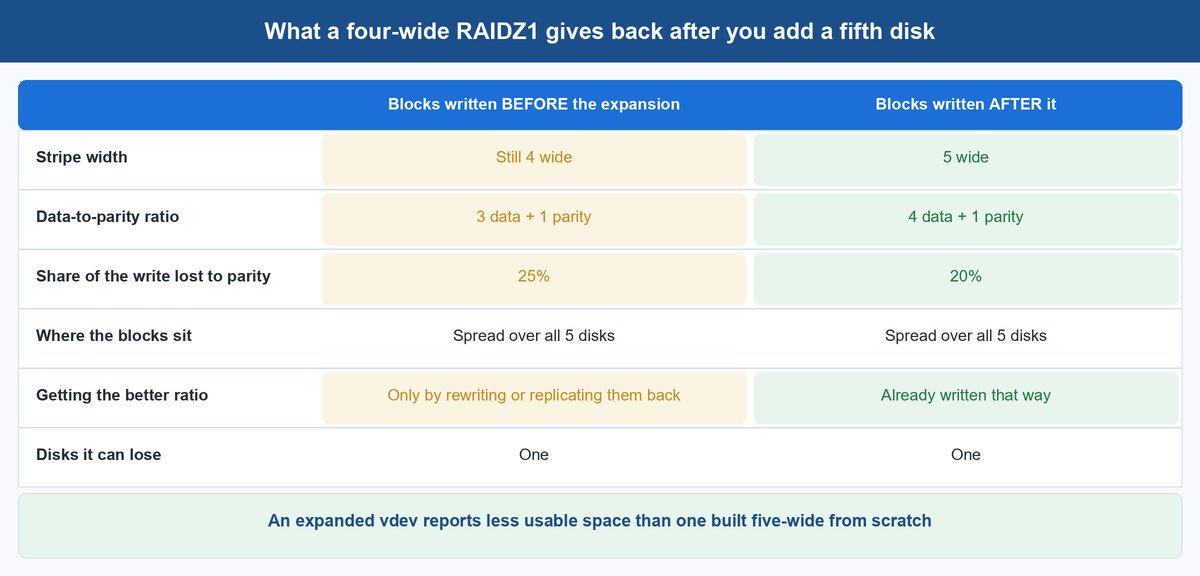
- RAIDZ expansion has shipped since TrueNAS 24.10, but old blocks keep their old parity ratio, so the space arrives only after a rewrite.
- Unraid costs $49 to $249 up front plus an optional $36 a year for updates. TrueNAS Community Edition costs nothing and never asks.
- TrueNAS SCALE vs CORE is settled. CORE is no longer under active development; new builds go to the Community Edition line.
Most comparisons of Unraid vs TrueNAS hand you the same spec bullet and move on: Unraid takes mixed-size disks, ZFS wants matched ones. True, and almost useless on its own.
That sentence is not a feature difference. It is the design bet each system made, and every argument you will have with your NAS three years from now falls out of it. Rebuild windows. The cost of the next drive. What you lose when two disks fail in the same week. Even how the licence bill behaves.
So follow the bet instead of the bullet.
The One Architectural Difference That Decides Everything Else
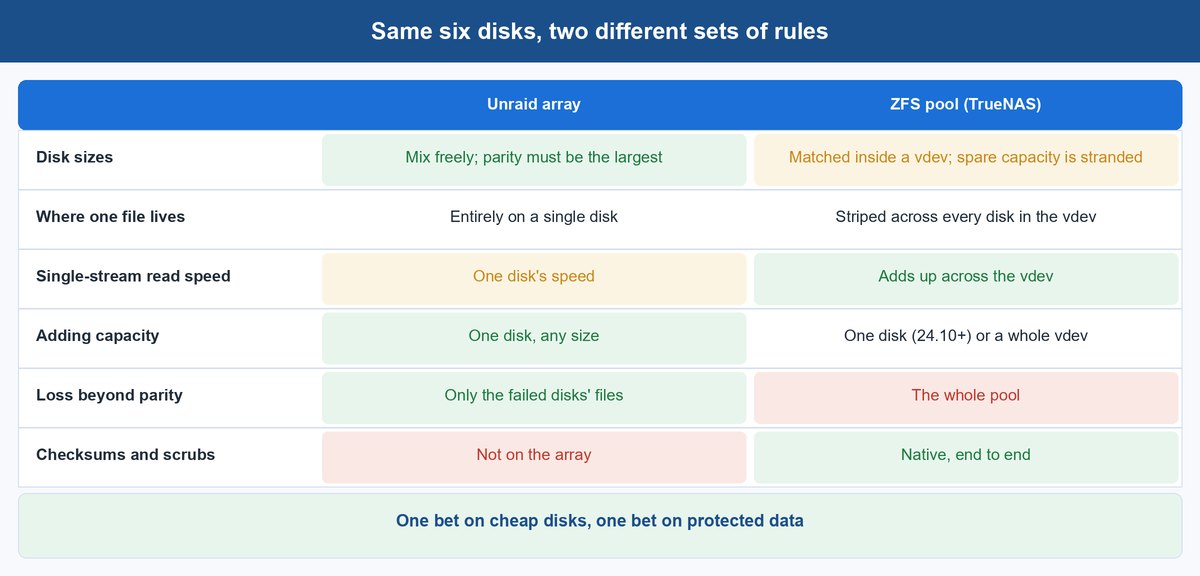
Both systems protect data with parity. They disagree about what a disk is allowed to be.
How the Unraid Array Treats Every Disk as Its Own Island
In an Unraid array, each drive is a complete, independently formatted filesystem. The documentation is blunt about the consequence: “Unraid stores each file on a single disk. This means read speeds won’t be boosted by the combined speeds of multiple drives” (Unraid array overview). Parity is computed across the disks rather than woven into them, so sizes never have to agree. The only rule is that a parity drive must be at least as large as your largest data disk.
That buys two things a striped pool cannot. A leftover 4 TB drive can sit beside a pair of 12 TB drives and count for its full capacity. And because a file lives whole on one disk, a loss beyond what parity covers costs you the failed drives’ contents, not the array — the survivors are still ordinary filesystems you can read on any Linux box. The price is throughput: one stream reads at one drive’s speed, forever.
Why a ZFS Vdev Wants Its Disks to Match
ZFS builds a pool out of vdevs, and a vdev spreads every write across all of its members. That is where the speed comes from, and why an odd disk is a problem: a RAIDZ vdev sizes itself to its smallest member, so the extra terabytes on a bigger drive just sit there. The pool then stripes across its vdevs, so losing one whole vdev takes the entire pool with it, however healthy the others look.
In return you get what Unraid’s array cannot offer at all: end-to-end checksums, scrubs that repair silent corruption, and snapshots plus zfs send replication as native operations. Unraid knows this, which is why it supports ZFS for any storage pool — RAIDZ1, RAIDZ2, RAIDZ3, mirrors and stripes, with scrub and send/receive in the WebGUI (Unraid ZFS storage). What it will not do is turn the main parity array into a ZFS pool. The two models sit side by side rather than merging.
What Actually Happens on Each System When a Drive Fails
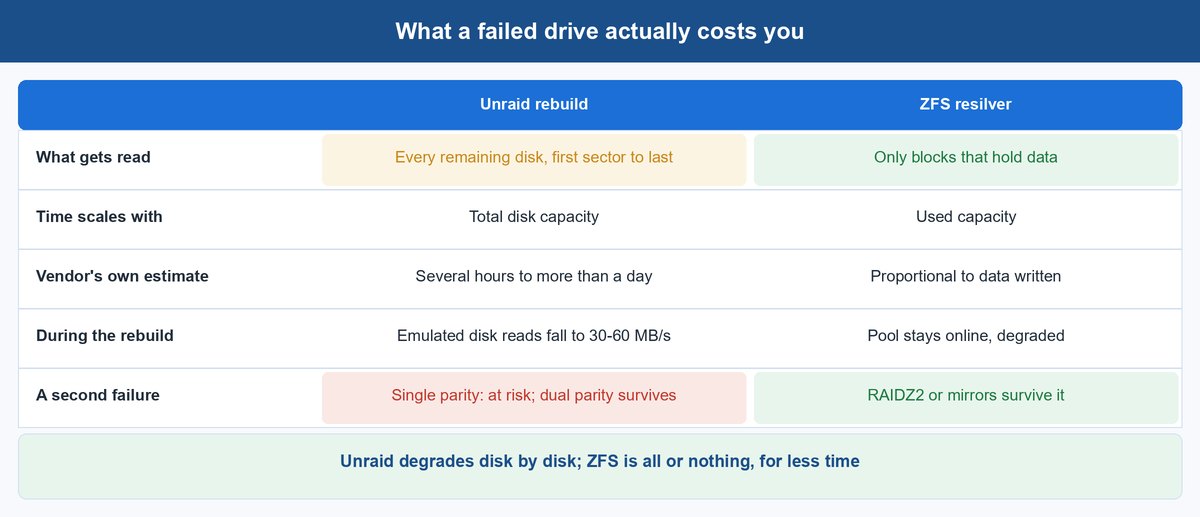
Here the architecture stops being philosophy and starts costing you a weekend.
An Unraid Rebuild Reads Every Other Disk End to End
Parity is computed across the whole array, so reconstructing one disk means reading every remaining disk from first sector to last. Not the used part — all of it. Unraid puts a replacement rebuild at “several hours” and a rebuild onto the same disk at “several hours to more than a day for larger drives” (replacing disks in the array). While a disabled disk is emulated, reads of it can fall to 30–60 MB/s, because every request is reassembled from the others.
The array stays usable throughout, which is the part people like. What they underestimate is the exposure: with single parity you replace one disk at a time, a second failure in that window puts data at risk, and every disk is doing a full-surface read at the moment your fleet is most fragile.
A ZFS Resilver Only Touches Blocks That Hold Data
ZFS knows which blocks are allocated, so a resilver copies data, not capacity. A 20 TB drive holding 3 TB resilvers roughly like a 3 TB job. Same hardware, a fraction of the window, and the pool stays online and readable while it runs.
The trade sits on the other side of the ledger. Redundancy belongs to the vdev, so a RAIDZ1 vdev that loses a second member takes the pool with it. That is why anyone with money on the line runs RAIDZ2 or mirrors on large drives. Unraid degrades disk by disk; ZFS is all or nothing, in a far smaller window.
The Real Cost of Adding One More Disk Two Years From Now
Ask both systems the same ordinary question — “I want 20 TB more, this month” — and the answers differ by hundreds of dollars.
Unraid Growth Is a One Drive Purchase
Buy a drive, slot it in, assign it, done. If it is larger than your parity disk you upgrade parity first, then reuse the old parity drive as data. Nothing is rebalanced, nothing is rewritten, and the array grows by exactly the capacity you bought — which is why Unraid keeps winning in boxes that grew by accident rather than by plan.
The ceiling is a licence line, not a physics one. A Starter licence covers six attached storage devices in total; Unleashed and Lifetime allow up to 30 array devices — 28 data plus two parity — and as many as 34 named pools (Unraid licensing FAQ). In most single-chassis builds you run out of bays and SATA ports first.
RAIDZ Expansion Adds the Disk but Not the Space
ZFS used to answer that question with “buy a whole vdev.” RAIDZ expansion, shipped in TrueNAS 24.10, changed the shape of it: you can add one disk at a time to an existing RAIDZ vdev, and TrueNAS redistributes existing data across the wider configuration. The gap narrowed. It did not close.
Read the caveat carefully: “Existing data blocks retain their original data-to-parity ratio and block width, but spread across the larger set of disks. New data blocks adopt the new data-to-parity ratio and width” (managing pools). Old data still pays the old parity tax, so an expanded five-wide vdev reports less usable space than a five-wide vdev built from scratch. You recover the difference only by rewriting or replicating that data back in.
Where the Licensing and Running Costs Actually Land
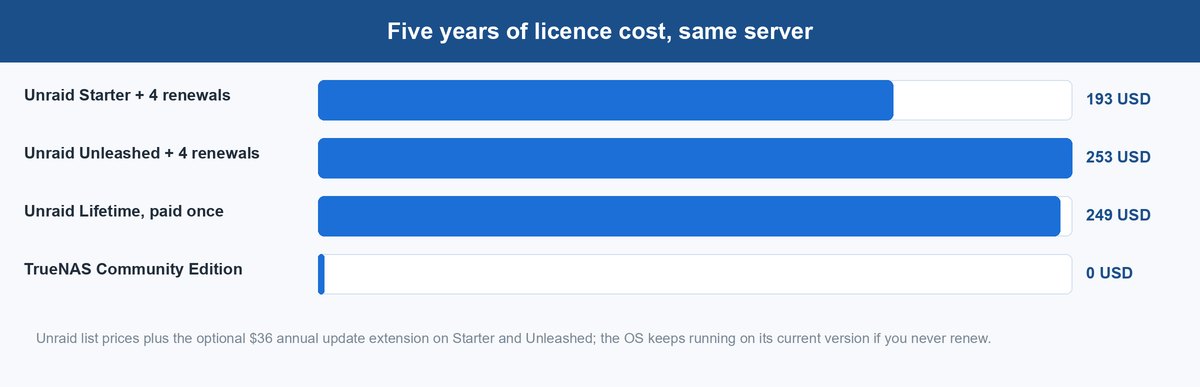
Unraid is paid software with a perpetual licence and an optional update subscription bolted to the side. TrueNAS Community Edition is a free download with no key at all.
| Unraid | TrueNAS Community Edition | |
|---|---|---|
| Entry cost | $49 Starter (6 devices), $109 Unleashed, $249 Lifetime | $0, no licence key |
| Updates after year one | Optional $36/year on Starter and Unleashed | Included, always |
| If you stop paying | Keep the licence, keep your current version | Not applicable |
| Upgrade paths | Starter to Unleashed $69, Starter to Lifetime $209, Unleashed to Lifetime $149 | Not applicable |
| Paid tier buys | More devices, more pools | Enterprise: appliances, SLAs, HA, Fibre Channel, FIPS encryption |
Prices come from Unraid’s buy page and the licensing FAQ; the Enterprise split is TrueNAS’s own. Note what the $36 does not do. Let it lapse and you keep the licence and the version you are on — you just stop receiving new ones. A security decision, not a lockout.
TrueNAS SCALE vs CORE Is No Longer a Live Decision
For years this was the real fork in the road: FreeBSD-based CORE with jails, or Linux-based SCALE with containers and clustering. Treat it as history. TrueNAS’s own software status page states that “TrueNAS CORE is no longer under active development,” with 13.3-U1.2 from April 2025 standing as its last release (TrueNAS software status).
The live line is what used to be SCALE and is now simply TrueNAS Community Edition: 25.10 “Goldeye” is current, with TrueNAS 26 already in beta. On a new box there is no CORE-versus-SCALE choice to agonise over — only which Community Edition release to run, which we weighed in our take on TrueNAS 26.
Where Proxmox Sits in the Unraid vs TrueNAS Argument
Proxmox VE gets pulled into this comparison constantly, and it is a category error that costs people months. Proxmox is a hypervisor first. It ships ZFS and will happily run your pool, but it is not a NAS operating system with a shares-and-users front end waiting for you.
The honest arrangement is layered. If virtual machines are the point and file serving is a side effect, run Proxmox and give TrueNAS a VM with the disk controller passed straight through. If storage is the point, run TrueNAS or Unraid directly and use their built-in virtualization. Picking Proxmox because it “does storage too” usually means rebuilding your shares by hand.
Three Ways to Get the Unraid Model Without Paying for Unraid
Most people looking for Unraid alternatives are not shopping for a cheaper licence. They want the specific thing Unraid sells — mixed-size disks, single-drive expansion, no rebalancing — from something else. These three come closest, and each gives up something real.
1 SnapRAID With MergerFS for Mixed Disks and No Licence
SnapRAID computes parity on a schedule rather than in real time, and mergerfs pools separate disks into one namespace. Together they reproduce Unraid’s core model — independent filesystems, mixed capacities, add a disk whenever — for nothing.
What you give up is the moment of protection. Parity is only as current as your last sync, so anything written since then is unprotected. Fine for media and archives that change slowly; not fine for anything actively written. You also assemble it yourself: config files, cron jobs, monitoring you build rather than a dashboard you open.
2 TrueNAS Community Edition With Mirrors Instead of RAIDZ
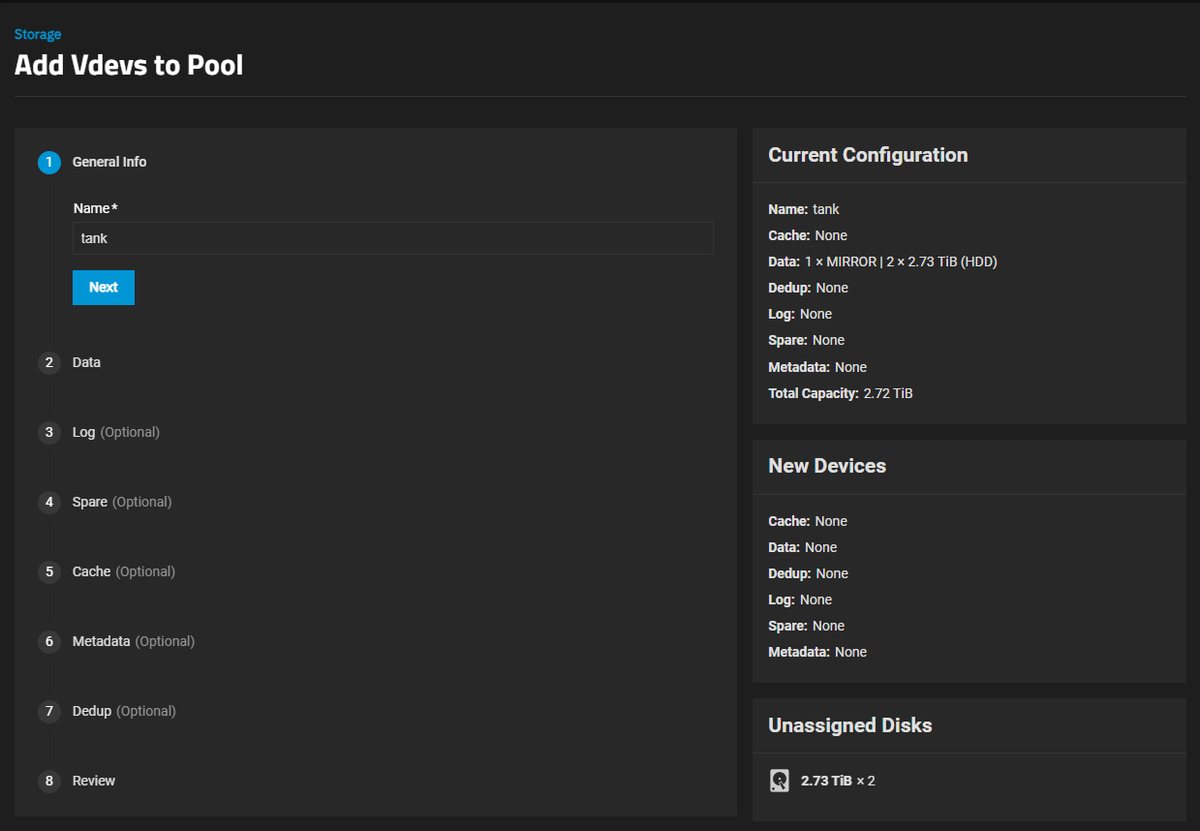
If the pull toward Unraid is really “I want to expand cheaply,” mirrored vdevs get you most of the way. A mirror pair is the smallest vdev there is, so growth means buying two drives instead of five, and each pair can be a different capacity from the last.
The costs are known up front: you pay 50% of raw capacity for redundancy, and rebuild risk concentrates on one surviving partner. In exchange, resilvers are the fastest ZFS does, and you keep checksums, scrubs, snapshots and replication.
3 OpenMediaVault When You Want Plain Debian Underneath
OpenMediaVault is a management layer over standard Debian, so nothing underneath is proprietary. It runs mdadm, ZFS through a plugin, and mergerfs and SnapRAID through plugins too — the natural landing spot for the Unraid model with a GUI but no licence.
The trade is cohesion. Features arrive as plugins from different maintainers rather than as one tested product, so you own the integration testing. It suits people comfortable in a terminal when something misbehaves, and frustrates anyone who wanted an appliance.
How to Choose Between Unraid and TrueNAS for Your Next Build
Skip the feature grid. Answer one question: which resource is actually scarce for you, the disks or the data?
Choose Unraid When the Disk Pile Is the Constraint
If your drives arrived over five years in five different sizes, if the box grows one disk at a time as money allows, if the workload is media and backups where one drive’s throughput is plenty, and if you want a single failure to be an inconvenience rather than a pool event — that is Unraid’s design centre.
Buy the tier that matches the chassis, not the ambition. Starter’s six-device ceiling is tight the moment you add a cache pool, so a four-bay build with a two-drive cache is already at the limit. Unleashed at $109 is the sane default for anything with room to grow, and it upgrades to Lifetime later for $149.
Choose TrueNAS When the Data Is the Constraint
If the contents matter more than the convenience — VM datastores, database dumps, anything you are obliged to keep intact — take ZFS. Checksums that catch silent corruption, scrubs that repair it, snapshots you can roll back in seconds and replication to a second box are not conveniences here. They are the job.
Plan the topology once, at creation, and buy in vdev-shaped units from then on. Match your disks, prefer RAIDZ2 or mirrors over RAIDZ1 on high-capacity drives, and treat RAIDZ expansion as an escape hatch rather than a growth strategy.
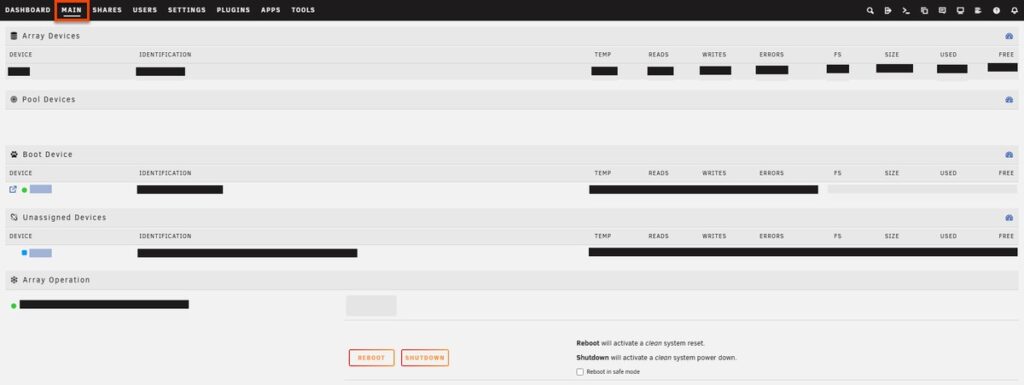
Featured screenshot: the Unraid Main tab, from Unraid’s official documentation demo.
Frequently Asked Questions
Is TrueNAS faster than Unraid?
For a single large transfer, usually yes. A ZFS vdev spreads each write across all its members, while Unraid stores each file on a single disk and its documentation states that read speeds are not boosted by combining drives. SSD cache pools narrow the gap on writes.
Can Unraid use ZFS, and does that make the comparison moot?
Unraid supports ZFS for any storage pool — RAIDZ1, RAIDZ2, RAIDZ3, mirrors and stripes, with scrubs and send/receive in the WebGUI. What it does not do is turn the main parity array into a ZFS pool, so the two models stay separate, each with its own rules. Unraid 7.2 also added one-drive-at-a-time RAIDZ expansion on those pools, though only where the pool has a single vdev (Unraid 7.2.0 release notes), so the growth gap now sits between the array and RAIDZ, not between the two products.
What happens if I stop paying Unraid’s $36 annual update fee?
You keep your licence and can keep using your current version of Unraid indefinitely, per Unraid’s licensing FAQ, and simply stop receiving new feature releases and major version upgrades — you stay eligible for patch updates on your current version until it reaches end of life. It is a security and features decision, not a switch that turns the server off.
Should I still install TrueNAS CORE on a new build?
No. TrueNAS says CORE is no longer under active development, and its last release was 13.3-U1.2 in April 2025. New builds should use the Community Edition line, where 25.10 “Goldeye” is current and TrueNAS 26 is in beta. Existing CORE pools import because the underlying ZFS is the same.
Does RAIDZ expansion mean I can grow a ZFS pool one disk at a time now?
Yes, since TrueNAS 24.10, with one important limit. Existing data blocks keep their original data-to-parity ratio and block width even after being spread over the larger set of disks, so an expanded vdev reports less usable space than a freshly created one of the same width.
Which one is better for running Docker containers and VMs?
Both do it, with different centres of gravity. Unraid’s Docker and VM management is approachable and its app catalogue is deep, which is why it dominates mixed home-lab and small-office boxes. TrueNAS runs apps and VMs too, but puts storage integrity first.
About the Author
Elena Brooks
Elena Brooks is the person her group chat texts when something at home stops working or a health trend starts trending. She’s spent years turning that instinct into a job — digging into the research behind everyday questions, calling the experts, and writing up what holds up and what doesn’t. Her beat is wherever curiosity points: kitchens, cars, pets, sleep, money, and the occasional meteor shower.