
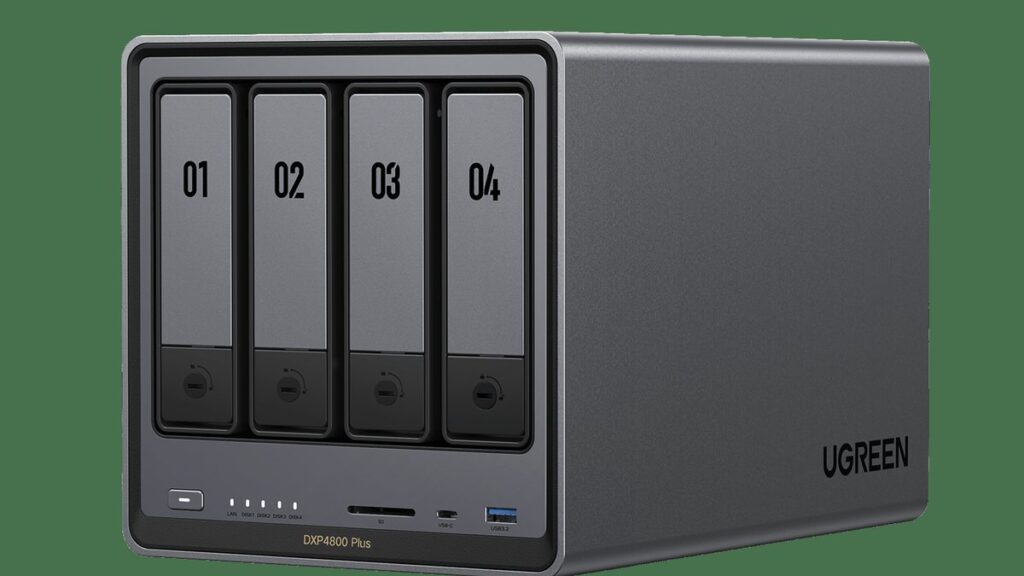
- UGREEN now sells four versions of the same 4-bay box. The Plus sits in the middle of them.
- The chip is the least useful thing to compare. Price and software support matter far more.
- Leaving Synology over its drive rules? The Plus accepts whatever drives you bring, and UGREEN says a third-party operating system does not by itself void the hardware warranty.
- Four drives now cost two to three times what the empty box costs. Budget for drives first.
- The freeze reports around this box are real, but the documented ones trace to third-party OS setups — a graphics driver, a microcode level, an LED driver — and each has a known fix.
- Buy the Plus for cheap 10GbE. Skip it if you plan to run virtual machines all day.
When you buy a 4-bay NAS, you are not really buying hardware. You are signing up for five to eight years of one company caring about the box on your shelf. Synology and QNAP taught you that timescale. They refresh a tier every three or four years, then leave it alone.
UGREEN does not work that way. Since the ugreen nasync dxp4800 plus arrived, the same 4-bay chassis has shipped as a Pro, as a cheaper base model, and in late June 2026 as a GT. Four versions of one box in about two years. That is a phone release cadence applied to an appliance.
And a lot of you reading this are not browsing. You are leaving. Synology’s newer models police which hard drives they will fully accept, and that policy has pushed a wave of long-time owners out the door looking for a box that treats their drives as theirs. If that is you, the question is sharper than “is this NAS good”. It is “is this a safe place to land”.
So the real question is not which chip is fastest. It is what happens to the middle model when a line fans out this fast, whether the freeze stories you may have read should scare you, and what the exit costs if UGOS ever lets you down. Here are the answers, plus the two costs nobody puts on the spec sheet.
We earn an affiliate commission if you buy through links on this page, at no extra cost to you. It never changes our picks.
Which UGREEN 4-bay actually fits what you do?
★ Your pick: UGREEN NASync DH4300 Plus
Four bays, gentler price, no 10GbE port.
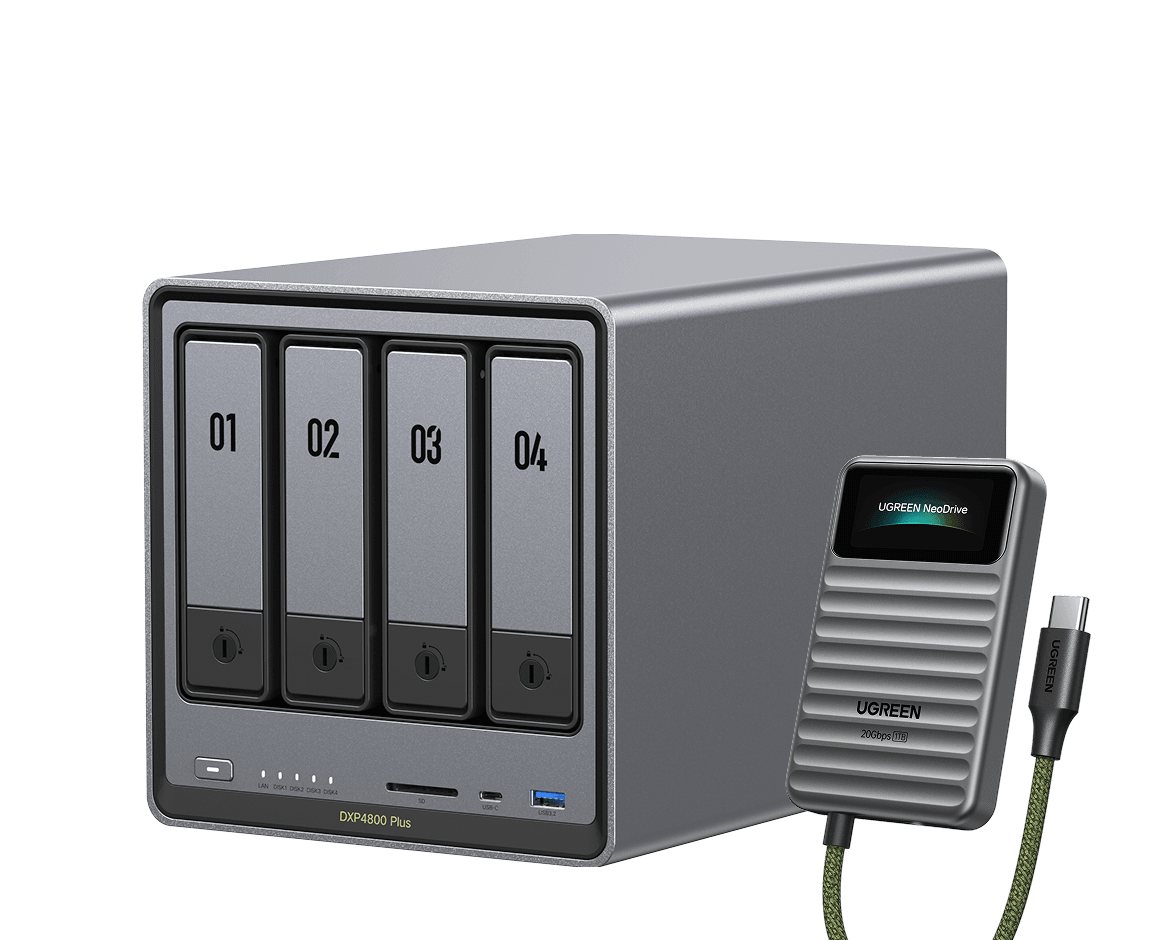
★ Your pick: UGREEN NASync DXP4800 Pro
Faster chip, higher memory ceiling, same chassis.
★ Your pick: UGREEN NASync DXP4800 GT
AMD engine and two 10GbE ports, shipped June 2026.
★ Your pick: Synology DS925+
Mature software, but check the drive list first.
★ Your pick: QNAP TS-464
Cheap, flexible, and the software asks for patience.
👑 Our Top Pick — Best Overall Value
UGREEN NASync DXP4800 Plus
10GbE and four bays without paying for the newest badge.
Opens on our Top Pick. Tap an option to see the best match for you.
Four Versions of One Box in About Two Years
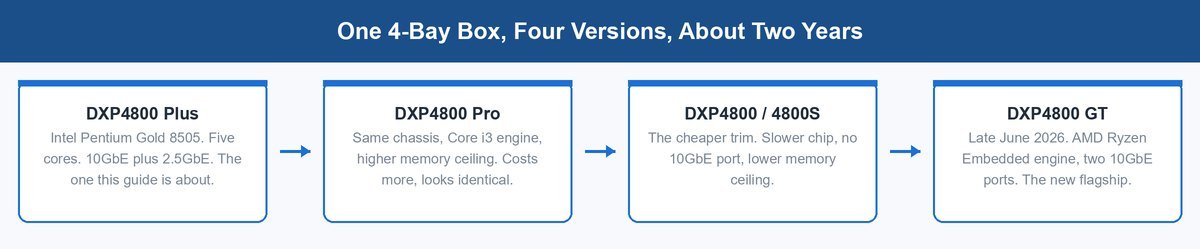
Look at the shape of the line, not the spec sheets. The Plus came first. Then a Pro with a faster chip in the same metal. Then a stripped base model without the 10GbE port. Then, in late June 2026, UGREEN announced the NASync DXP GT lineup on an AMD chip with two 10GbE ports.
All four have the same four bays, the same two M.2 slots, the same HDMI out and SD reader. The chassis did not move. The engine did.
That pattern is not sinister. It is what a hardware company does when it wants shelf space at every price. Phones do it. Laptops do it. The catch is that a NAS is not a phone. You keep it. And the base rate across consumer hardware is unkind here: as a line fans out, each model gets a thinner slice of the software team, and the middle models usually go quiet first.
What Actually Separates the Plus From the Pro and the GT
Here is the whole family, side by side. Read the last column first.
| Model | Engine | Network | Genuinely worse at |
|---|---|---|---|
| DXP4800 Plus | Intel Pentium Gold 8505, 5 cores | One 10GbE, one 2.5GbE | Heavy virtual machine work; it is now the middle child of four |
| DXP4800 Pro | Intel Core i3-1315U | One 10GbE, one 2.5GbE | Costs noticeably more for a difference most people never feel |
| DXP4800 GT | AMD Ryzen Embedded R2514 | Two 10GbE | Newest and priciest; almost no independent testing exists yet |
| DXP4800 / 4800S | Slower Intel chip | 2.5GbE only | No 10GbE at all, so the ceiling is set on day one |
| Synology DS925+ | AMD Ryzen embedded | 2.5GbE ports | Drive compatibility rules are tighter than UGREEN’s |
The Processor Is the Least Useful Thing to Compare
Ask what you will actually ask this box to do. File shares. Backups from two or three machines. Maybe a media server and a handful of containers. Every chip in that table clears that bar without breathing hard.
The UGREEN NASync DXP4800 Plus runs a 12th-gen Intel Pentium Gold 8505 with five cores. That reads modest next to a Core i3. But a NAS spends most of its life idle and the rest of it waiting on disks. The bottleneck almost never lives in the chip. So ranking these boxes by CPU score ranks them on the axis that changes your day the least.
The Memory Ceiling Is a Virtual Machine Question
UGREEN ships the Plus with 8GB of DDR5, and the memory is user-replaceable. Listings put the Plus ceiling at 64GB and the DXP4800 Pro higher still. Check UGREEN’s own compare page before you commit, because that ceiling is the single honest reason to step up.
Here is the plain version. For files, backups and a few containers, 8GB is fine and 16GB is comfortable. Containers are light, because they share the system underneath them. Virtual machines are not. Each one takes its own slice of memory and holds it. Run two or three and you eat 16GB fast. That is the one workload where the Pro’s headroom earns its price.
The GT Changed the Network, Not the Chassis
The GT is why the Plus suddenly reads as a middle model. It moved to an AMD Ryzen Embedded R2514 and carries two 10GbE ports instead of one. UGREEN says GT stands for Grand Touring. TechPowerUp’s launch coverage matches the company’s own release.
Two 10GbE ports matter in exactly one situation: two fast clients hammering the box at once, or a bonded link. If that is not your setup, the second port is a spec you paid for and will never touch.
The Drives Now Cost More Than the Box Itself
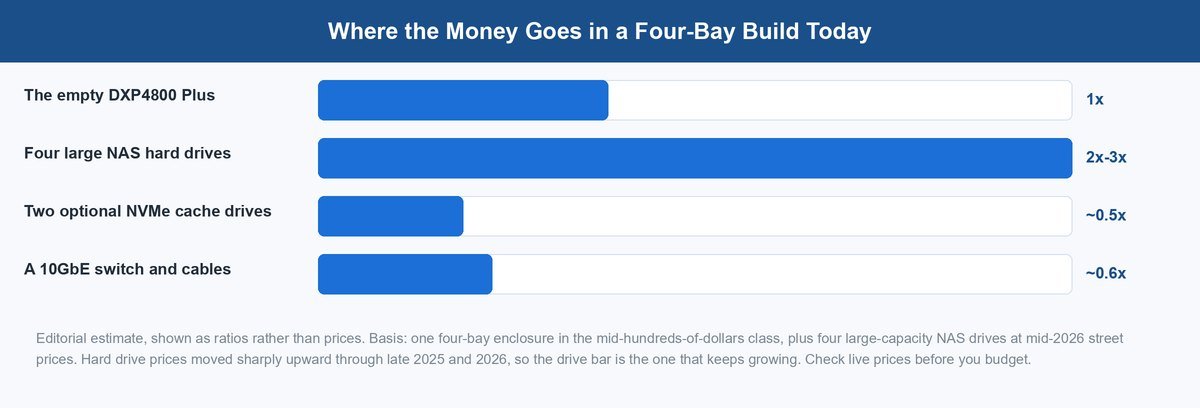
This is the part older reviews of this NAS are missing, and it is not their fault. They were written before it happened.
Hard drive prices climbed sharply through late 2025 and into 2026, with reported rises around 46% to 50% as AI data-centre demand soaked up supply. Lead times on big nearline drives stretched badly. Those are reported market figures, not lab numbers, so treat them as direction rather than decimals.
Four Bays Means Four Purchases, Not One
A 4-bay NAS is a shopping list, not a product. The empty box is the smallest line on it. Four large drives will typically run two to three times the cost of the enclosure, and that gap has been widening.
That reframes the whole comparison. Arguing over whether to spend a bit more on the Pro is arguing about a small slice of your total. The drive decision is the big slice, and almost nobody agonises over it the same way. Our guide to the best NAS hard drives walks the choices, and the Seagate IronWolf Pro and WD Red Plus are where most people land.
Filling the Bays Slowly Costs You Time Later
The obvious move is two drives now and two later. It works, and the Plus supports RAID 1, 5, 6 and 10. But there is a cost you only meet months afterwards.
Growing an array means a rebuild. On large modern drives a rebuild can run many hours, sometimes past a day, and the array is at its most fragile while it runs. Buy in stages if the budget demands it. Just know you are trading money now for a nervous weekend later.
The 10GbE Port Is Why You Buy This Tier and Most Buyers Never Use It
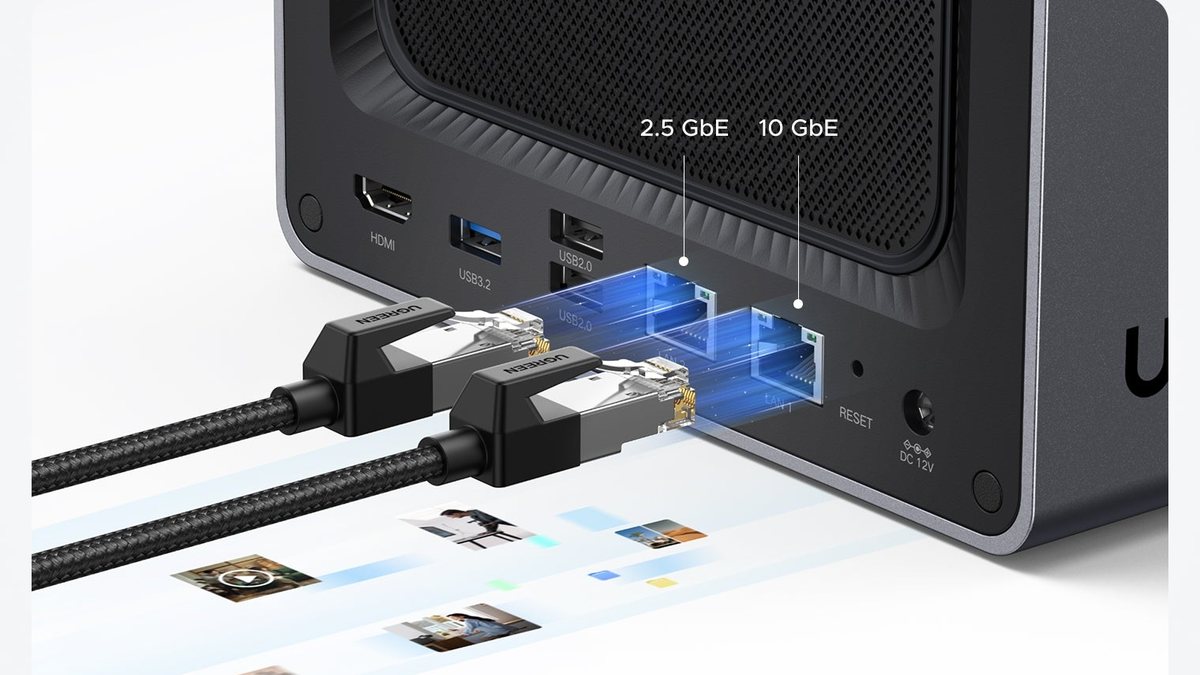
Let us be honest about the headline feature, because the vendor pages will not be. A single spinning hard drive reads big files at roughly 190 to 280 MB/s on a good day. A 10GbE link can carry over 1,000 MB/s. One drive fills about a quarter of the pipe. Four drives in an array get closer, but still not there on real mixed work.
The Port Earns Its Keep With Cache or With Crowds
There are two setups where 10GbE genuinely pays. The first is NVMe caching. Drop fast M.2 drives into the two slots and hot files come off flash, not platters, and flash can fill the pipe. The second is a crowd. Four people pulling video at once add up, even when no single stream is fast.
If neither describes you, the port is still not wasted. It is future room. Just do not pay a premium believing your file copies get ten times faster tomorrow, because they will not.
That Port Implies a Switch You Have Not Budgeted
A 10GbE port needs something to talk to, and your router almost certainly has nothing to offer it. So the port quietly adds a switch and cables to the shopping list.
That belongs in the plan on day one, not as a surprise in month three. We covered choosing a 10GbE switch in detail, including why the cheap fanless models are usually right at home.
The Software Is the Real Purchase and the Real Unknown
UGOS Pro is UGREEN’s own operating system, and it is what you actually live in. It is genuinely pleasant. It looks modern, setup is short, and it does not assume you already know what a share is.
The uncomfortable part is that it is young. Synology’s DSM has been refined for two decades. UGREEN publishes a per-model firmware download centre, and updates have kept arriving: the current UGOS Pro build, 1.19.1.0126, shipped on August 31, 2026 and moved the system to the 6.18 long-term-support Linux kernel, which stays supported into late 2027. A vendor that is still moving its kernel forward is a vendor still spending on the platform. That is the honest, checkable signal available today.
What You Can Verify Yourself Before You Buy
Do not take anyone’s word on this, ours included. Open UGREEN’s download centre, pick the DXP4800 Plus from the model list, and look at the date on the newest firmware.
That one check tells you more than any review can. A recent date means the middle model is still getting attention. A stale date, six months from now, means something changed. It costs thirty seconds and it is the most useful thing in this article.
What the Freeze and Lockup Reports Actually Show
If you searched this NAS recently, you probably ran into someone whose box froze solid — no network, no web page, nothing but a long press on the power button. Those stories are real. We went and read the actual threads, and the pattern in them matters more than the scare. The documented freezes we could trace do not come from UGOS. They come from people running a different operating system on this hardware, and each thread ends at a specific, fixable cause.
That is genuinely good news either way. If you run UGOS, the documented lockups are not your bug. If you plan to run TrueNAS, Unraid or Proxmox on it, you get to skip the exact traps other owners already walked into. Here is each one.
Unraid Freezes Trace Back to the Intel Graphics Driver
An owner running Unraid 7.1.4 on a DXP4800 Plus reported regular full-system freezes that only a forced power-off would clear, with the log filling up with i915 graphics-driver errors roughly every minute. The i915 module is the Linux driver for the Intel chip’s built-in graphics — the same silicon that feeds the HDMI port.
The workaround from the Unraid team was blunt and it worked: blacklist the i915 driver so it never loads. The owner reported the errors stopped immediately afterwards. The cost is that hardware video transcoding and the HDMI output stop working under Unraid, which is a real trade if Plex was the plan.
Proxmox Hangs Came Down to Microcode and One NVMe Model
A Proxmox user on the same box described intermittent hangs that left nothing in the logs, persisting from Proxmox VE 8 through the version 9 upgrade. That is the nastiest kind of fault, because there is no error to chase.
The resolution took two steps and several months of patience. First an Intel microcode update — a low-level CPU fix Proxmox documents how to apply. Then, in December 2025, the owner found the true culprit: a pair of Orico J-10 NVMe drives in the M.2 slots. After swapping those drives out, the report reads “not a single hang in months”. The box was never the problem. One incompatible flash drive was.
The Community LED Driver Can Lock the Whole Box
Third-party operating systems need a community-written driver to run the NASync’s front LEDs, and that driver has a documented total-lockup failure on a recent Unraid kernel: the machine drops off the network and goes completely unresponsive until you physically cut power. The investigation found the driver hammering the internal SMBus with about 14 blocking transactions every half second and retrying forever when the bus wedges.
The fix is simply removing the LED driver, at the cost of dark status lights. Petty as it sounds, this is the freeze report worth remembering, because it comes bundled with the exact community scripts most third-party-OS guides tell you to install.
What the Record Shows for UGOS Itself
For stock UGOS Pro, we could not find a confirmed, widespread freeze wave as of late September 2026 — no forum megathread, no acknowledged advisory. The one issue owners did flag after the August 31 update is narrower: UGOS’s backup service now embeds its own copy of Syncthing, which grabs UDP port 21027 and breaks anyone running their own Syncthing container until they move its discovery port. Annoying, documented, not a freeze.
If your UGOS box does lock up, the useful first moves are the boring ones: update to the current firmware, pull any third-party M.2 drives to test, and open a ticket with UGREEN while the logs are fresh. And treat this section as dated evidence, not a promise — it reflects the public record in September 2026, and the honest check is always the current one.
The Main Reasons Buyers Pick Synology, QNAP or TerraMaster Instead
This is where the ugreen nas vs synology question usually lands, so let us take it head on. Each brand is genuinely better at something and genuinely worse at something else.
1 Synology Is More Mature and Less Flexible
DSM is the best NAS software you can buy. It is stable, the apps are good, and the answer to your problem was written years ago by someone else. If software is what you are buying, Synology wins.
The trade is control. Synology’s 2025-generation models tightened which drives they fully accept, steering owners toward Synology-branded and validated disks, and that policy has cost the company real goodwill — it is the single most common reason people tell us they are shopping this UGREEN box at all. The Synology DS925+ is a fine machine, but check the drive compatibility list before assuming the drives you own are welcome. The Plus asks no such question. Your drives are your drives, and if drive freedom is why you are leaving, that freedom is fully delivered here.
2 QNAP Gives You More Ports and Asks for Patience
QNAP has always been the value-per-port brand. The QNAP TS-464 packs a lot of hardware into a modest price, and the software is deeply capable if you enjoy tinkering.
The honest weakness is polish and security history. QNAP’s track record with vulnerabilities has been rougher than its rivals, which makes discipline about updates less optional than it should be. If you want to set a NAS up and forget it, that friction counts.
3 TerraMaster Undercuts Everyone and You Feel It
The TerraMaster F4-424 Pro is often the cheapest route to four bays and a capable chip. On raw hardware per dollar it is hard to argue with.
Where it slips is software feel and support depth. TMOS works, but it is the least refined here and the community is smaller, so you solve more problems yourself. Many owners install TrueNAS or Unraid instead, which is a fine plan if you enjoy that project and a poor one if you do not.
4 The Weakness That Sends Buyers to Synology
We are recommending the Plus, so here is its downside stated plainly. It is a middle model in a fast-moving line, from a company still young at making operating systems. Nobody knows how much attention it gets in year five.
Synology buyers are buying a longer proven record, and that is a real advantage. Our pick trades some of that certainty for a 10GbE port, HDMI out, open drive choice and a friendlier price — and keeps an escape hatch Synology does not offer, because if UGOS ever goes quiet this hardware will happily run TrueNAS. Make that trade with your eyes open.
Two Ways to Make Sure the Box You Order Is Actually the Plus
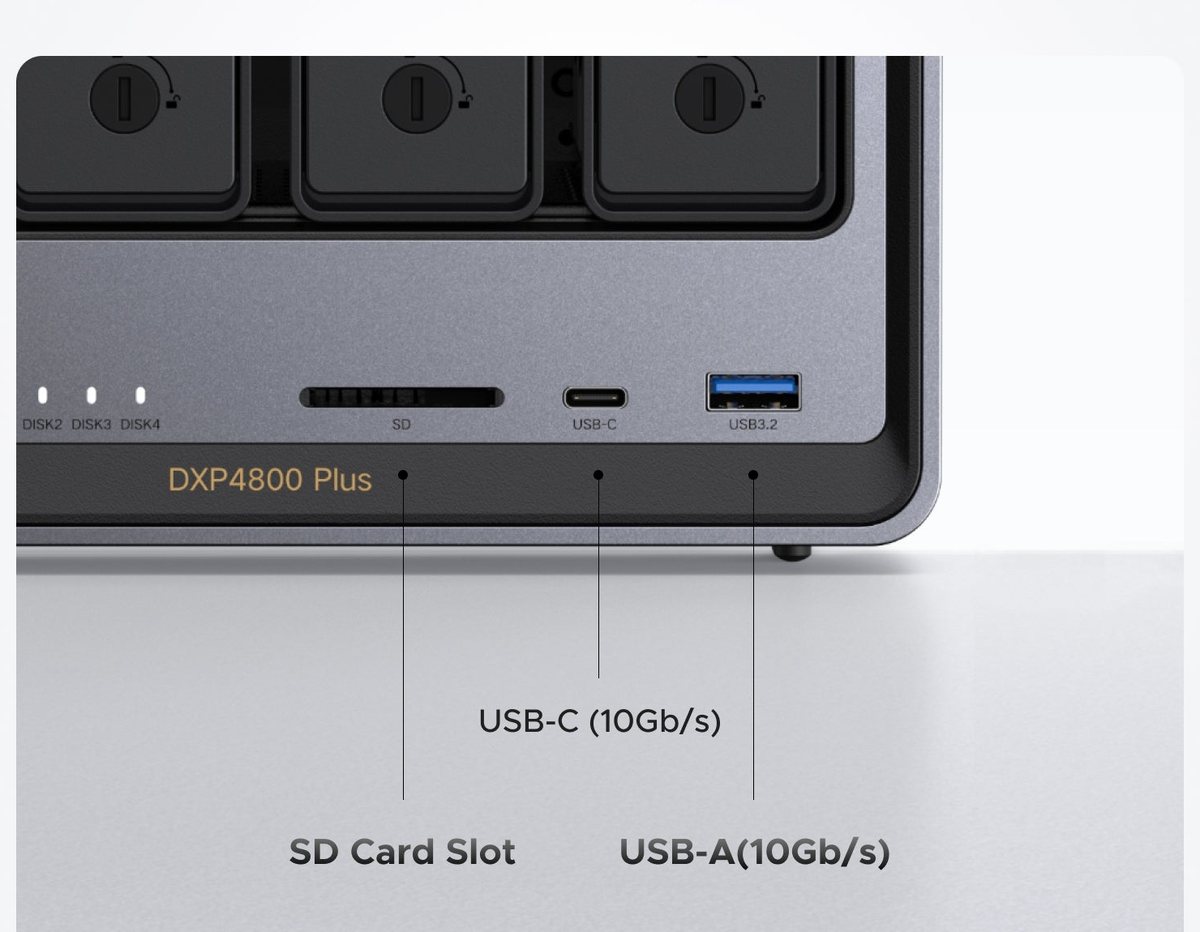
Do not skim this one. Four models share this chassis, and marketplace listings mix them up. The Amazon listing for this NAS has carried a spec block describing two different machines at once. One line says a 5-core Intel chip with DDR5 memory. Another says a 2-core Pentium with DDR4 and 2.5GbE. Only one of those is the Plus.
1 Read the Model String, Not the Headline Words
The front of the case is printed with the exact model. On the Plus it reads DXP4800 Plus, in small text under the bays and next to the card slot. When your box arrives, read that line before you install a single drive.
In the listing, look for the same string in the title and repeated in the technical details. If the title says Plus but the spec table says something else, treat the listing as unreliable and buy elsewhere.
2 Check the Chip Line and the Network Line
Two details separate the Plus from everything near it. The chip should be the 12th-gen Intel Pentium Gold 8505 with five cores. The network line should read 10GbE plus 2.5GbE, not 2.5GbE alone.
If either disagrees, you are looking at the base model or the Pro under the wrong name. UGREEN’s own product page for the Plus is the reference to check against.
How Much Storage It Actually Holds and Why the Numbers Disagree
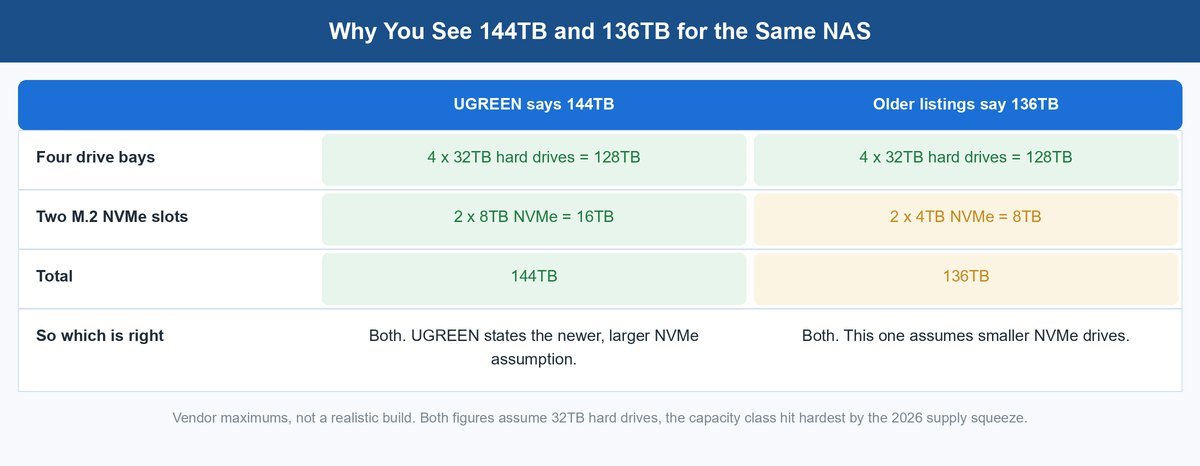
You will see two capacity figures for this NAS, both quoted as fact. UGREEN’s current product page says 144TB. Older listings and Google’s info panel say 136TB. That looks like a contradiction. It is not.
UGREEN states its assumption alongside the number: four 32TB hard drives in the bays, plus two 8TB NVMe drives in the M.2 slots. That is 128TB of spinning storage plus 16TB of flash, which is exactly 144TB. The 136TB figure counts the same four drives with 4TB NVMe drives instead, and 128TB plus 8TB is 136TB. Same box, different flash.
Putting TrueNAS on It Turns the Box Into Plain Hardware
Here is the option that matters most to anyone burned by a vendor before. The DXP4800 Plus is, underneath UGOS, an ordinary x86 Intel computer with UEFI boot. That means TrueNAS SCALE installs on it the way it installs on any PC — boot installer from USB, install to a drive, done. There are full walkthroughs, including a step-by-step DXP4800 Plus guide covering pools, shares, bridges and virtual machines on this exact box.
Why does that matter even if you never do it? Because it caps your risk. The whole worry with a young NAS company is what its software looks like in year five. On a Synology, the software and the hardware are welded together. On this box, if UGOS ever stalls or UGREEN loses interest, you reinstall and keep the metal. For a Synology refugee, that is the difference between switching vendors and switching hostages.
UGREEN Says the Hardware Warranty Survives the Swap
This is the question everyone asks first, and the answer is unusually friendly. UGREEN’s position, as documented for the DXP line, is that installing a third-party operating system does not by itself change the hardware-warranty policy. What you lose is compatibility support — UGREEN will not troubleshoot TrueNAS for you — and damage caused by modification would not be covered. Compare that with the industry habit of treating any OS swap as warranty poison, and it reads as quiet confidence in their own hardware.
What You Give Up the Day You Leave UGOS
Be honest with yourself about the chores. On TrueNAS or Unraid, the fans no longer manage themselves — you configure that by hand with Linux tools. The front status LEDs go dark unless you install the community LED driver, and that driver is the one with the documented lockup bug above, so many owners sensibly run without lights. The HDMI port needs the same i915 graphics driver that caused the Unraid freezes. And the friendly UGOS apps — photos, mobile backup, the polished dashboard — are gone, replaced by TrueNAS’s more powerful, less gentle world.
So treat third-party OS as an insurance policy and a hobby, not a free upgrade. If you enjoy that project, this is one of the best-value boxes to do it on. If you do not, run UGOS and simply be glad the exit exists. Our Unraid vs TrueNAS comparison covers which side of that project to pick.
Who Should Buy It and Who Should Walk Away
A verdict that fits everyone is not a verdict. Here is who this box is for and who should look elsewhere.
Buy It for 10GbE Without the Newest-Badge Tax
If you want four bays, a 10GbE port, two NVMe slots and open drive choice at a price that does not sting, the Plus is the best-value member of this family. Being the middle child is exactly why. Attention moved to the GT, and the Plus is the one you can buy sensibly today.
It suits a small studio well too. Video editors pulling from a shared box are the people who genuinely use that 10GbE port, and the HDMI output and SD reader are quietly useful on an ingest desk.
Walk Away If Virtual Machines Are the Plan
If your NAS is really a small server and you intend to run several virtual machines on it, buy the Pro or build something else. The memory ceiling is the constraint, and stepping up costs less than regretting it.
The same goes if you want a box you never think about again. That is Synology’s promise and Synology delivers it better. Pay for maturity if maturity is what you want.
Should You Return a DXP2800 and Get This Instead
People ask this constantly, so here is a straight answer. If your DXP2800 has two bays filled and you are nowhere near full, keep it. Returning a working NAS to gain bays you have not needed yet is churn.
Swap if either of two things is true. You have already outgrown two bays, or you specifically need 10GbE for editing or multiple clients. Otherwise put the money toward drives, because that is where your real limit sits.
Frequently Asked Questions
Is the UGREEN NASync DXP4800 Plus still worth buying in 2026?
Yes, for most people. It is now the middle model of four similar boxes, which is exactly why it represents good value. It still has four bays, a 10GbE port, two M.2 NVMe slots and open drive choice. The newer GT is faster on paper, costs more, and almost nobody has independently tested it yet.
What is the real difference between the DXP4800 Plus and the Pro?
The chip and the memory ceiling. The Plus uses a 12th-gen Intel Pentium Gold 8505 with five cores. The Pro uses a Core i3 and takes more memory. The chassis, the four bays, the two M.2 slots, the ports and the RAID options are the same. If you are not running virtual machines, you will rarely feel the difference.
What changed with the DXP4800 GT?
UGREEN announced the GT line in late June 2026. It moved to an AMD Ryzen Embedded R2514 chip and gave the 4-bay model two 10GbE ports instead of one. The chassis, the bay count and the M.2 slots stayed the same. GT stands for Grand Touring.
How much storage does the DXP4800 Plus hold?
UGREEN’s own page says up to 144TB, and it says what that assumes: four 32TB hard drives plus two 8TB NVMe drives. Older listings say 136TB, which is the same four drives with 4TB NVMe drives instead. Both are vendor maximums, not what a normal build costs.
Can I upgrade the RAM in the DXP4800 Plus?
Yes. It ships with 8GB of DDR5 and the memory is user-replaceable. Listings put the ceiling at 64GB. For files, backups and containers, 8GB works and 16GB is comfortable. Virtual machines are the workload that actually needs more.
Why do some owners report the DXP4800 Plus freezing or locking up?
The documented freeze reports trace to third-party operating system setups, not stock UGOS. On Unraid, the Intel i915 graphics driver caused regular freezes until owners blacklisted it. On Proxmox, one owner’s intermittent hangs stopped after an Intel microcode update and swapping out Orico J-10 NVMe drives. The community LED driver has also locked machines up completely until removed. On stock UGOS, no widespread confirmed freeze issue was on record as of late September 2026.
Can I install TrueNAS on the DXP4800 Plus?
Yes. It is a standard x86 Intel machine with UEFI boot, so TrueNAS SCALE installs from a USB stick like on any PC, and full walkthroughs exist for this exact model. UGREEN says a third-party OS does not by itself void the hardware warranty, though they will not support the OS itself. You give up automatic fan control, the front LEDs and the UGOS apps, so treat it as a project, not a free upgrade.
Is UGREEN a good NAS brand?
The hardware is good and priced well, with ports rivals charge extra for. The open question is software over time. UGOS Pro is young next to Synology’s DSM, and UGREEN now supports four similar 4-bay models with one team. Check the firmware date for your model on UGREEN’s download centre before you buy.
How does UGREEN compare with Synology?
Synology has better, more mature software and a much deeper community. UGREEN gives you more hardware for the money, a 10GbE port at this tier, HDMI out and freedom to use whatever drives you like. Choose Synology if you want to stop thinking about it. Choose UGREEN if you want the ports and the drive freedom.
Do I need the 10GbE port on the DXP4800 Plus?
Probably not on day one. A single hard drive fills only about a quarter of a 10GbE link. The port pays off with NVMe caching in the M.2 slots, or when several people hit the box at once. Remember your computer and your switch both need 10GbE too, or nothing speeds up.
About the Author
Elena Brooks
Elena Brooks covers storage and infrastructure at vpod – the boxes and drives that quietly hold everything else up, from one shelf in a spare room to a rack in a small office. She reads vendor spec pages and release notes line by line, so the capacity figures, port counts and firmware claims in a guide like this come from the manufacturer’s own pages rather than marketing copy.