
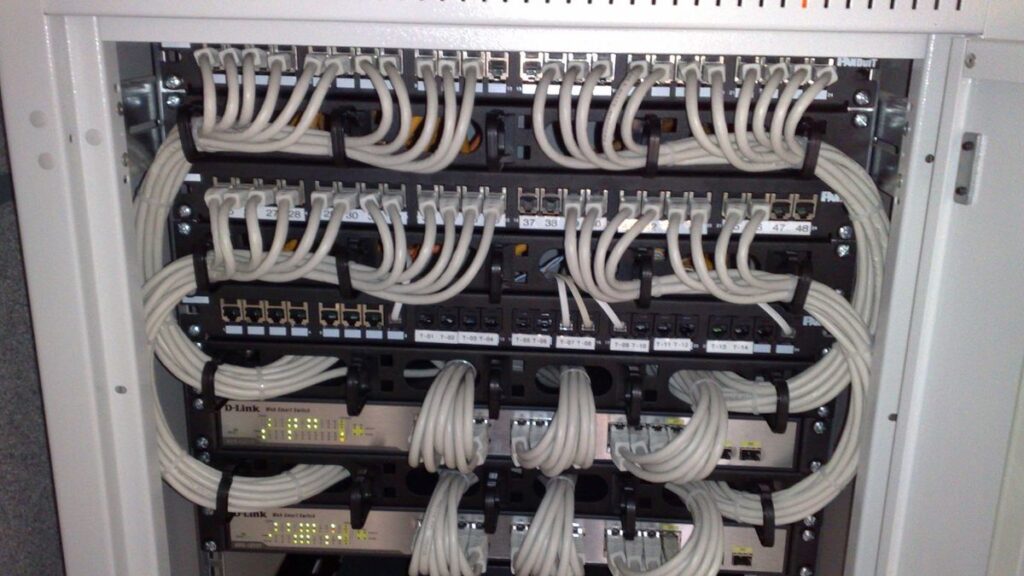
- A patch panel is passive wiring, not electronics. It terminates permanent in-wall cable so all daily plugging happens in disposable patch cords instead.
- It does not replace a switch. The panel organizes cable; the switch moves data. You almost always need both.
- The real buying decision is punch-down vs keystone. Punch-down panels are cheaper and complete; keystone panels are empty frames you fill with jacks, port by port.
- In-wall cable is solid core and hates being flexed. Ending it at a panel — instead of crimping plugs on it — is what stops flaky links years later.
- Size for your cable drops plus growth. A 24-port 1U panel — 1U means it takes up one single rack slot, about 1.75 inches tall — covers most homes and small offices; a 12-port wall-mount covers a closet.
- Cat6 handles 10GbE (10-Gigabit Ethernet, ten times the speed of standard Gigabit) up to 55 meters; Cat6A carries it a full 100 meters. Buy the panel to match the cable you pulled, not the other way around.
Here is the short answer. A patch panel is not rack jewelry. It is insurance for the one part of your network you cannot easily replace: the solid-core cable buried in your walls and ceilings. The switch you can swap in five minutes. The wall cable took a whole weekend, a drill, and some crawling. A panel lets that cable land once, get punched down once, and never move again. Every future change happens in a cheap patch cord on the front. If your runs disappear into drywall, you want one. If everything sits on one desk, you don’t. This guide covers the real buying decision — punch-down vs keystone — plus sizing, Cat6 vs Cat6A, and the exact panels worth ordering. (vpod is an Amazon affiliate, so some links here earn us a commission at no cost to you.)
What does your rack actually need?
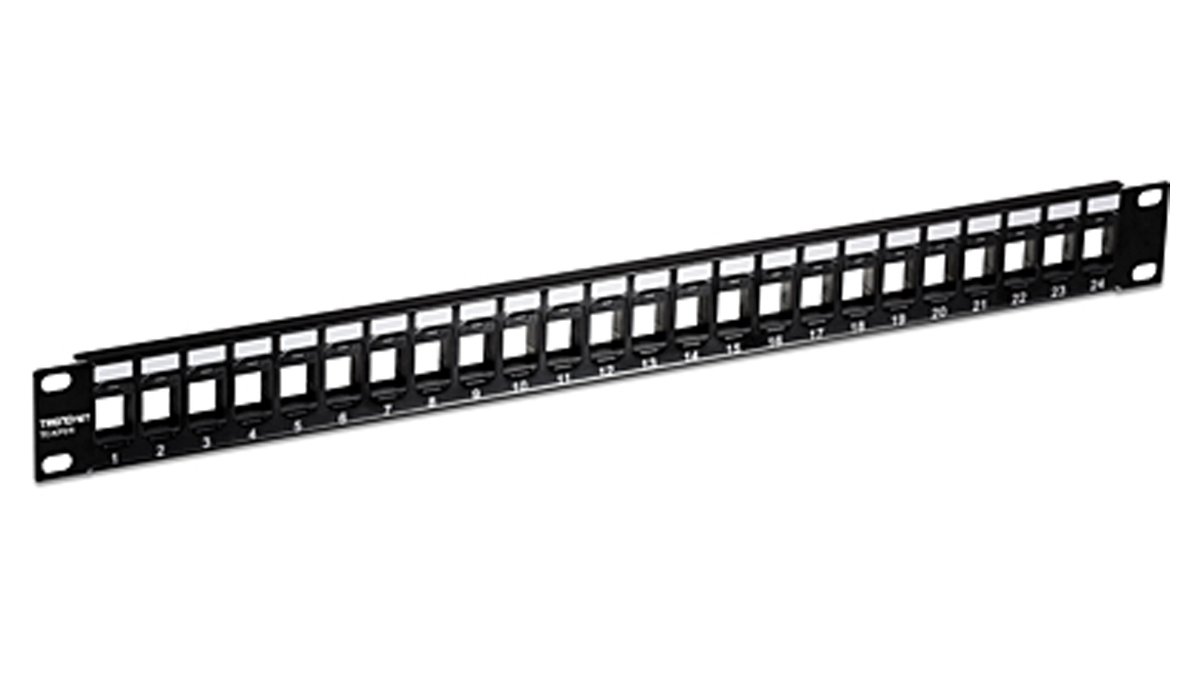
★ Your pick: TRENDnet TC-KP24
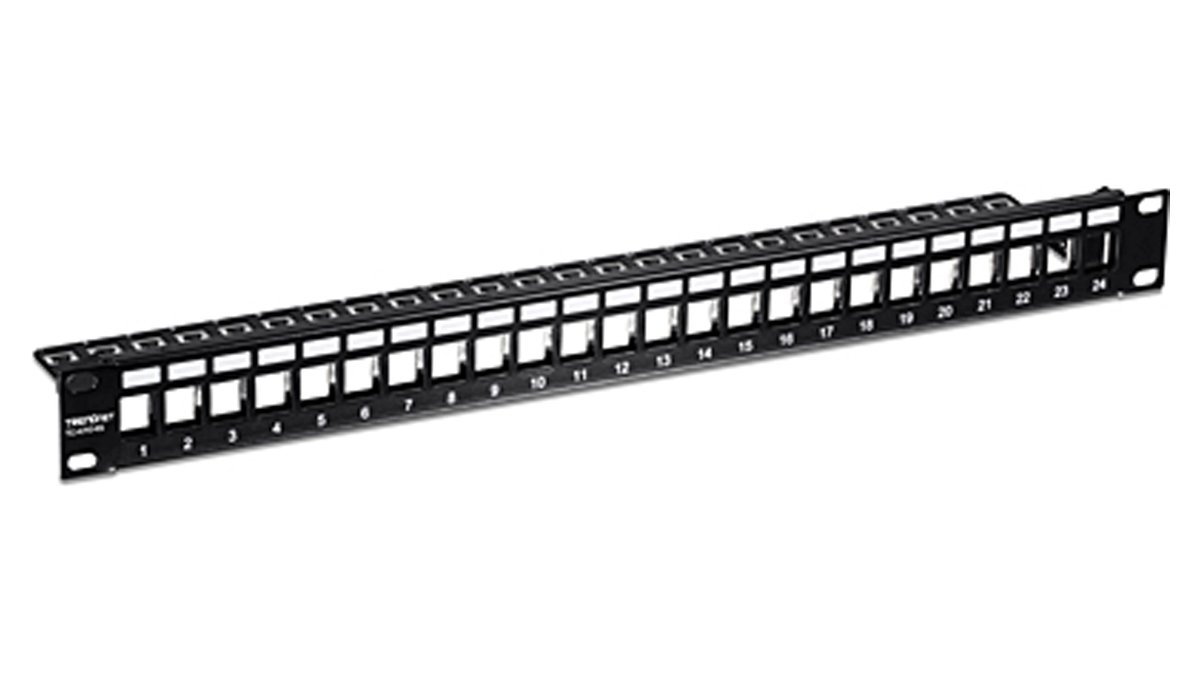
An empty keystone frame: mix Cat6, Cat6A, even fiber couplers, and re-do one port without touching the rest.
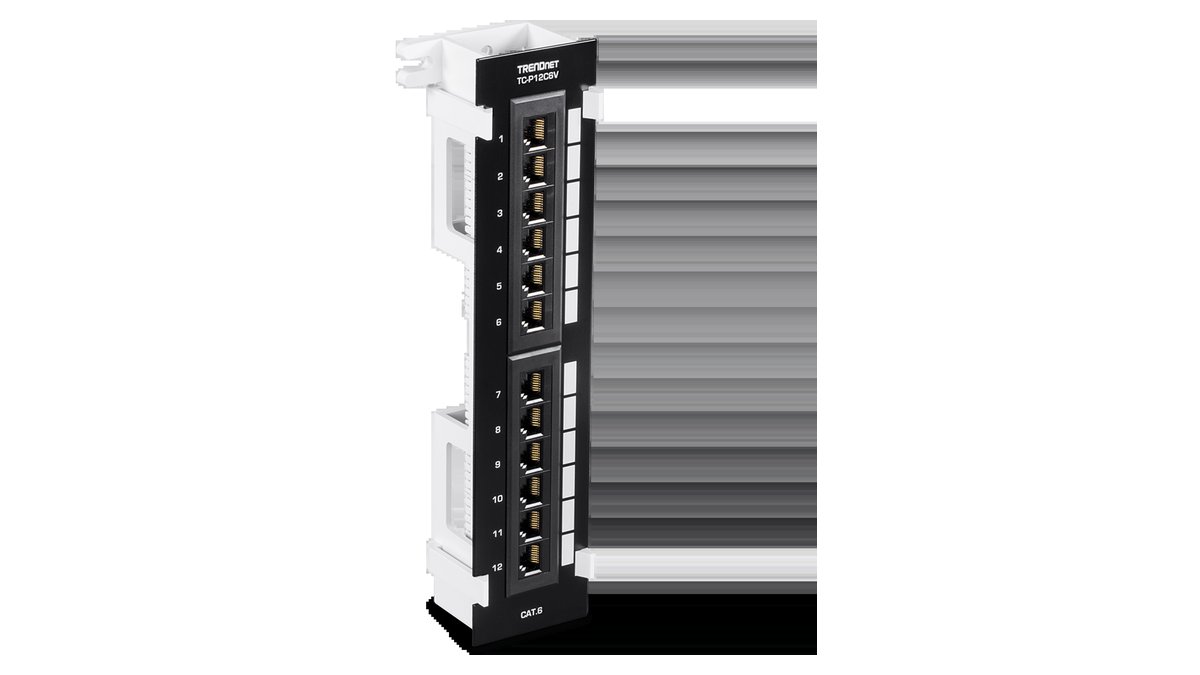
★ Your pick: TRENDnet TC-P12C6V
A 12-port vertical wall-mount with its own bracket — made for the structured-media box, the home's wiring cabinet, by the electrical panel.
★ Your pick: TRENDnet TC-KP24S
A shielded keystone frame that grounds to the rack and takes Cat6A shielded jacks for full-distance 10GbE.
👑 Our Top Pick — Best Overall Value
TRENDnet TC-P24C6
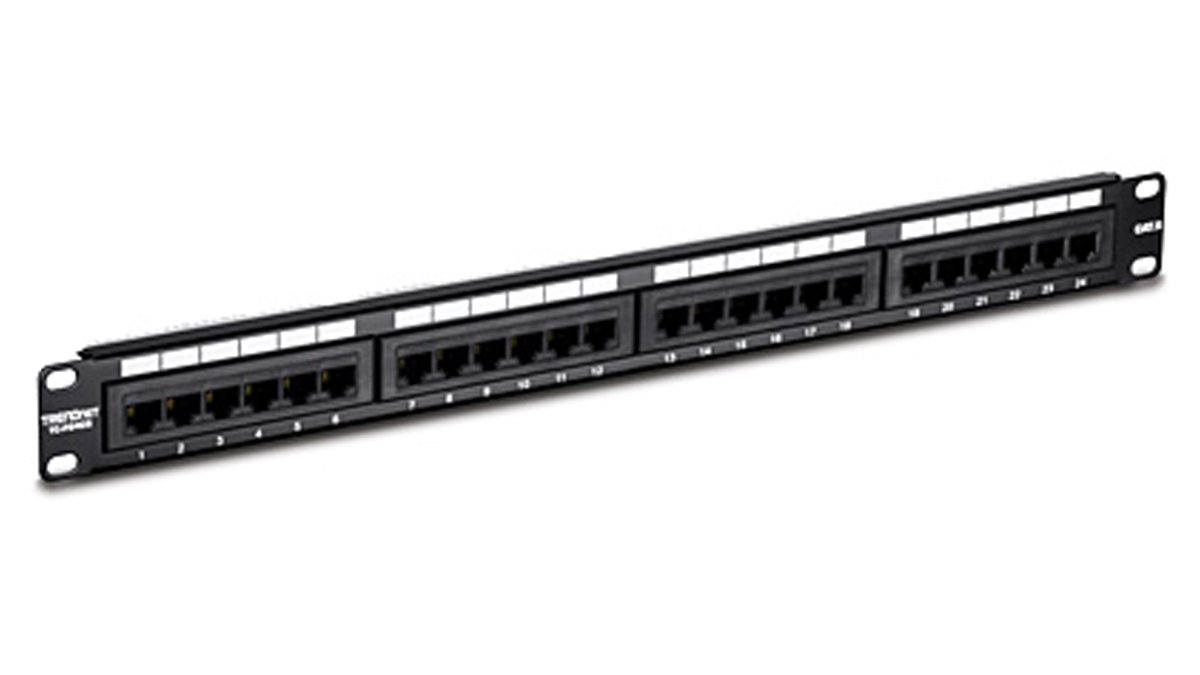
The complete-value pick: 24 Cat6 ports with the 110 blocks built in, so there is nothing else to buy.
Opens on our Top Pick. Tap an option to see the best match for you.
What a Patch Panel Actually Does for Your Wiring
A patch panel is a row of network ports with no brain behind it. The back side accepts the permanent cable coming out of your walls. The front side presents each of those cables as a numbered RJ45 port — the same square plug every Ethernet cable uses. That is the whole product. No power, no chips, no firmware.
So why buy a dumb row of ports? Because the cable in your wall is a different animal from the cable on your desk. In-wall runs use solid-core conductors — each of the eight wires is one stiff strand of copper. Solid core is great over distance and terrible at being flexed. Bend it back and forth enough times and it cracks. Patch cords use stranded wire for exactly that reason: they are built to be yanked, coiled, and re-plugged daily.
The panel is the handoff point between those two worlds. The solid-core run gets terminated once on the rear and clamped down with a tie. It never moves again. All the daily abuse — swapping a port to a different switch, moving an office, testing a link — lands on a patch cord you can replace for pocket change. Without a panel, that abuse lands on the one cable you would have to open drywall to replace. That is the insurance policy, and it costs less than a single drywall repair.
Patch Panel vs Switch Is Wiring vs Data
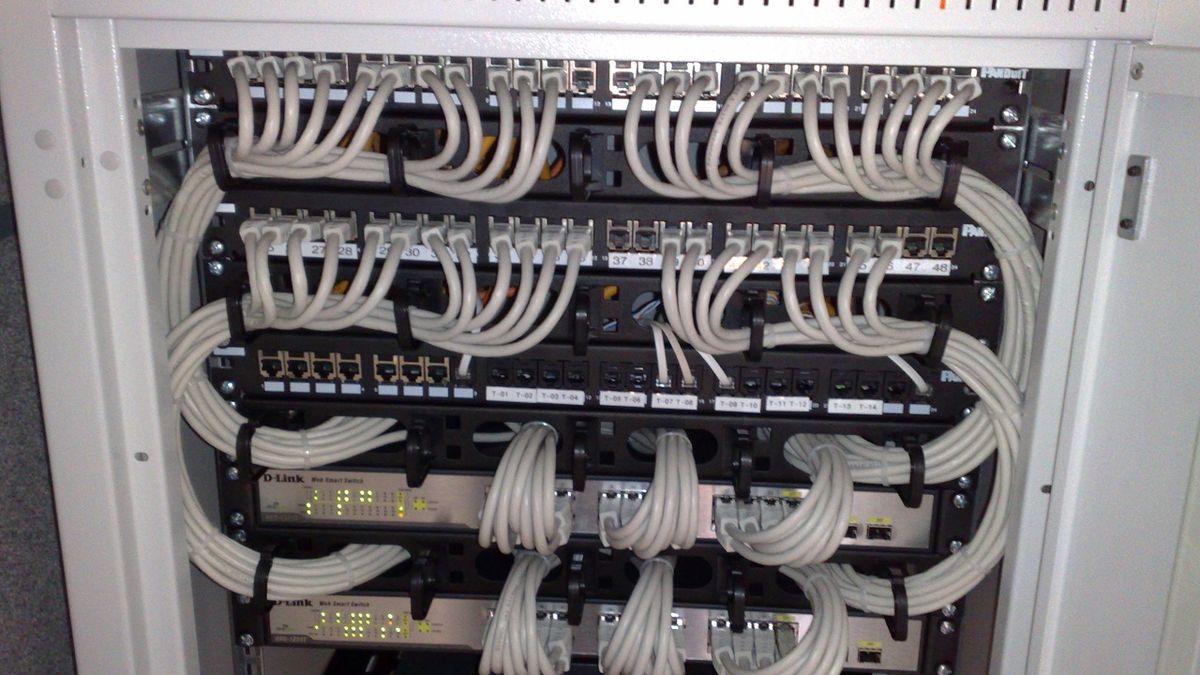
People shopping for their first rack mix these up constantly, and the confusion is fair — both are 1U rows of RJ45 ports. The jobs could not be more different. A switch is powered electronics that reads every frame and decides where it goes. A patch panel is copper and plastic that decides nothing. The panel could not slow your network down if it tried, because it is electrically just the end of the cable.
You almost always need both, connected by short patch cords. Wall cable lands on the panel’s rear. A patch cord runs from panel port 7 to any switch port you like. When you upgrade the switch — say you finally move to 10GbE and pick something from our 10GbE switch guide — you unplug patch cords, swap the switch, and plug them back. The wall wiring never knows anything happened.
There is one honest exception. If every device sits within patch-cord reach of the switch — a single desk, a lab bench, a shelf — a panel adds nothing but cost. Panels earn their slot when cable leaves the room. That is the test, and it is the same test for a house or an office.
Do You Need a Patch Panel at Home or in a Small Office
The secondary question buyers actually type — do I need a patch panel — has a cleaner answer than most forum threads give you. It depends on where your cable goes, not how serious you are about networking.
You Need One When the Cable Disappears Into a Wall
Any run you cannot re-pull in ten minutes deserves a panel. Wall drops to bedrooms, ceiling runs to access points, conduit to a garage or a detached office — all of it. The math is simple: the labor to pull the cable is the expensive part, and the panel is what keeps you from ever paying it twice. This is also why installers quote structured cabling with panels by default. They are not padding the invoice; they are protecting the part of the job they cannot warranty if you flex it to death.
Home networks hit this the moment you wire more than one room. A 12-port wall-mount panel in a closet, punched down in an evening, turns a bundle of mystery cables into numbered, labeled ports. Two years later, when a bedroom jack goes quiet, you test panel port 4 instead of playing guess-the-cable.
You Can Skip It When Everything Reaches the Switch
A homelab that lives on one rack shelf does not need a panel. Neither does an apartment where the router, NAS (network storage box), and desktop share a cabinet. Patch cords straight into the switch are the right call there, and anyone who tells you a panel is mandatory is selling tidiness, not function. Tidy is nice. It is not forty dollars plus an evening of punching down nice, if nothing you own is behind drywall.
The trap to avoid is the middle case: two or three in-wall runs crimped straight into RJ45 plugs and plugged into the switch. Field-crimped plugs on solid core are the single most common cause of links that drop to 100 Mbps or flap for no reason. Solid core wants the bite of a punch-down contact, not a plug crimp. Three runs are enough to justify a small panel or a keystone wall plate feeding a switch.
A Small Office Needs One for the Next Technician
For a small business the panel is less about copper and more about the person who touches the rack after you. Staff change, IT providers change, and an unlabeled bundle of ceiling cables is a billable archaeology project every single visit. A punched-down, numbered panel with a port map taped inside the cabinet door is the cheapest documentation you will ever produce. It also keeps insurance-relevant gear — cameras, door controllers, alarm panels — on ports nobody has to unplug to trace.
Punch-Down vs Keystone Is the Real Buying Decision
Brand matters less than buyers think — the metal is commodity and the port spacing is standardized. What actually changes your daily life is which of the two panel designs you pick. This is the decision the spec sheets bury.
Punch-Down Panels Are Cheaper and Complete
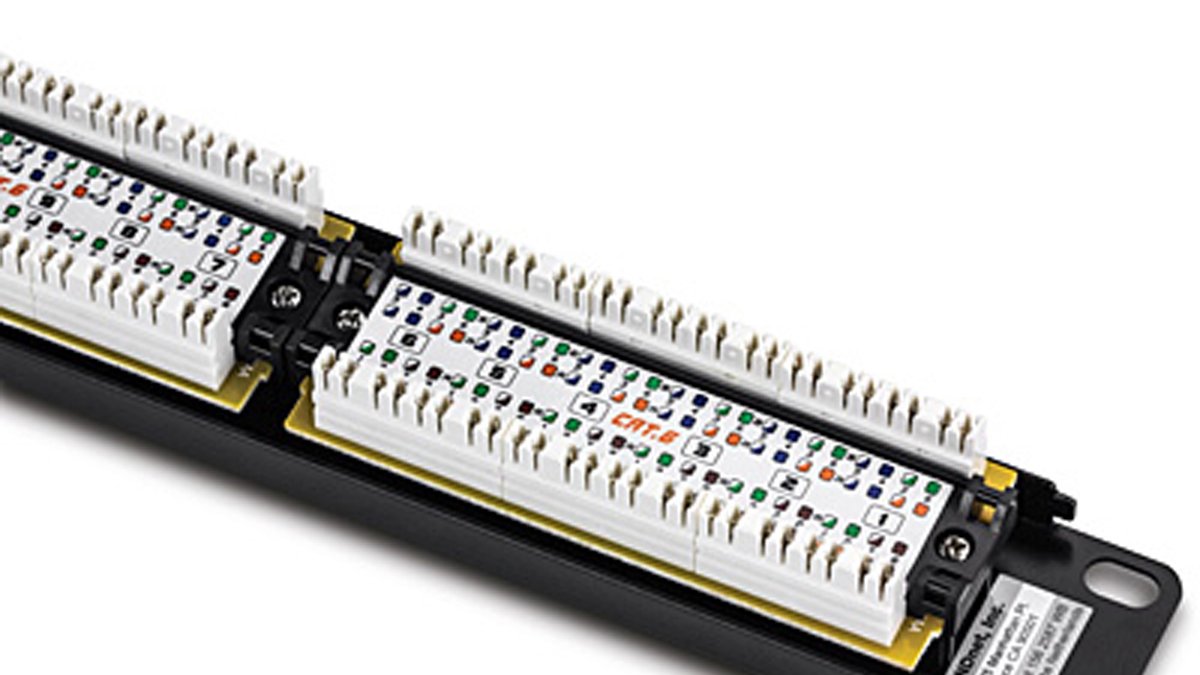
A punch-down panel has its jacks built in. The rear is a row of 110-style IDC blocks — the white plastic combs with color-coded wiring labels. You strip the cable jacket, lay the eight wires into the slots by color, and seat them with a punch tool. One tool, one motion per wire, done. Because the jacks are integral, the sticker price is the whole price, and per-port cost runs meaningfully below a filled keystone panel.
The trade-off is rigidity. Every port is the same category the panel shipped with, forever. If you punch 24 ports of Cat6 and later want two Cat6A drops for 10GbE access points, those two runs need a new home. For a house that will never see a re-pull, that trade is usually fine — which is why the classic 24-port Cat6 punch-down panel is still the default recommendation for most residential jobs.
Keystone Panels Are Empty Frames You Fill Port by Port
A keystone panel ships as a bare 1U frame with 24 rectangular holes. You buy keystone jacks separately, terminate each wall run into its own jack, and snap the jack into the frame. Any jack, any hole: Cat6 next to Cat6A next to a fiber coupler next to a blank. Made a mistake on one port? Pop that jack out and redo it at your bench, at eye level, without un-racking anything.
That flexibility is why keystone has quietly become the installer default for anything that might grow. The cost shows up in the jacks — each one adds a few dollars per port, so a filled 24-port keystone panel can run double the punch-down equivalent. You are paying for the right to change your mind one port at a time. In a homelab that upgrades every two years, that right is worth the money. In a rental house wired once, it usually is not.
How to Size and Spec the Panel
Three spec-sheet questions decide the rest: how many ports, which category, and shielded or not. All three have short answers.
Count Your Drops and Add Half Again
Count every cable run that exists or is planned, then add roughly 50 percent. Pulling cable is expensive; panel ports are not. A 16-drop office belongs on a 24-port panel, not two 12s. Standard sizes are 12 ports (wall-mount or 1U), 24 ports in 1U — the sweet spot for homes and small offices — and 48 ports in 2U for bigger builds. Fill panels top-left to bottom-right and label as you go; future-you is the customer here.
Match the Panel Category to the Cable You Pulled
The panel’s rating must meet or beat the cable’s. Cat6 is specified to 250 MHz and carries 10GBASE-T — 10GbE running over copper — only about 55 meters; Cat6A is specified to 500 MHz and carries that same 10GbE the full 100 meters, per the figures summarized on Wikipedia’s Cat6 entry. If you pulled Cat6A and land it on a Cat6 panel, you just bought 55-meter 10GbE at 100-meter cable prices. For most homes running 1GbE or 2.5GbE today, Cat6 panels are honestly fine — the upgrade pressure is on the cable in the wall, not the panel, and a keystone frame lets you upgrade jacks later.
Go Shielded Only If the Whole Channel Is Shielded
Shielded panels exist for shielded (STP/FTP) cable plants, and they only work as a system: shielded cable, shielded jacks, shielded patch cords, and a panel that bonds the shield to the grounded rack. One unshielded link in that chain and the shield does roughly nothing. Unless you pulled shielded Cat6A on purpose — dense 10GbE, a machine shop, cable trays sharing space with power — buy unshielded and spend the difference on better cable routing.
The Best Patch Panel Picks You Can Order Today
Every pick below is a current, Amazon-buyable model we verified against the manufacturer’s own spec pages. There are other fine brands — Cable Matters and Monoprice make solid frames — but TRENDnet publishes clean specs, warranties the metal for two to three years, and covers every configuration this guide discusses, which makes like-for-like comparison honest.
1 TRENDnet TC-P24C6 for the Complete-Value Rack
The TC-P24C6 is the classic 24-port Cat6 punch-down panel. It is 1U and fits a standard 19-inch rack. The rear uses 110-style IDC blocks and takes either a 110 or a Krone punch-tool blade — two common blade shapes, so it works with whichever tool you already own. Every port is color-coded for both T568A and T568B, the two standard wiring orders; pick one and wire every port the same way. It ships with a rear cable bar to tie off the wall cable, and TRENDnet backs it with a 3-year warranty. Nothing else to buy except the punch tool itself. For a house or small office wired in Cat6 that wants one panel and no further decisions, this is the default for a reason.
- 24 Cat6 ports, 1U, fits a standard 19-inch rack
- Built-in 110-style punch-down blocks — no separate jacks to buy
- Takes either a 110 or a Krone punch-tool blade
- Color-coded for both T568A and T568B wiring orders
- Rear cable bar to tie off and support the wall cable
- 3-year warranty (TRENDnet spec page)
- Nothing else to buy. The jacks are already built in.
- Lowest cost per port in this whole guide.
- Color-coded ports. Hard to wire one wrong.
- Backed by a 3-year warranty.
- Every port stays Cat6. No mixing in Cat6A or fiber later.
- Punch a port wrong and you re-punch that same slot.
- Rack-mount only. No rack means the TC-P12C6V instead.
2 TRENDnet TC-KP24 for Ports You’ll Change Later
The TC-KP24 is the empty 24-slot keystone frame. Fill it with TC-K25C6 Cat6 jacks today, swap individual ports to Cat6A or fiber couplers whenever the network demands it. Terminating jacks at a bench beats hunching over a racked panel, and one botched port never risks its neighbors. This is our pick for homelabs and any rack that upgrades in pieces.
- 24-slot empty keystone frame, 1U rack mount
- Accepts any keystone jack: Cat6, Cat6A, or fiber couplers
- Each port terminates and swaps on its own — no need to un-rack the panel
- Pairs with TC-K25C6 Cat6 keystone jacks
- Jacks terminate at a bench, not hunched over the rack
- Mix Cat6, Cat6A, and fiber in one frame.
- One bad port gets redone at the bench. The other 23 stay untouched.
- Room to add faster jacks later, one port at a time.
- Costs more per finished port than a punch-down panel.
- Two things to buy and track instead of one.
- Empty out of the box. No jacks, no working port yet.
3 TRENDnet TC-P12C6V for the Closet With No Rack
Most homes do not have a 19-inch rack, and the TC-P12C6V is built for that reality: 12 Cat6 punch-down ports on a vertical bracket that screws straight to plywood or into a structured-media enclosure. It accepts the same 110 termination as its rack-mount siblings and supports T568A/B. If your cable all lands in a hallway closet next to the electrical panel, this is the right shape.
- 12 Cat6 punch-down ports
- Vertical wall-mount bracket, no rack needed
- Screws straight to plywood or into a structured-media enclosure
- Same 110-style punch-down termination as the rack-mount panels
- Supports both T568A and T568B wiring orders
- Mounts to plywood. No rack needed anywhere in the house.
- Same reliable punch-down as the rack panels, just built for a closet.
- Sized for a real home closet, not a data center.
- Caps out at 12 ports.
- Cat6 only, same as the standard rack panel.
- Won’t fit a 19-inch rack if you add one later.
4 TRENDnet TC-KP24S for Shielded Cat6A and 10GbE
The TC-KP24S is the shielded version of the keystone frame — nickel-plated, bonding the shield of each jack to the grounded rack. Pair it with TC-K06C6A shielded Cat6A jacks and you have a proper terminated shielded channel for full-distance 10GBASE-T, per TRENDnet’s panel spec. Only buy this if the cable plant is shielded end to end; on unshielded cable it is money spent on a shield with nothing to bond.
- Shielded 24-slot keystone frame, nickel-plated
- Bonds each jack’s shield to the grounded rack
- Pairs with TC-K06C6A shielded Cat6A keystone jacks
- Built for a full 100-meter shielded 10GBASE-T channel
- Only worth it when the whole cable run is shielded end to end
- Bonds every jack’s shield to the rack.
- Full 100-meter 10GbE reach with shielded Cat6A jacks.
- Same port-by-port swap flexibility as the standard keystone frame.
- Wasted money on unshielded cable or jacks.
- Costs more than the unshielded keystone frame.
- Still an empty frame. Budget for the jacks too.
Getting the Termination Right the First Time
The panel only protects your wiring if the termination itself is sound, and Cat6A punishes sloppy work harder than Cat5e ever did. Three rules cover most of it.
First, respect bend radius. Four-pair copper cable should never bend tighter than four times its own outer diameter, and Cat6A is a fat cable — many jackets run over 7 mm, which puts the minimum bend near 30 mm, roughly the curve of a soda can. Sharp bends behind the panel are invisible and show up later as failed 10GbE negotiation on a link that passes at 1GbE.
Second, preserve the twist. Untwist each pair only as far as the contact requires — near the 13 mm the standards intend, not the finger-length of untwisted wire a rushed job leaves. The twist is the noise cancellation; every extra untwisted millimeter is signal you paid for and threw away. Strip back only as much jacket as the block needs, and keep the jacket landed under the strain-relief tie.
Third, leave slack. Coil a half meter of service loop above the rack before the run drops to the panel, with wide, lazy turns. The day you re-terminate a damaged port, that loop is the difference between a five-minute fix and a re-pull.
The Bottom Line on Buying One
Buy a patch panel when cable leaves the room; skip it when everything reaches the switch. Pick punch-down when the wiring will never change, keystone when it might. Size at your drop count plus half, match the category to the cable you actually pulled, and skip shielded unless the whole channel is shielded. Do the termination once, carefully, and the wall side of your network becomes the one component you never think about again — which is exactly what it should be.
Frequently Asked Questions
Do I need a patch panel for a home network?
Only if cable runs through walls or ceilings. Wired drops to two or more rooms justify a small panel — a 12-port wall-mount is enough for most homes. If the router, switch, and every device sit within patch-cord reach in one cabinet, plug straight into the switch and spend the money elsewhere.
What is the difference between a patch panel and a switch?
A switch is powered electronics that moves data between ports. A patch panel is unpowered copper that simply terminates permanent cable and presents it as neat front-side ports. The panel organizes wiring; the switch makes forwarding decisions. In a typical rack, wall cable lands on the panel and short patch cords connect panel ports to switch ports.
Should I buy a punch-down or a keystone patch panel?
Punch-down if the wiring is set for life: it is cheaper and the jacks are built in. Keystone if anything might change: each port is its own snap-in jack, so you can mix Cat6, Cat6A, and fiber couplers, and redo a single port without touching the rest. Homelabs and growing offices generally justify keystone; a wired-once house generally does not.
Does a patch panel slow down my network?
No. A properly terminated panel is a passive connection point, electrically part of the cable itself. The standards budget for its connection losses within a 100-meter channel. What does hurt performance is bad termination — excessive untwist, crushed pairs, or tight bends — which can drop a 10GbE link to lower speeds. The panel is never the bottleneck; the workmanship can be.
What size patch panel should I buy?
Count your existing and planned cable drops, then add about 50 percent headroom. A 24-port 1U panel is the sweet spot for most homes and small offices; 12-port panels suit closets and wall-mount setups; 48-port 2U panels serve larger offices. Empty ports cost almost nothing, while a second panel later means re-dressing cable.
Do I need a shielded patch panel?
Only if your entire cable plant is shielded — cable, jacks, and patch cords — and the rack is grounded, because shielding works as a continuous system. Typical homes and offices on unshielded Cat6 or Cat6A gain nothing from a shielded panel. Buy shielded when you deliberately pulled shielded Cat6A for dense 10GbE or electrically noisy environments.
About the Author
Elena Brooks
Elena Brooks is the person her group chat texts when something at home stops working or a health trend starts trending. She’s spent years turning that instinct into a job — digging into the research behind everyday questions, calling the experts, and writing up what holds up and what doesn’t. Her beat is wherever curiosity points: kitchens, cars, pets, sleep, money, and the occasional meteor shower.